

Bopador ransomware – a STOP/Djvu virus variant that denies access to all personal files located on the computer
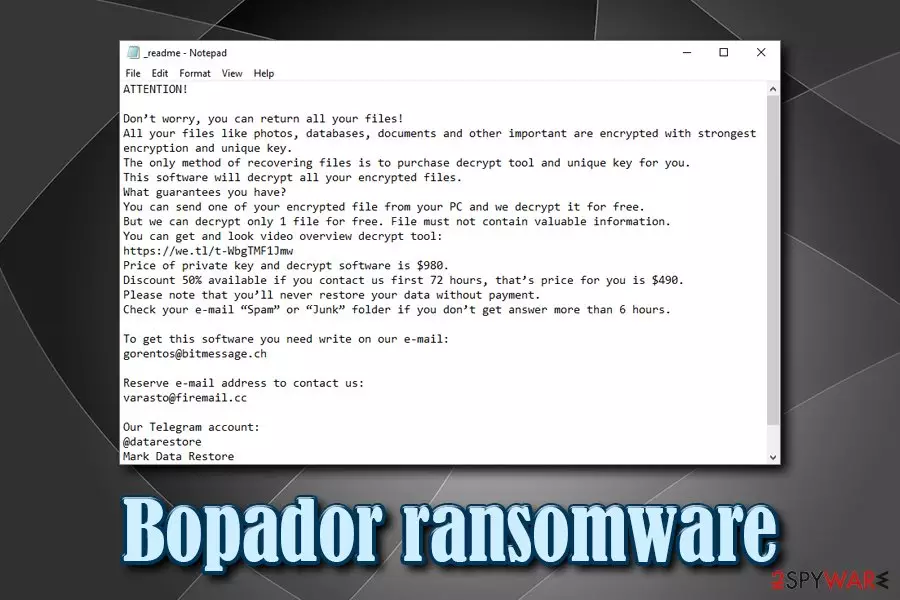
Bopador ransomware is a type of malware that infects Windows operating system and then locks pictures, documents, databases, video, image, and other files. Users are unable to access data unless they receive a unique key that is located on the remote server, and hackers demand $980/$490 in Bitcoin for that.
As soon as Bopador ransomware gains access to the system, it compromises its functions and then locks data using a sophisticated encryption algorithm,[1] such as AES. Files modified in such way receive .bopador appendix, and users can also view a ransom note _readme.txt which is dropped into each of the affected folders. In the note, users are explained what they need to do in order to get their files back – pay the ransom and contact crooks via the gorentos@bitmessage.ch, varasto@firemail.cc, or @datarestore (Telegram).
While initially Bopador virus infection might seem like the end of the world to some users, it is vital not panic, as there might be possible to recover data without paying. For more information, check out our data recovery section below.
| Name | Bopador |
| Type | Ransomware |
| Family | STOP/Djvu |
| Ransom note | _readme.txt |
| Contact | gorentos@bitmessage.ch, varasto@firemail.cc, or @datarestore (Telegram) |
| Ransom size | $980/$490 in BTC |
| File extension | .bopador |
| Decryption | STOPDecrypter [download link]might be able to help; otherwise use third-party software |
| Removal | Use reputable anti-malware software, such as FortectIntego,SpyHunterCombo Cleaner or MalwarebytesMalwarebytes |
Bopador virus belongs to the notorious STOP/Djvu malware family, and there are hundreds of versions this ransomware. While the extensions and contact details vary, most of them operate by the same principle: they lock files and demand the ransom for their release. However, experts do not recommend contacting cyber criminals due to the possibility of being scammed. Instead, focus on Bopador ransomware removal, as well as alternative data recovery methods.
Before encrypting files, Bopador ransomware performs a variety of changes to the system, including:
- Removes Shadow Volume Copies;
- Modifies Windows registry;
- Launches new processes;
- Imports new files deletes others;
- Creates new processes;
- Establishes communication with a remote server, etc.
After these modifications, Bopador ransomware performs file encryption without interruption, and then drops a ransom note that reads:
ATTENTION!
Don’t worry, you can return all your files!
All your files like photos, databases, documents and other important are encrypted with strongest encryption and unique key.
The only method of recovering files is to purchase decrypt tool and unique key for you.
This software will decrypt all your encrypted files.
What guarantees you have?
You can send one of your encrypted file from your PC and we decrypt it for free.
But we can decrypt only 1 file for free. File must not contain valuable information.
You can get and look video overview decrypt tool:
https://we.tl/t-WbgTMF1Jmw
Price of private key and decrypt software is $980.
Discount 50% available if you contact us first 72 hours, that’s price for you is $490.
Please note that you’ll never restore your data without payment.
Check your e-mail “Spam” or “Junk” folder if you don’t get answer more than 6 hours.To get this software you need write on our e-mail:
gorentos@bitmessage.chReserve e-mail address to contact us:
varasto@firemail.ccOur Telegram account:
@datarestore
Security experts[2] highly discourage contacting threat actors behind Bopador ransomware, as they might simply not send you the required key. In such a case, you would lose not only your files but also money. Besides, paying hackers will only encourage them to develop new versions and infecting more people.

Instead, you should remove Bopador ransomware using security software like FortectIntego or SpyHunterCombo Cleaner, and use backups to retrieve your files. If you did not prepare those, you can try a decryption tool (however, it only works if the locking process was performed while being offline) or use third-party software.
The most common ransomware distribution methods and ways to avoid the deadly infection
There are countless of malware created over the years by cybercriminals. Some are deemed to be less harmful (mainly a nuisance), while others, such as ransomware, can devastate companies and upset regular users. What makes ransomware so dangerous is that its altered files located on local HDD or all the networked devices will be locked even if the infection is terminated. Therefore, it is recommended avoiding the deadly infection in the first place.
Hackers use various methods to deliver ransomware payloads, such as spam emails, exploit kits, web injects, brute-force attacks, etc. While security software is a significant step forward when it comes to malware prevention, it is not enough. Here's what you can do to protect your computer better:
- Beware of spam emails: never open suspicious attachments or click on hyperlinks;
- Update your Windows OS and the installed software on a regular basis;
- Install ad-blocker;
- Never download pirated software installers or cracks/keygens;
- Use two factor authentication where possible;
- Use complicated passwords and never reuse them.
Finally, to negate all the damages in case ransomware does get into your device, make sure you constantly back up your data.

Remove Bopador ransomware and only then attempt file recovery
If you were unlucky enough to get infected with Bopador virus, it does not necessarily mean that you will lose your files forever. Security researchers are continually working on new methods to help victims, and they proved to be successful many times.[3]
Nevertheless, before you start the recovery process, you need to remove Bopador ransomware from your machine. To do that, you should access Safe Mode with Networking – a safe environment where the operation of the malware will be temporarily disabled. Once inside, scan your computer with anti-malware software (such as FortectIntego or SpyHunterCombo Cleaner, although other reputable tools can be used as well).
Once you are sure that Bopador ransomware removal is successful, you can connect your backup device and copy all the files. If you did not have backups, please check our recovery section below.
Did this guide help?
Be the first to comment