

Moka – ransomware virus that is using a completely different encryption algorithm to lock files and get the desired ransom
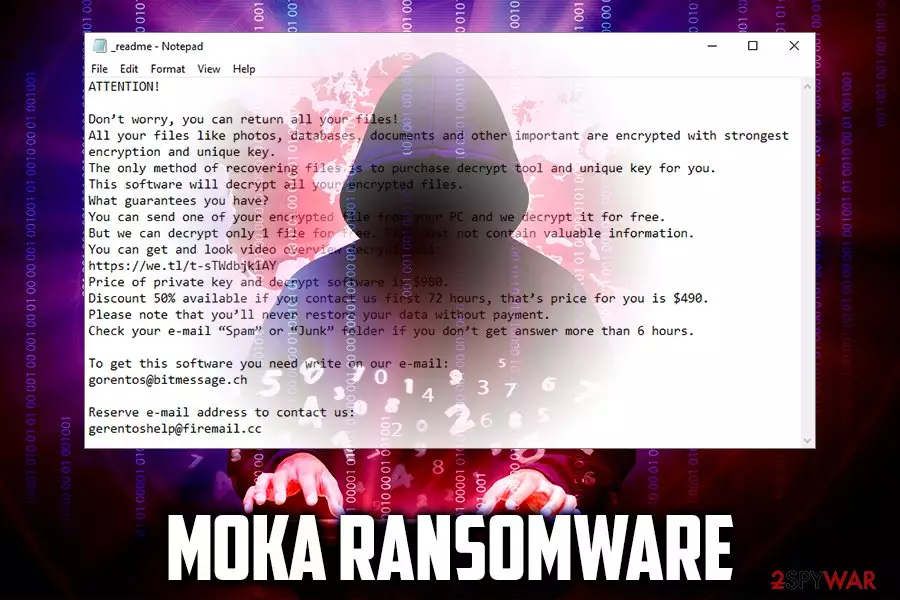
Moka ransomware is a cryptovirus that targets random users in order to extort money from them. Discovered in September 2019, the malware was spotted attacking users in Indonesia, India, USA, and other countries. This new variant of STOP/Djvu virus family differs from its predecessors as it has started using a completely different encryption algorithm to encrypt files. As a result, STOPDecrypter has become useless.
As soon as Moka file virus infiltrates the machine, it performs a scan and locks up pictures, databases, documents, videos, music, etc., and appends each of the files with .moka extension – this prevents victims from using them. The key to the encrypted files is held on the remote server which is controlled by the attackers, and, in exchange, they want money.
Moka virus authors promise to send the affected users the decryption tool as soon as they contact them via gorentos@bitmessage.ch, gerentoshelp@firemail.cc or Telegram account @datarestore and pay the ransom of $980/$490 in Bitcoin. The contact details and other information is provided in a ransom note _readme.txt, which is dropped into every folder of the encrypted files. However, experts advise avoiding Moka developers and rather attempt to restore the locked data by using alternative methods.
| Name | Moka |
| Type | Ransomware |
| First spotted | September 9, 2019 |
| File appendix | .moka |
| Ransom note | _readme.txt |
| Contact | gorentos@bitmessage.ch, gerentoshelp@firemail.cc or Telegram account @datarestore |
| Ransom size | $980/$490 |
| Main dangers | Encrypts files to make them unusable, alters hosts file to disable security sites |
| Malware removal | Use anti-malware software |
| Recovery | Windows OS might get corrupted after virus infection. To repair virus damage, scan your computer with FortectIntego |
| File decryption | Only safe way to recover files is by using backups. STOPDecrypter [download link] is not working for this version yet. |
While it is yet unknown how does Moka ransomware spread around, there are several methods that hackers typically use to infect as many users as possible for bigger profits.[1] They include:
- Exploits;
- Fake updates;
- Spam emails;
- Software cracks;
- Adware bundles;
- Malicious ads;
- Unprotected RDP, etc.
To prevent such devastating infections in the future, you should check the tips we provide in the second part of the article. Nevertheless, if you have been already infected, you should focus on Moka ransomware removal and ways to recover your files.
Moka virus is targeting the most common file types, including .jpg, .mpg, .html, .mp3, .doc, .xls, etc. The malware skips most of the system files, as ransomware developers' goal is not to corrupt the system, but rather make the victims pay the ransom for the decryption tool. Nevertheless, Moka ransomware alters some of the Windows system functions in order to run with every launch (altering of the registry) and prevent file recovery process (deletes Shadow copies). Additionally, it can alter the hosts file to disable security-related websites.
Once infected, Moka ransomware encrypts all personal data with a strong encryption algorithm and drops the following ransom note:
ATTENTION!
Don’t worry, you can return all your files!
All your files like photos, databases, documents and other important are encrypted with strongest encryption and unique key.
The only method of recovering files is to purchase decrypt tool and unique key for you.
This software will decrypt all your encrypted files.
What guarantees you have?
You can send one of your encrypted file from your PC and we decrypt it for free.
But we can decrypt only 1 file for free. File must not contain valuable information.
You can get and look video overview decrypt tool:
https://we.tl/t-sTWdbjk1AY
Price of private key and decrypt software is $980.
Discount 50% available if you contact us first 72 hours, that’s price for you is $490.
Please note that you’ll never restore your data without payment.
Check your e-mail “Spam” or “Junk” folder if you don’t get answer more than 6 hours.To get this software you need write on our e-mail:
gorentos@bitmessage.chReserve e-mail address to contact us:
gerentoshelp@firemail.cc
As evident, the 50% discount is offered to make users pay as soon as possible, and some people actually do it when panic struck. However, there are other options that might help you recover the locked data, such as the particular decryption tool explicitly developed for Moka ransomware and other STOP variants.

Additionally, you may also try using third-party recovery tools that might retrieve at least some of your files. Paying the ransom, however, might lead to money loss, as hackers might simply ignore you. Therefore, remove Moka ransomware and try other methods for file recovery we provide below. To remediate your system from malware, make use of repair tools like FortectIntego.
Avoid infecting your computer with ransomware by following simple security tips
Users often make a mistake by thinking that the careless online behavior will not lead to any ramifications. Moreover, while some of the malware might be less harmful and eliminated without much trouble, ransomware will leave the locked files even after its removal. Therefore, this type of infection might result in loss of files that are crucial for the business or consists of precious memories in the photos.
Thus, never underestimate the power of malware, it can have a significant impact on you. Luckily, you can protect yourself in most of the cases if you follow the security tips from industry experts:[2]
- Install security software with real-time protection feature and enable firewall;
- Regularly update your Windows system along with all the installed applications;
- Do not download pirated programs or software cracks;
- Never open email attachments that ask you to enable macro function;
- Protect all your accounts with robust passwords and use two-factor authentication where possible;
- Do not use default port when using Remote Desktop;
- Be careful with clicking links coming form unknown people on social media.
However, be aware that no method can protect you 100%, so the best way to nullify the effects of a ransomware infection is by keeping all your crucial data on backups.
Terminate Moka ransomware from your computer and only then attempt the file recovery
While some people will see no other choice but paying cybercriminals, the action is highly discouraged by researchers. Instead, you should remove Moka virus from your machine by using reputable anti-malware software that can recognize the infection[3].
However, it is known that this variant might also prevent various security solutions from operating, so you should enter Safe Mode with Networking – it will disable malware's operation and allow you to perform a full system scan.
NOTE! You can be disabled from browsing online and reaching security-themed sites. In this case, check your Windows hosts file. For that, go to: C:\Windows\System32\drivers\etc. Here, find hosts file, check it and delete it (you might be asked Administrator permission).

Once you complete Moka ransomware removal, you can proceed with file recovery – connect your external device with backups or copy the data over from cloud services. If you had no backup prepared, you should try third-party tools, a built-in Windows Previous Versions feature or use STOPDecrypter by Michael Gillespie.
Did this guide help?
Be the first to comment