

Unicorn ransomware – file locking malware attacking Italian users via a fake coronavirus website
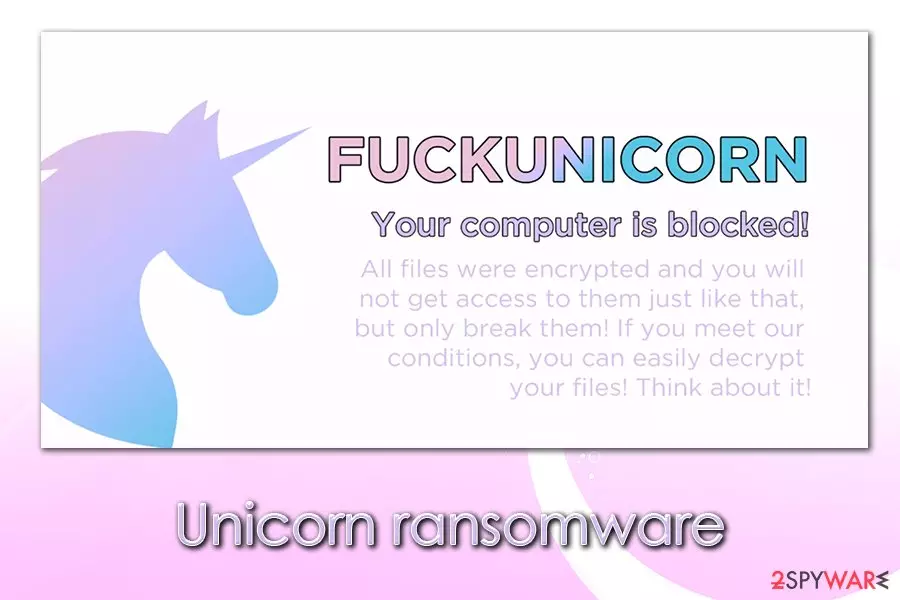
Unicorn ransomware is a data locker that was spotted by researchers at the end of May 2020.[1] This type of malware is considered one of the most damaging computer infections, as it can potentially result in permanent loss of personal data like pictures, music, videos, documents, databases, etc. Hackers lock all personal files using an encryption algorithm and then demand a ransom of 300 euros to be paid in exchange for Unicorn ransomware decryptor. It appends .fuckunicorn[random] to each of the affected files, drops a Read_IT.txt ransom note (written in Italian) file, and asks users to contact the attackers via the xxcte2664@protonmail.com email address.
Unicorn ransomware spreads via fake phishing websites such as www.fofl[.]it – it mimics an official coronavirus-related Italian website www.fofi.it. Users are tricked into downloading IMMUNI.exe executable file, which begins the infection and later runs a “fuckunicorn” process in the background. While the situation might seem threatening, security researchers MalwareHunterTeam claimed that the Unicorn file virus is based on open-source code and was most likely produced by a low-skilled, wannabe hacker.
| Name | Unicorn ransomware |
| Type | File locking virus, crypto-malware |
| Targets | Italian users |
| Distribution | Malware developers created a fake website mimicking a legitimate Italian, coronavirus-themed site. Users are then tricked into downloading and installing malicious installer via the site, infecting their machines with ransowmare |
| Related | IMMUNI.exe, “fuckunicorn” ransomware process |
| Ransom note | Read_IT.txt dropped into each of the affected file folders. Also, the desktop wallpaper is changed, which includes a share of a unicorn and a brief version of the message from malware authors |
| File extension | Each of the susceptible files are appended with .fuckunicorn[random] extension |
| Contact | Crooks provide xxcte2664@protonmail.com for communication purposes |
| Ransom size | 300 euro in bitcoin |
| Data return | Safest data return can be performed via backups. If no backups exist, MalwareHunterTeam [can be contacted on Twitter] claimed that they could provide a possible decryptor. Alternatively, use alternative data recovery methods provided below |
| Malware removal | Download and install powerful anti-malware software and perform a full system scan (access Safe Mode if required) |
| System fix | Unicorn ransomware is opensource-based malware that could include many bugs that could destroy Windows OS. To fix this damage, scan your system with FortectIntego after malware elimination |
Once inside the system, Unicorn ransomware does not encrypt data immediately, as it needs to prepare the system for the process. The malware only attacks Windows-based systems with the help of the PE EXE file (portable executable).[2]
As soon as IMMUNI.exe file (can be named as something else in other instances) is launched, malware would place it into one of the following folders:
- %AppData%
- %Temp%
- %User%
From there, it begins the infection routine and performs changes to Windows. For example, Unicorn virus would eliminate Shadow Volume Copies in order to prevent users from fast data recovery, would modify the Windows registry to be booted each time the computer is started, launch a “fuckunicorn” ransomware process in the background, and change the system in other ways.
Since malware is not stable, it might cause serious Windows malfunctions, even after ransomware removal is performed using security software. If you notice substantial performance drop after you eliminate the threat, also perform a scan with a repair tool FortectIntego.
An interesting fact is that Unicorn ransomware also drops a working COVID-19 map provided by the Center for Systems Science and Engineering at Johns Hopkins University. This map was previously abused by multiple campaigns and delivered such threats as AZORult banking Trojan on users' systems without them knowing anything about it.

As soon as the system is prepared, Unicorn ransomware immediately encrypts all personal files on the system targeting the most commonly-used extension such as .pdf, .doc, .jpg, .mp4, .rar, and many others. As a result, victims are unable to open any of the files on their computer, since it requires a special key that is held hostage by malicious actors. Each of suchlike files will be appended with a partially random extension, for example, “picture.jpg.fuckunicornhtrhrtjrjy.”
After that, users will be presented with a changed background, which has the following text:
FUCKUNICORN
Your computer is blocked!
All files were encrypted and you will not get access to them just like that, but only break them! If you meed our conditions, you can easily decrypt your files! Think about it!
While desktop wallpaper text is written in English, the actual ransom note Read_IT.txt is in Italian, confirming that the attackers aim to infect users from this country. The message from the Unicorn ransomware authors is full of Greek mythology references, mentioning ancient gods like Asclepius:
La lunga serpe sul bastone di Asceplio si è ribellata, ed una nuova era sta per sopraggiungere!
Questa è la vostra possibilità per redimervi dopo anni di peccati e soprusi.
Sta a voi scegliere. Entro 3 giorni il pegno pagare dovrai o il fuoco di Prometeo cancellerà
i vostri dati così come ha cancellato il potere degli Dei sugli uomini. Il pegno è di solamente 300 euros, da pagare
con i Bitcoin al seguente indirizzo : 195naAM74WpLtGHsKp9azSsXWmBCaDscxJ dopo che pagato avrai,
una email mandarci dovrai. xxcte2664@protonmail.com il codice di transazione sarà la prova.
Dopo il pegno pagato riceverai la soluzione per spegnere il fuoco di Prometeo. Andare dalla
polizia o chiamare tecnici a niente servirà, nessun essere umano aiutarti potrà.
Even though Unicorn ransomware developers might be inspired by mythology and of a creative nature, it does not matter much for the infected users. Victims are asked to transfer 300 euro payment into the provided Bitcoin wallet, and that allegedly nothing else can help them.
However, security researchers highly discourage making any deals with ransomware developers, especially sine malware, is based on open-source code. The delivered Unicorn ransomware decryptor might simply fail to work, or the attackers might ignore you completely.
Therefore, rather use alternative methods for data recovery we provide below and remove ransomware instead. Keep in mind that some malware of such type is designed to exit the system after the encryption is performed. However, due to the change of secondary payloads, it is important to perform a full system scan with reputable anti-malware tools like SpyHunterCombo Cleaner or MalwarebytesMalwarebytes.
Ways to prevent COVID-19 phishing attacks
COVID-19 pandemic struck many industries financially, as well as humanity as a whole. People were forced to work from home; others lost their jobs due to a difficult worldwide situation that companies are facing. While many try to help by sowing masks for free and volunteering, cybercriminals are not there to help and are trying to abuse the coronavirus crisis to their own advantage. Maze ransomware authors claimed that they would spare medical institutions from the attacks, even though they continue to infect overloaded hospitals and institutions that try to help fight the virus.[3]
As a result, coronavirus phishing attacks increased in volume exponentially, as threat actors see the pandemic as a good opportunity to earn some more of the illegal income.[4] Ransomware plays a big role in this, as even more regular users and organizations keep getting tricked by COVID-19-themed emails, fake websites, and other means of phishing.

Therefore, it is vital to be vigilant during the pandemic and ensure computer security as much as possible. Here are some tips that could be helpful:
- Employ comprehensive security software with real-time/web protection feature;
- Do not download software cracks or pirated software installers;
- When trying to download a coronavirus map, ensure that it is coming from a legitimate source;
- Check the URL address of the website you visit: the attackers often replace similarly-looking letters in order to confuse visitors, all while displaying a site identical to the original one;
- Ensure that visited sites have the padlock icon neat the address bar and are marked as “Secure”;
- Do not open suspicious email attachments that ask you to enable macro function on click on hyperlinks. If unsure, put the attachment for analysis via tools like Virus Total (you can also right-click on the link and copy its address, which can be later analyzed via Virus Total);
- Backup your files regularly.
Do not pay the attackers and remove Unicorn ransomware instead
As previously mentioned, the virus is based on open-source code and is written by low-skilled criminals. Despite this, the threat should be treated as a regular ransomware infection, and all the correct measures are undertaken. Thus, before you do anything, we recommend you back up all the encrypted data (unless you have a copy of the locked files), and only then remove Unicorn ransomware from the computer.
For that, you should employ powerful anti-malware software like SpyHunterCombo Cleaner or MalwarebytesMalwarebytes and perform a full system scan. If, for some reason, you are unable to do so (malware can attempt to corrupt your antivirus software), you can access Safe Mode with Networking, as explained below. Once in Safe Mode, perform a full system scan to ensure that malware and its secondary payloads are eliminated promptly.
Once you have backups ready and you sure that ransomware removal was successful, you can begin the data recovery process. Security researchers might help with a free decryption tool since the encryption of this cryptovirus is not very strong. If that does not help, you can always resort to third-party recovery tools – we provide download links below.
Did this guide help?
Be the first to comment