

Bmic ransomware is the cryptovirus that demands money for alleged decryption that is, in most cases, not possible
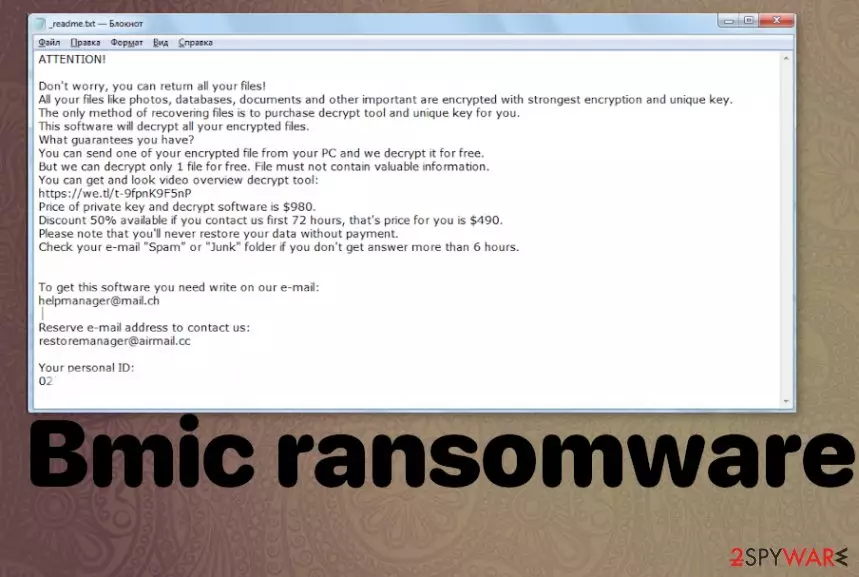
Bmic ransomware virus is the file-encryption based threat that relies on army-grade algorithms and file encoding. When the original code of the particular file gets changed, and it receives the .bmci extensions after the original name and filetype extension, you also notice the ransom note file added on the desktop. _readme.txt is the message from criminals, ransomware creators, so you get informed about the Djvu ransomware family activities. This particular group of crypto-malware creators is known for delivering version after version, so neither the message nor the contact emails listed in the text file are changed for a while.
| Name | Bmic ransomware |
|---|---|
| Family | Djvu ransomware/STOP virus |
| File marker | .bmic – the appendix that gets added on files affected during the encryption process |
| Distribution | Fake updates, installers, pirated files, software, licensed programs, or video games. All these pieces of files can include malicious payload and trigger the infection on the machine |
| Ransom note | _readme.txt – file with the message from criminals behind this virus. This text file contains ransom amount specification, email addresses, Bitcoin wallet address |
| Issues | The virus developers claim to have decryption options, so people believe those lies and pay the ransom. These ransomware attacks can easily lead to money or data loss, permanent damage to your computer. Any threats that involve money are more dangerous than any other cyber infection |
| Elimination | Bmic ransomware removal process should include the usage of anti-malware tools because all the traces need to get deleted to terminate the virus fully |
| Repair | Try to recover after the attack by running the proper PC repair tool and fix the damage caused by ransomware. Try FortectIntego for the indication |
Bmic ransomware is the threat that focuses on encryption and money demands, so the first step when dealing with the infection like this would be ignoring any messages from criminals. There are no reasons to contact them, especially when you think about paying the demanded amount of $980/$490 in Bitcoin cryptocurrency.
Creators of this virus demand the payment in a text file _readme.txt that gets placed on the desktop once the Bmic ransomware attack starts and files get encrypted. The message is not changed for a while because the malware group focuses on releasing new variants all the time.
ATTENTION!
Don’t worry, you can return all your files!
All your files like photos, databases, documents and other important are encrypted with strongest encryption and unique key.
The only method of recovering files is to purchase decrypt tool and unique key for you.
This software will decrypt all your encrypted files.
What guarantees you have?
You can send one of your encrypted file from your PC and we decrypt it for free.
But we can decrypt only 1 file for free. File must not contain valuable information.
You can get and look video overview decrypt tool:
https://we.tl/t-gSEEREZ5tS
Price of private key and decrypt software is $980.
Discount 50% available if you contact us first 72 hours, that’s price for you is $490.
Please note that you’ll never restore your data without payment.
Check your e-mail “Spam” or “Junk” folder if you don’t get answer more than 6 hours.To get this software you need write on our e-mail:
helpmanager@mail.chReserve e-mail address to contact us:
restoremanager@firemail.ccYour personal ID:
When you receive the message from Bmic file virus creators try to ignore these claims and focus on cleaning the machine fully. You can achieve that by running an anti-malware tool that finds and removes traces of the infection. Unfortunately, that is not the process that could recover your encrypted data.
The success of Bmic ransomware removal process depends on the time that ransomware has already spent on the machine. The more affected your system gets the more difficult it is to delete the cryptovirus. You may experience issues with the machine when the particular functions get disabled, so you need additional help.

Dealing with .bmic file virus
The first step before you try to remove Bmic ransomware is to determine what you would like to choose for the file recovery after that. If you think that you can delete the treat and repair files with one AV tool, you should think again. Djvu ransomware uses various methods to ensure persistence, so you cannot decrypt or repair files easily.
When you think that there is no way to decrypt files in the future, you can go straight to removal and clean the machine from any traces of the Bmic ransomware virus. When you run FortectIntego, you can find and repair affected system files, registry entries, so functions run smoothly again. However, this is still not recovering your encoded data.
For files encrypted by the threat, you need to get a third-party recovery tool or rely on your data backups.[2] You should note that Bmic ransomware uses online IDs while encrypting files, so each key formed for the particular victim is unique and cannot be obtained easily.

Encryption starts one the payload of the ransomware is launched on the machine
You cannot know when the ransomware managed to affect your device because cryptovirus as any other more severe piece of malware can stealthily infiltrate the machine and trigger changes, launch malicious processes. The infection gets triggered by the users themselves because macro viruses get added on files that only need to be opened on the computer.
The more common way to spread this version of the ransomware is focussing on torrent sites, pirating platforms, and files that can spread during the installation and downloads of licensed versions of software, game cheats. You need to stay away from anything suspicious and illegal, so you can avoid infections like these. Experts[3] always note that there are many issues with pirating services, so do not get involved.
Recover files affected by the Bmic encryption virus and clear the traces of the threat
Focus on the proper tools, processes that can help you to remove Bmic ransomware from the machine. There is no easy way because this threat is residing in the memory, affecting more system files and other parts of the machine. You cannot manually find these pieces related to the infection, so automatic tools are needed.
The best tool for Bmic ransomware removal is security or anti-malware program. SpyHunterCombo Cleaner or MalwarebytesMalwarebytes can check the system and indicate malicious programs, files related to malware. Then you need to follow suggestions and clear the system properly.
Any legitimate tools that can find the Bmic ransomware virus on your device should be able to eliminate all the traces. Unfortunately, to repair the system functions, programs, and other crucial files needed for the machine to run smoothly, you need something like FortectIntego.
Did this guide help?
Be the first to comment