

Trojan:win32/fuery.b!cl – malicious program that is spread through third-party downloads
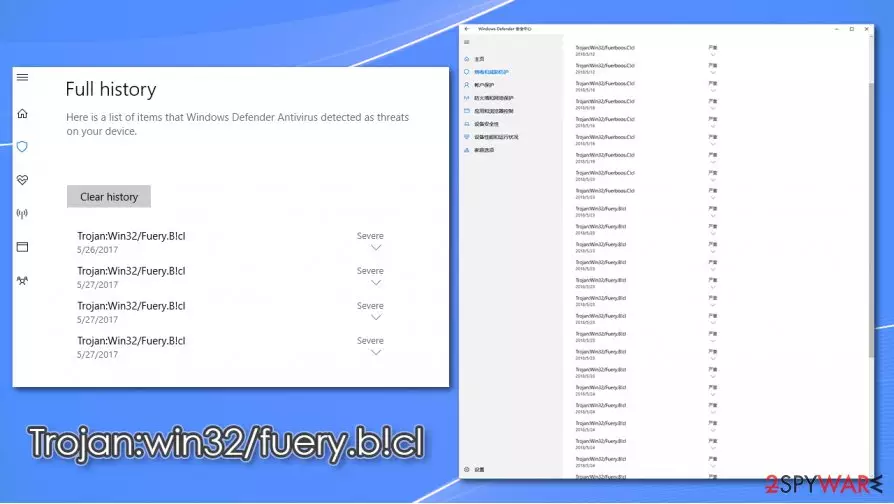
Trojan:win32/fuery.b!cl is a heuristic detection name a particular computer threat, typically assigned by Windows Defender. Trojans can represent a wide variety of different functions, depending on what the hackers programmed it to do. Essentially, these types of infections are defined by their distribution method rather than functionality. Thus, there could be different tasks that the malicious program that you are dealing with was designed to do, for example, steal personal or sensitive information, redirect traffic, inject other malware, etc.
In some cases, however, Trojan:win32/fuery.b!cl virus detection might indicate a false positive,[1] as it sometimes happens with generic detection threats. If your security software flagged a download as malicious, you should always investigate and never ignore these warnings.
| Name | Trojan:win32/fuery.b!cl |
| Type | Trojan |
| Distribution | These malicious programs are typically downloaded when users believe that the file is safe and legitimate. Users can download a Trojan through fake updates, software cracks, software bundles, malicious spam email attachments, deceptive ads, and similar |
| Symptoms | Symptoms might vary, depending on what the malicious program was designed to do. For example, a crypto-mining malware would run CPU/GPU at its full capacity, traffic hijacking apps would change homepage and other browser settings. In some cases, symptoms would be completely lacking |
| Dangers | Installation of other malware, personal data theft, account compromise, personal file loss, identity theft |
| Elimination | If you are unsure whether the detection is legitimate and not a false positive, you can scan your machine with alternative anti-malware software, such as SpyHunterCombo Cleaner or MalwarebytesMalwarebytes |
| System fix | In case malware managed to break into your PC, you might start suffering from various stability issues (crashes, errors, lag) after the elimination. We recommend using repair software FortectIntego to fix post-infection problems |
Since Trojan:win32/fuery.b!cl is a generic Trojan, it appears on users' systems when they attempt to download something that they believe to be legitimate. There are several different ways how this can occur, as malicious actors come up with various ways to make users download and execute malicious files on their computers. Here are a few examples:
- Fake Flash update prompts;
- Malicious spam email attachments;
- Software bundles;
- Pirated software installers, software cracks;
- Malicious advertisements.
Initially, Windows Defender will show a popup and remove Trojan:win32/fuery.b!cl from the active files by placing it into quarantine. However, many users reported that the detection might come back, so they were worried whether the threat was actually deleted fully.
In case malware manages to bypass defenses, it can cause significant issues to users and their computers. Quite often, Trojans perform registry changes in order to run with every system boot, inject hundreds of malicious files, terminate and spawn new processes, etc. These modifications can impact Windows in various negative ways and later cause significant performance issues. If that is the case for you, we recommend using FortectIntego to attempt to fix virus damage an remediate the system automatically.

If Trojan:win32/fuery.b!cl removal is not performed on time, it can allow the attackers to achieve whatever goals they set. In most cases, the malicious program might alter the web browser settings and redirect traffic to malicious websites or perform clicks on behalf of the user. This proves to be a lucrative business model, as bots can make thousands of clicks every minute.
However, if the Trojan:win32/fuery.b!cl virus is programmed to steal information in the background, you are less likely to see any infection symptoms at all, which makes the whole situation a lot more complicated. Since malware remains stealthy and is not detected by security software (or the lack of it), it can remain operational for weeks or years, stealing banking details, logins, financial, and other types of sensitive data. This way, the infection can result in serious consequences, including identity theft, monetary losses, and much more.
Therefore, we highly advise you to employ a powerful third-party security solution that could work along with Windows Defender or replace it entirely. For that, we recommend using SpyHunterCombo Cleaner or MalwarebytesMalwarebytes. Scanning the device with a different anti-malware would also help you to determine whether the Trojan:win32/fuery.b!cl detection is a false positive or not.
You can protect your computer from most of the infections
As already mentioned, Trojans are not defined by their functionality as they can possess an array of different capabilities. The classification comes from their distribution techniques – these types of threats are injected into systems after users attempt to install something they believe to be secure. In most cases, distribution techniques rely on social engineering and phishing tactics, so users get convinced easier.
One of the most common Trojan distribution methods is fake Flash Player update prompts (or other popular software such as Google Chrome or Mozilla Firefox). Since the plugin was widely used by various websites to play multimedia, it got embedded in users' minds, and they still believe that it is required – hackers are well aware of that. Thus, it is very easy to trick the general population to download the alleged updates. In most cases, users will not even know that they let a Trojan into their systems and believe they installed an actual Flash update.
Another reason why users get infected with Trojans – spam emails. These are typically comprised of a fake message that urges recipients to open the attachment. As soon as the file is opened and the macro function allowed, a set of commands are executed, and malicious payload downloaded in the background. Thus, never open suspicious attachments, even if they seem legitimate and the email address of the sender seems to match the original one – it can be easily spoofed.
Finally, some users ignore anti-virus software warnings during the attempts to download pirated programs or software cracks. These installers should never be used, as it is the easiest way to infect your machine with malware.

Delete Trojan:win32/fuery.b!cl and perform additional checks to ensure computer safety
Some people said they were not convinced that the threat was completely dealt with after Trojan:win32/fuery.b!cl removal. In some cases, users even found a suspicious app installed on their machines after the termination was seemingly completed. Therefore, it is always worth checking the system with an alternative security tool to ensure that no more threats are present – experts[2] recommend using SpyHunterCombo Cleaner or MalwarebytesMalwarebytes. In case malware is preventing your security software from working correctly, access Safe Mode with Networking and perform a scan from there.
However, if you were downloading a legitimate application and Windows Defender flagged it as malicious, you should perform several checks before you remove Trojan:win32/fuery.b!cl. Scanning it with an alternative security tool could help with this as well; or, you could upload the file to sandbox analysis[3] platforms such as Virus Total.
Did this guide help?
Be the first to comment