

MSN Toolbar is the browser component that can be difficult to remove due to various relations and bugs
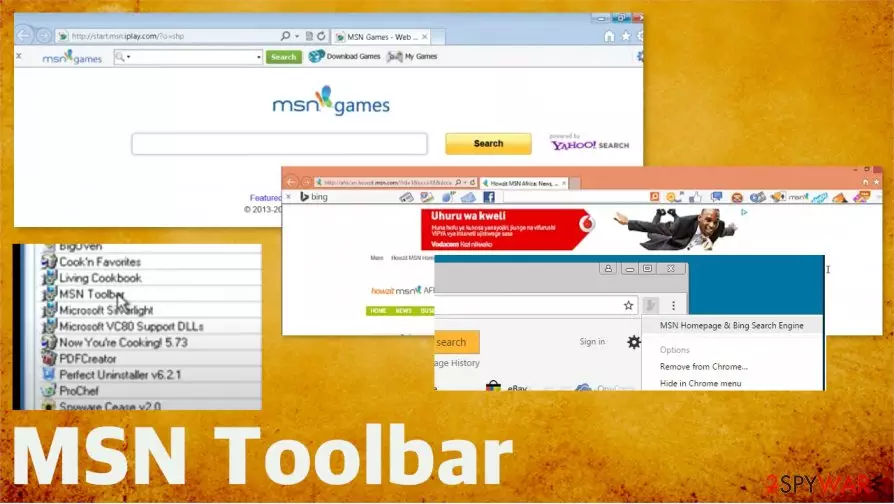
The particular message, a pop-up that appears and promotes the installation, can state about the offer to add the toolbar. Such content like install.toolbar.msn.com, leads to the automatic download of the browser extension, toolbar, other applications, or add-ons. This suspicious toolbar can create issues on various devices, so the shady installer gets hidden deep to keep the program running as it supposed to. Even though this is not a virus of any kind, you should get rid of it since it is not valuable nor useful or needed.[2]
| Name | MSN Toolbar |
|---|---|
| Type | Browser extension/ Search toolbar |
| Issues | The program is promoted with the help of advertisements and commercial sites. Install.toolbar.msn.com pop-ups aim to trick people into installing the Toolbar themselves. It can be related to third-party companies and distributors, so creates other issues |
| Distribution | Freeware installations can lead to infiltration of PUPs and suspicious programs, tools |
| Elimination | To remove Install.toolbar.msn.com and other suspicious material related to this browser-based program, you need proper security or anti-malware tool. AV engines can identify PUPs and remove them off of the system |
| System repair | Silent intruders can trigger other issues on the system, so run FortectIntego to find affected files or corrupted functions |
Install.toolbar.msn.com can trigger the drop of executable msntask.exe that is the file related to legitimate services and not harmful, but sometimes it is possible to receive a fake file misused by malicious actors[3] that name their malware like commonly found tasks and processes so users cannot notice the purpose of the executable file. If such cases, you should get an anti-malware tool and check the system for possible intruders yourself.
MSN Toolbar is not related to serious malware, but this is not the first MSN- related campaign that creates issues for users. MSN virus is a serious threat that relies on the popularity of the app and service. Unfortunately, this MSHN Homepage/ Bing Search Engine relation is also not that innocent.
MSN Toolbar or those install.toolbar.msn.com redirects and other issues can trigger exposure to shady sites and trigger problems while being non-dangerous itself. It adds Skype, Office, outlook, bing search, and other reward programs, advertisements on the browser directly. It claims to redirect your searches through a valuable engine and show improved results.
Nor the toolbar, not the install.toolbar.msn.com messages can improve the performance or affect search results in a positive way. This third-party interaction, additional content that gets installed on the machine affects the computer in a negative way – triggers slowness and exposure to useless online commercial pages.

So even though this is not malicious, you should run a tool like SpyHunterCombo Cleaner or MalwarebytesMalwarebytes to find components of the suspicious tool, so you can remove Install.toolbar.msn.com and any other programs that interfere with speed or performance of the computer. You might be not needing the program itself, so it can be properly removed without additional damage.
MSN Toolbar removal manually might take too much time when you are not the one that installed the program in the first place. Running a scan on the possibly infected machine can help with the speed and performance significantly when the application finds and terminates all the harmful pieces.
It is the only way to get rid of install.toolbar.msn.com, other promotional messages, and those search engine and browsing online issues that search toolbar can easily create. Users claim that there are some features that can interrupt the performance or create issues with the operating system. Keep that in mind.

Pay attention to content on the internet and focus on security
You can get exposed to malicious material online when you visit pages that are not reliable or trustworthy. Anything online can lead to malicious pages, download sites, and trigger pop-ups, redirects, other material that can have scripts that disturb or even damage the machine.
Of course, PUP developers and software creators can always promote and distribute their programs on official websites, create advertising campaignsns. You should always go for the sources you can trust and know more about, so the risk is lessened. Also, Advanced or Custom installation options give more control for you as a user.
Make sure to follow the guidelines for the proper install.toolbar.msn.com removal
You might get the particular browser piece installed on purpose when you believe all the claims on promotional pages and advertisements. However, there are reports that claim about MSN Toolbar and its intrusive distribution, interruption to system performance while it gets downloaded without users' permission.
It means that you might possibly click on something suspicious or harmful, so the suspicious message or other promotional pieces lead to the installation of the browser extension. The install.toolbar.msn.com pop-up can occur on the screen out of nowhere, so you do not know what to do.
You can remove install.toolbar.msn.com when you run SpyHunterCombo Cleaner or MalwarebytesMalwarebytes on the machine and check for the security issues, harmful programs, and intruders. Even when the Toolbar or application that bothers you is not malicious, such a system check can easily improve the speed and performance quality. Remember to check for additional system issues with FortectIntego
How to uninstall MSN Toolbar yourself:
- You can find the Control Panel on the machine where these tools and applications can be found.
- Find the Programs and Features section.
- Find MSN Toolbar on the list.
- Click on it and then choose the Uninstall button at the top or right-click on it to get the menu and this option.
- Confirm and follow instructions on the screen until the process is done and you can Finish the procedure.
Did this guide help?
Be the first to comment