
MSN virus, MSN malware: what it is and how to remove it
MSN virus is a type of computer threat that aims to infect Windows Live Messenger users. Initially released in 1999, the chat application was shipped with Windows OS and was often used as a communications app within the office environment, as well as home users.
Facts checked October 7, 2026. Removal steps tested on Windows 11 (26H2) and checked against Microsoft's and the browser makers' current documentation. Sections marked as our earlier report are the original text: they describe the threat as it was then and have not been reviewed since. The 2026 status, the removal steps and the questions are current.
Automatic
Get a free scan and check if your PC is infected.
Fortect finds malware, unwanted programs and the Windows damage they leave behind, and repairs it in one pass.
Unsure whether jpg.vbs is safe? A free scan checks the file and what starts it.
Do it yourself · free Remove MSN virus, MSN malware yourself 6 steps, about 18 minutes, no software needed.
Start the steps
MSN virus, MSN malware: summary
| Distribution | While the virus is mainly spread via the Windows Messenger platform automatically, users might also get infected via other sources, such as spam emails, exploits, software cracks, infected external drives, etc. |
|---|---|
| Name | MSN virus, MSN malware |
| Type | Malware, Torjan |
| Functionality | Once malware populates its payload, it begins sending phishing messages to all the people in the contact list; collects sensitive information on the host machine and delivers it to the attackers – it can be used for various malicious purposes, such as money theft |
| Symptoms | Unknown processes run in the background Computer slowdowns, lag, or crashes Private messages with embedded links sent to friends via MSN Messenger without permission |
| Detection names | No Microsoft detection name is known |
| Removal | Scan the PC with security software to find and remove the malware and anything installed with it. Fortect scans Windows for malware and repairs the system files and settings it damaged. Remove it nowTo use the full-featured product, you have to purchase a license for Fortect. The scan is free. |
Show 5 more facts
| Damage | Not recorded in the old report |
|---|---|
| Evidence | 4 write-ups by security sites; details still limited |
| File names | jpg.vbs |
| First seen | 5 March 2020 |
| Facts checked | 7 October 2026 |
What MSN virus, MSN malware does on an infected PC
From our report of Mar 2020 · not reviewed since
More from our earlier report on MSN virus, MSN malware
- The best way to get rid of malware on the system is scanning it with powerful anti-malware software like or
How MSN virus, MSN malware got on your PC
From our report of Mar 2020 · not reviewed since
MSN virus - malware that spreads via instant chat application
MSN virus is a type of computer threat that aims to infect Windows Live Messenger users.
Initially released in 1999, the chat application was shipped with Windows OS and was often used as a communications app within the office environment, as well as home users. Besides communication using text messaging, MSN also supported video calling and file transfer function.
The platform was eventually discontinued by Microsoft in 2013, although many users kept employing it for online communication. Unfortunately, because the service is no longer supported, it became much more susceptible to cyberattacks, and MSN malware remains a significant risk to Windows users to this day.
Similarly to other computer parasites that spread via VoIP applications like Facebook's Messenger or WhatsApp, MSN virus uses the platform for distribution. The files that are sent via the Messenger can be of various formats, including .zip, .pif, .xls, .arj, .exe and others. Once clicked, the MSN virus is immediately launched on the system, which also begins the Windows system modification routine (you can revert this damage with tools like ).
Nevertheless, users can get infected with it not only by clicking on a malicious link delivered to them, but also in other ways, which include:
MSN virus is classified as a Trojan - a type of malware that enters the machine when users believe that it is something else. Due to this functionality, the distribution means can vary greatly (as mentioned above). Nevertheless, those who do get infected with malware should think about MSN virus removal immediately, as it can cause various privacy and security risks.
Nevertheless, in some cases, noticing the infection of MSN malware might not be that easy - Trojans are usually stealthy so that they can remain on the system for as long as possible. Among the symptoms that users may experience are the unsolicited messages sent via their MSN Live Messenger client, as well as occasional system slowdowns.
Those who are more experienced with malware and the Windows process might notice other signs that might not be apparent straight away. For example, MSN virus may spawn new Services, shut down automatic restore points, run processes in the background, connect to a remote server, etc.
Speaking of which, besides sending spam, MSN virus is designed to steal sensitive information on the machine, which means that all the information you are typing in via your keyboard can be transferred to a remote server controlled by attackers. Once harvested, such data can be used for various malicious purposes or sold on the Dark Web for profits.
All in all, you need to ensure that you remove MSN virus from your machine as soon as possible. The best way to do that is by scanning your computer with anti-malware software, such as or . For more information, check the removal section below.
- Spam email attachments and embedded hyperlinks;
- Software cracks or pirated program installers;
- Infected external drives (USB flash, external HHDs, etc.)
- Fake updates and scam websites, etc.
From our report of Mar 2020 · not reviewed since
Messenger viruses spread not only via the chat app
Since one of the main traits of the virus is to send spam to other users on the contact list, this is it's one of the main propagation methods.
Typically, the phishing message arrives from somebody that the victim already knows with a curiosity-sparking line of text, such as "Is that you in the photo?" which includes a link to an unknown domain.
Once clicked, it brings users to a malicious website where they are asked to download a seemingly innocent file disguised as a picture, such as "photo656.pif" or "database99.jpg.vbs." In reality, these types of files are executables that run a script in the background which downloads malware payload from a remote server.
However, this is not the only way that a Trojan can break-in into the computed of thousands since hackers use other methods to expand the malicious campaign. For example, a malicious file can come via the email - it typically includes a phishing message urging to open it. Additionally, crooks may also use hyperlinks, email spoofing, and other tricks in order to make users execute the malware.
To protect yourself from malware attacks, equip yourself with sophisticated anti-malware, web protection, ad-block, and Firewall. Besides the automatic tools, you should also practice caution when browsing the internet - never download software cracks, use secure passwords, not open spam email attachments, update the installed software regularly, etc.
How to check the PC for MSN virus, MSN malware
- File:
jpg.vbs
How to remove MSN virus, MSN malware
A loader's job is to install other malware, so treat the PC as infected with more than one program until the scans are clean.
Step 1: Check where jpg.vbs runs from and stop it
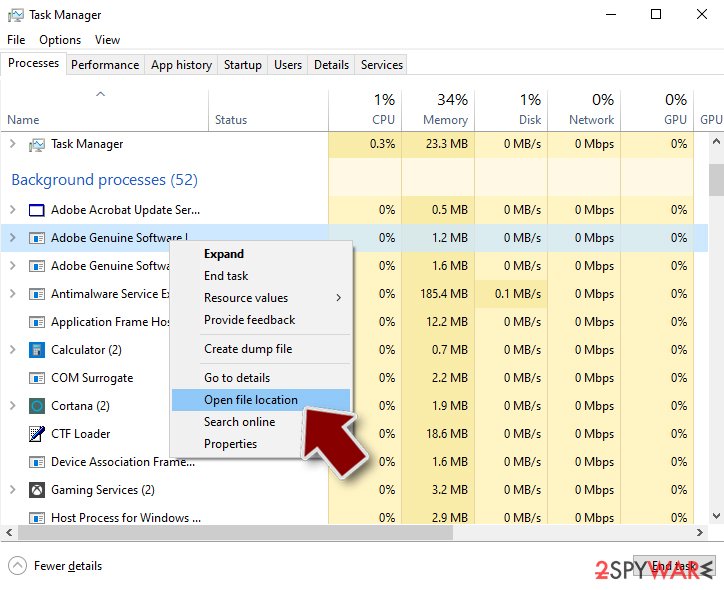
jpg.vbsis the part you can see, and its location tells you whether it belongs there. Right-click it on the Processes page of Task Manager and choose Open file location, then right-click the file > Properties > Digital Signatures to see who signed it.An unsigned file, or one in a user folder such as
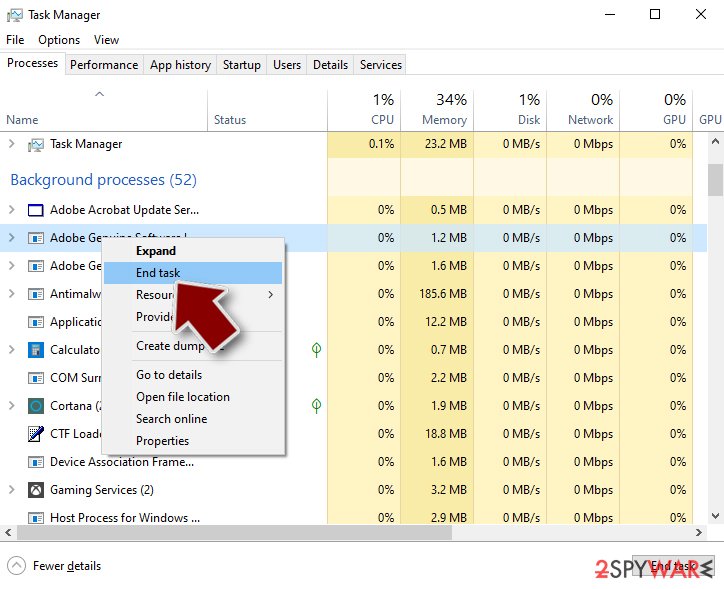
%AppData%, is the one to remove: end the task, then delete the file.Note the folder name, because the same folder usually holds its other files. This is the same in Windows 11 and Windows 10.
Full procedure with screenshots: Close a frozen app (Task Manager, Force Quit) On uGetFix
Step 2: Delete scheduled tasks that bring it back
Open Task Scheduler from the Start menu and click Task Scheduler Library.
Select each task you do not recognise and read the Actions tab: a task that starts a file in
%AppData%or%Temp%, runs powershell with a long encoded line, or opens a web address belongs to MSN virus, MSN malware or a similar program.Right-click such a task and choose Delete, and check the subfolders too. Leave tasks from Microsoft, your PC's maker and programs you use. Task Scheduler is the same in Windows 11 and Windows 10.

Windows 11: Task Scheduler Library, the task selected, the Actions tab shows the file it runs. Full procedure with screenshots: Remove what malware leaves behind in Windows
Step 3: Remove it from startup
Whatever MSN virus, MSN malware installed usually starts with Windows.
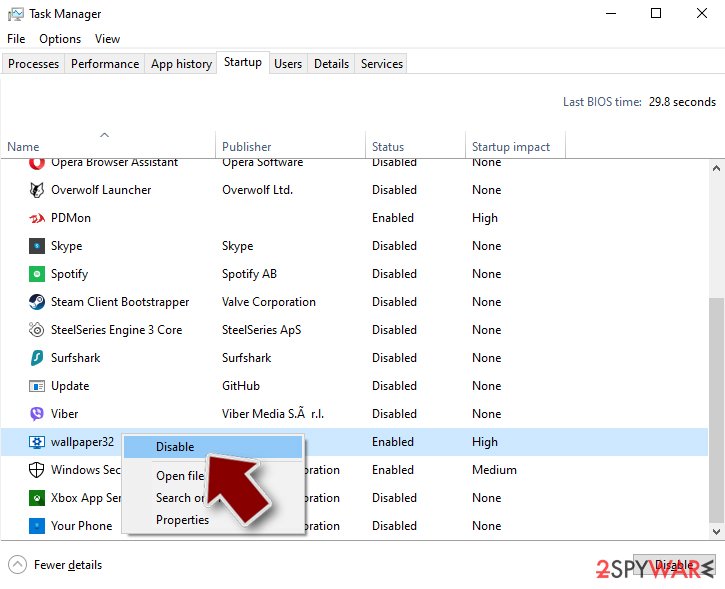
Open Task Manager with Ctrl + Shift + Esc, go to Startup apps in Windows 11 or the Startup tab in Windows 10, and disable what you do not know, starting with entries that have an empty Publisher column.
Open file location on the right-click menu shows the file, which helps you decide and tells you what to delete later. Disabling is safe: if something you need stops working, switch it back on.
Full procedure with screenshots: Stop apps from opening at startup On uGetFix
Step 4: Delete the folders left behind
What the uninstaller leaves behind is usually in the user folders. Open File Explorer, switch on View > Show > Hidden items (in Windows 10 View > Hidden items), and go through
%LocalAppData%,%AppData%, %ProgramData% and the two Program Files folders.Sort by Date modified and delete folders that appeared together with the problem and belong to no program you use. Folders with random names that hold
.exe,.dll, .js or .ps1 files are the strongest sign.Full procedure with screenshots: Remove what malware leaves behind in Windows
Step 5: Scan the PC, then run the offline scan
Open Windows Security > Virus & threat protection > Scan options, run a Full scan and remove everything it finds. Then select Microsoft Defender Antivirus (offline scan) and click Scan now: the PC restarts and scans before Windows loads, which finds files that hide while Windows runs.
Save your work first, because the offline scan takes about 15 minutes. Both scans are built into Windows 11 and Windows 10, and a second scanner from another vendor is a useful extra opinion.

Windows 11: Windows Security > Virus & threat protection > Scan options. Full procedure with screenshots: Run a Microsoft Defender Offline scan
Step 6: Change passwords from another device and sign out other sessions
Assume that the passwords saved in this PC's browsers, and the accounts that were open in them, are known to the attacker. From a phone or a clean computer, change the e-mail password first, then banking, shopping, social and gaming accounts.
Use each service's option to sign out of all other sessions, because stolen cookies keep a session open even after a password change. Turn on two-step verification on each account. Wait with the infected Windows 11 or Windows 10 PC until the scans are clean.
Full procedure with screenshots: Turn on two-step verification / secure a hacked account
Instructions for each browser and system
The detailed steps for every browser and system this guide covers. Open the one you use.
Manual removal using Safe Mode
Important! →
Manual removal guide might be too complicated for regular computer users. It requires advanced IT knowledge to be performed correctly (if vital system files are removed or damaged, it might result in full Windows compromise), and it also might take hours to complete. Therefore, we highly advise using the automatic method provided above instead.
Step 1. Access Safe Mode with Networking
Manual malware removal should be best performed in the Safe Mode environment.
Windows 7 / Vista / XP
- Click Start > Shutdown > Restart > OK.
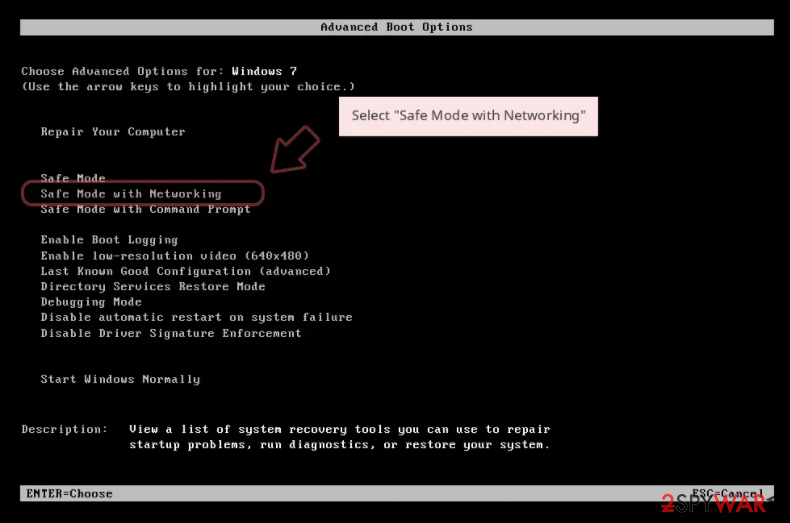
- When your computer becomes active, start pressing F8 button (if that does not work, try F2, F12, Del, etc. - it all depends on your motherboard model) multiple times until you see the Advanced Boot Options window.
- Select Safe Mode with Networking from the list.
Windows 10 / Windows 8
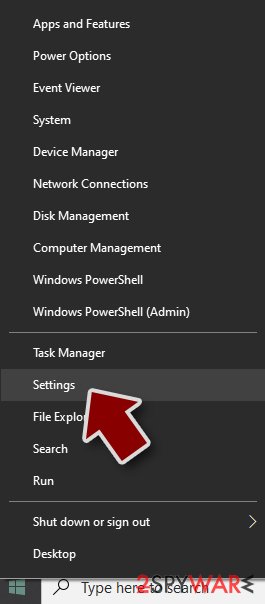
- Right-click on Start button and select Settings.
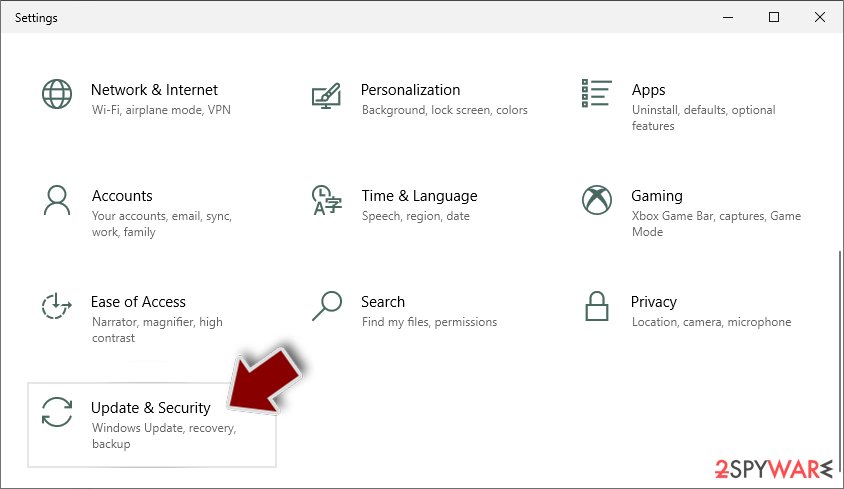
- Scroll down to pick Update & Security.
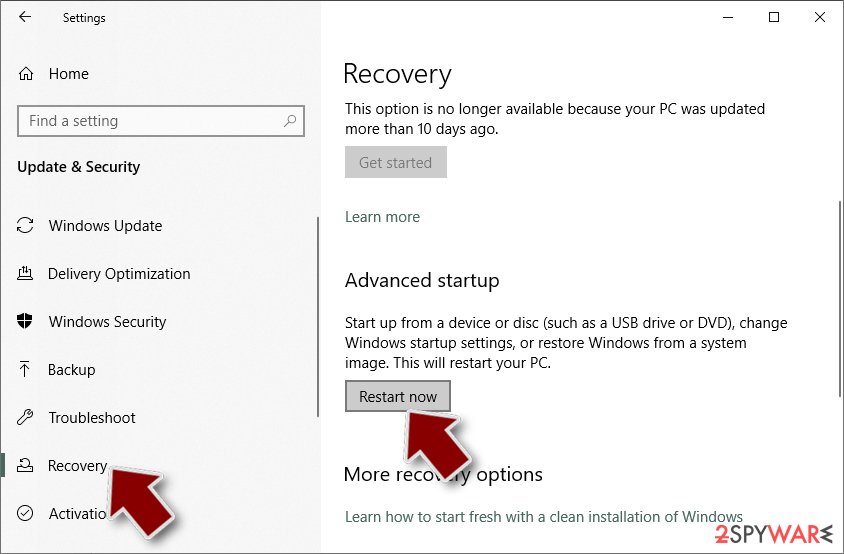
- On the left side of the window, pick Recovery.
- Now scroll down to find Advanced Startup section.
- Click Restart now.
- Select Troubleshoot.
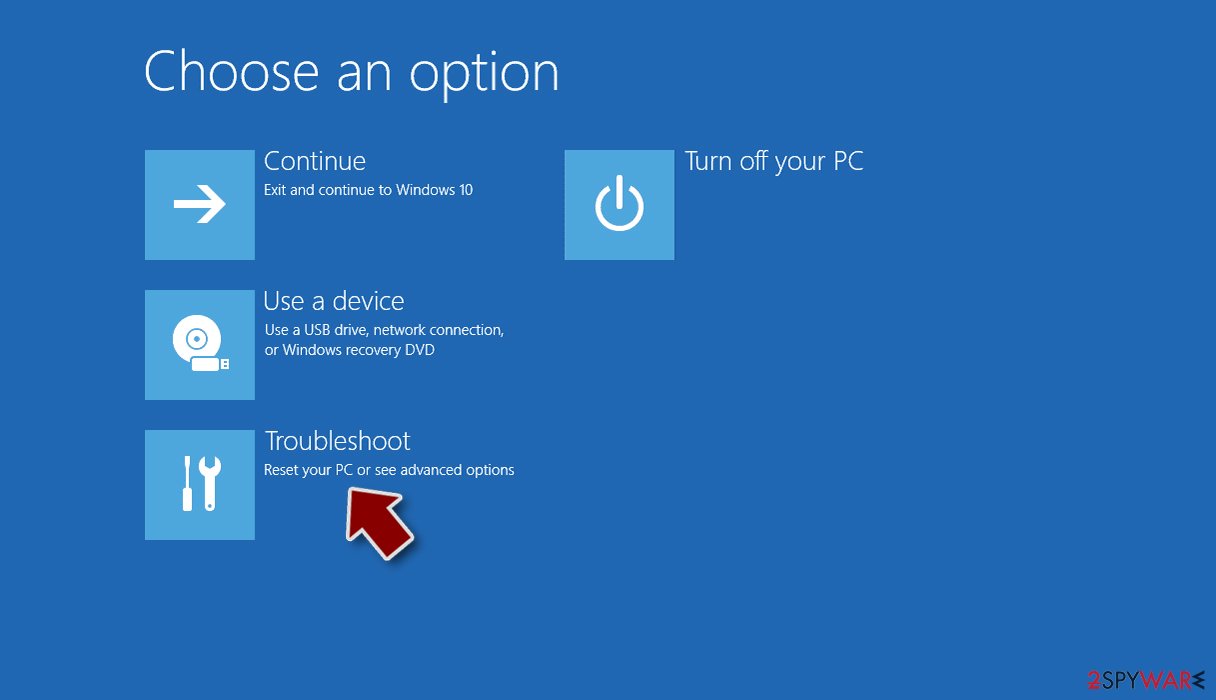
- Go to Advanced options.
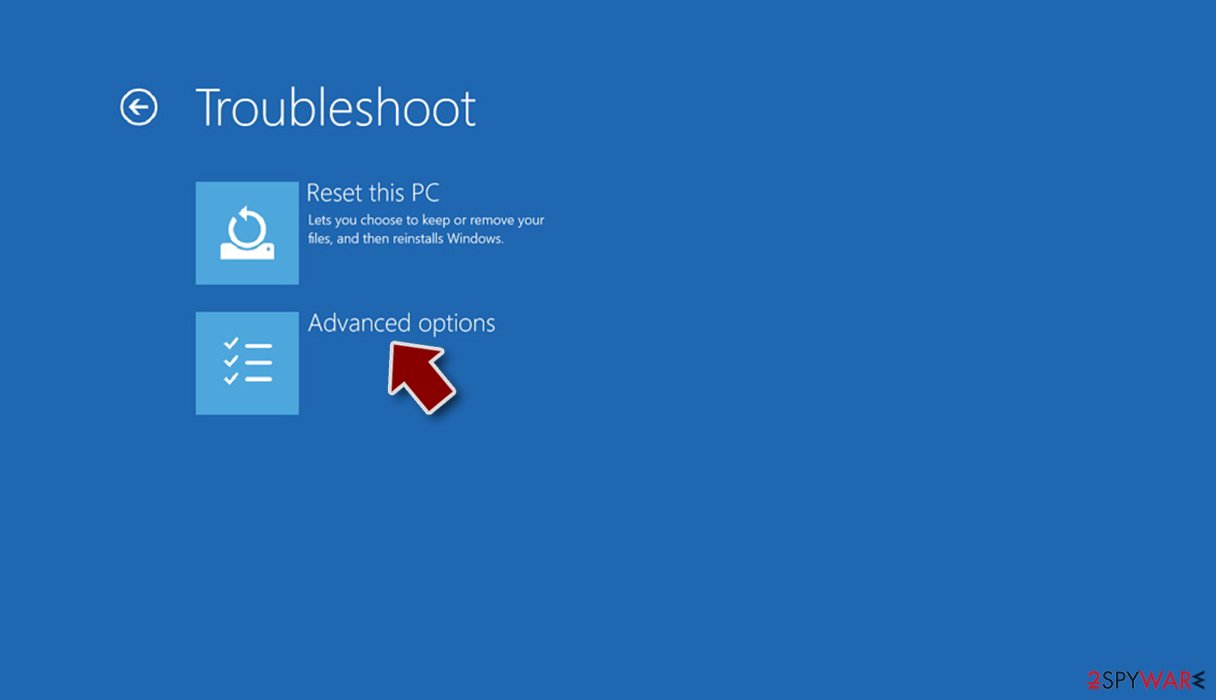
- Select Startup Settings.
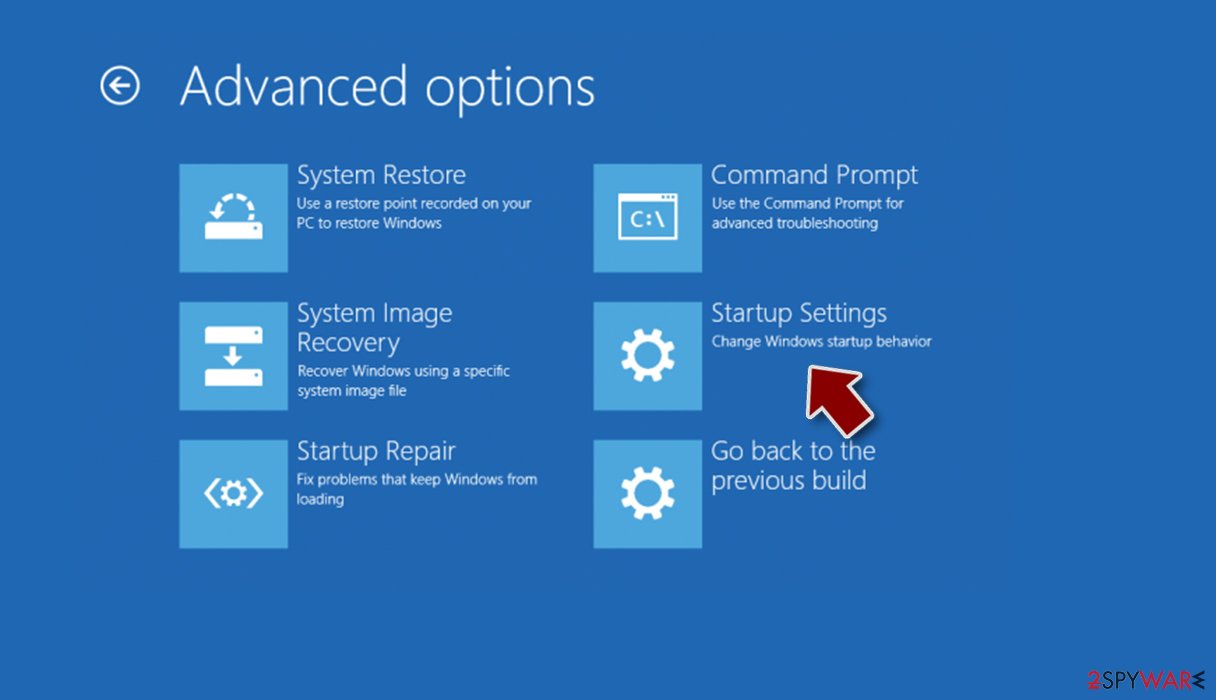
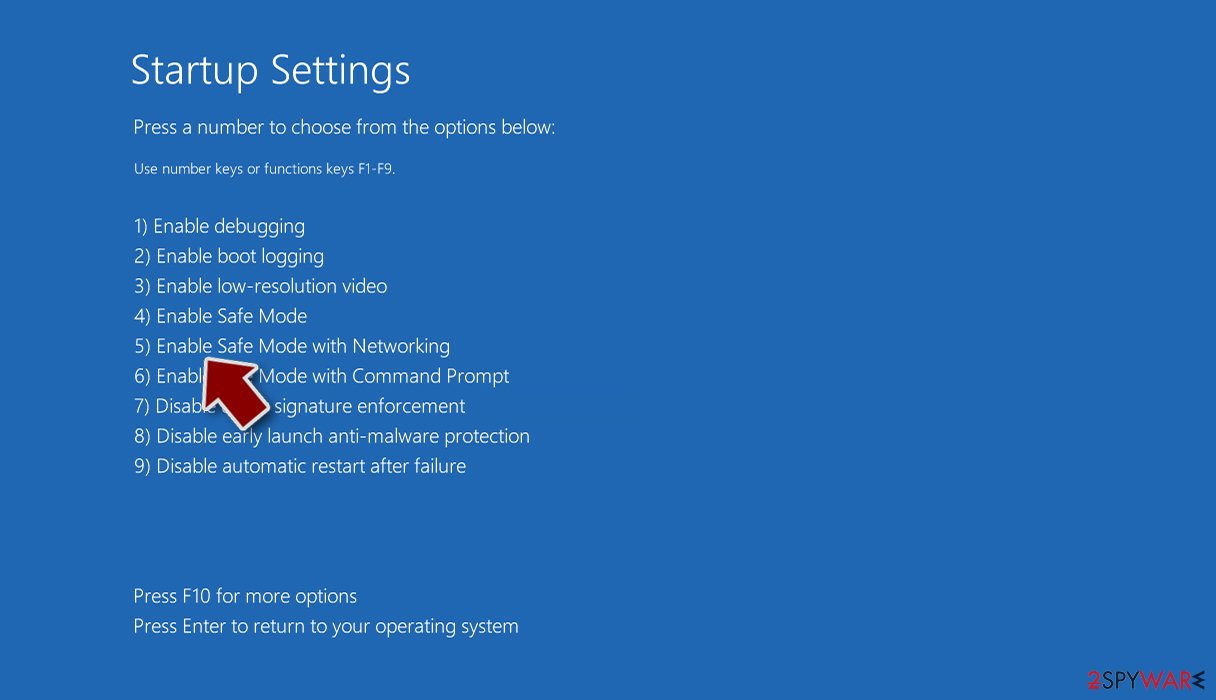
- Press Restart.
- Now press 5 or click 5) Enable Safe Mode with Networking.
Step 2. Shut down suspicious processes
Windows Task Manager is a useful tool that shows all the processes running in the background. If malware is running a process, you need to shut it down:
- Press Ctrl + Shift + Esc on your keyboard to open Windows Task Manager.
- Click on More details.
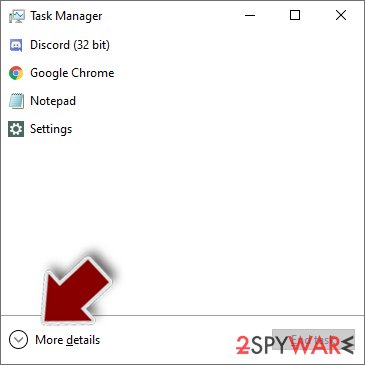
- Scroll down to Background processes section, and look for anything suspicious.
- Right-click and select Open file location.
- Go back to the process, right-click and pick End Task.
- Delete the contents of the malicious folder.
Step 3. Check program Startup
- Press Ctrl + Shift + Esc on your keyboard to open Windows Task Manager.
- Go to Startup tab.
- Right-click on the suspicious program and pick Disable.
Step 4. Delete virus files
Malware-related files can be found in various places within your computer. Here are instructions that could help you find them:
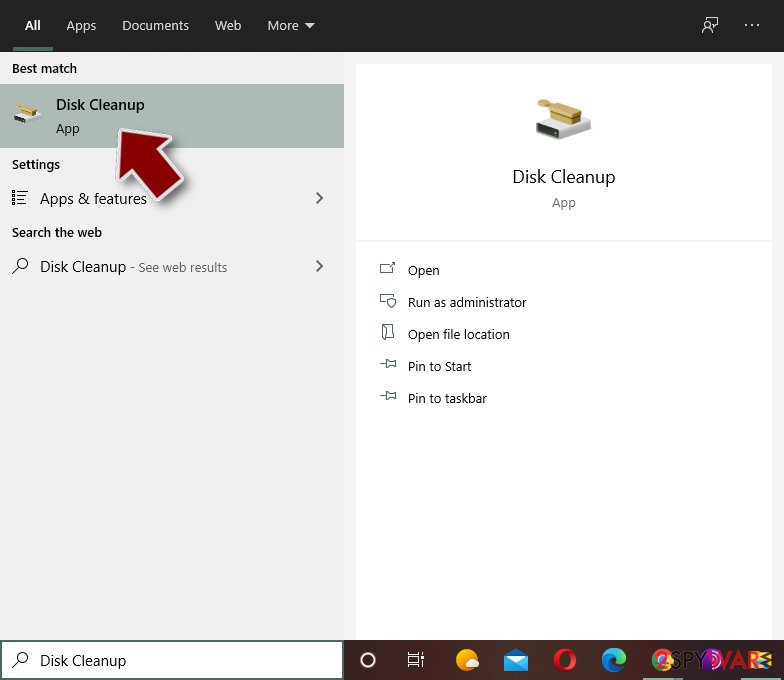
- Type in Disk Cleanup in Windows search and press Enter.
- Select the drive you want to clean (C: is your main drive by default and is likely to be the one that has malicious files in).
- Scroll through the Files to delete list and select the following:
Temporary Internet Files
Downloads
Recycle Bin
Temporary files - Pick Clean up system files.
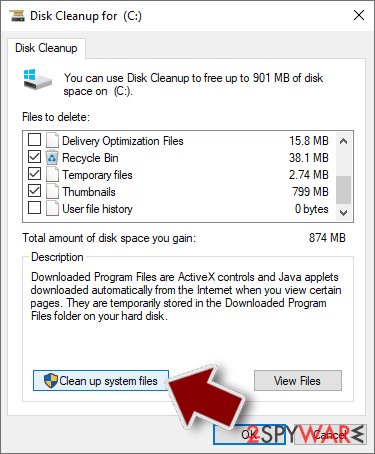
- You can also look for other malicious files hidden in the following folders (type these entries in Windows Search and press Enter):
%AppData%
%LocalAppData%
%ProgramData%
%WinDir%
After you are finished, reboot the PC in normal mode.
From our report of Mar 2020 · not reviewed since
Get rid of the MSN virus at once
If you want to fully remove MSN virus from your computer, you should use an automated anti-malware program.
Nevertheless, because some Trojans might be capable of disabling anti-malware software on the infected machine, you should access Safe Mode with Networking if you encounter any problems with MSN virus removal process - we explain how to reach this mode below.
Because of MSN malware's ability to steal personal information, you should also take extra precautionary measures and reset all the passwords with unique, alphanumeric ones. Additionally, you might want to keep checking your online banking account in order to spot unsolicited transactions - you can usually undo them by contacting your bank as soon as possible and explaining the situation.
[GI=method-1]Access Safe Mode with Networking to disable its functions temporary:
After removal: passwords, accounts and prevention
Accounts come next
Because the PC showed an unfamiliar process called jpg.vbs in Task Manager, a sign of a program that could read browser data, the clean-up is only half of the work.
The other half happens in your online accounts.
Change passwords from a clean device, beginning with e-mail; sign out of all sessions; check forwarding rules and recovery phone numbers; and turn on two-step verification with an authenticator app or a passkey. Ask your bank to replace cards saved in the browser.
Why the order matters and what to check in each account: secure your accounts after malware.
Stream videos without limitations, no matter where you are
There are multiple parties that could find out almost anything about you by checking your online activity.
While this is highly unlikely, advertisers and tech companies are constantly tracking you online. The first step to privacy should be a secure browser that focuses on tracker reduction to a minimum.
Even if you employ a secure browser, you will not be able to access websites that are restricted due to local government laws or other reasons. In other words, you may not be able to stream Disney+ or US-based Netflix in some countries. To bypass these restrictions, you can employ a powerful VPN, which provides dedicated servers for torrenting and streaming, not slowing you down in the process.
Data backups are important - recover your lost files
Ransomware is one of the biggest threats to personal data.
Once it is executed on a machine, it launches a sophisticated encryption algorithm that locks all your files, although it does not destroy them. The most common misconception is that anti-malware software can return files to their previous states. This is not true, however, and data remains locked after the malicious payload is deleted.
While regular data backups are the only secure method to recover your files after a ransomware attack, tools such as can also be effective and restore at least some of your lost data.
Questions about MSN virus, MSN malware
Is jpg.vbs a virus?
The name jpg.vbs is not enough to say. Malware often uses technical-sounding names, and harmless updaters often use odd ones. Check three things:
- the folder the file runs from
- the Digital Signatures tab in its properties
- the program that starts it (Startup apps, Task Scheduler or services)
A signed file from a company whose product you use is almost certainly fine. An unsigned file in a user folder that no installed program explains should be removed, and the PC scanned with Microsoft Defender in offline mode.
jpg.vbs keeps coming back. What should I do?
A process that returns after you end it has a restart mechanism, and that is a reason to treat jpg.vbs as unwanted. Check Settings > Apps > Startup, Task Scheduler and the Services list for entries pointing to its folder, and disable them.
Look in Installed apps for anything added the same day and uninstall it. Then delete the folder and run a Microsoft Defender Offline scan, which works before Windows starts and can remove files that are locked or hidden while the system is running.
Can I just delete jpg.vbs?
Deleting jpg.vbs by hand rarely removes MSN virus, MSN malware. While the trojan runs, Windows may refuse to delete the file, and if you succeed, a scheduled task, a service or a second copy may bring it back at the next restart.
The file can also be only one part of the infection: loaders and remote access tools often install other programs. Use the Microsoft Defender offline scan, which removes the file together with its startup entries before Windows loads, and then check startup items and scheduled tasks as described in the plan.
Can MSN virus, MSN malware spread to other devices on my network?
Most trojans aimed at home users stay on the PC they infected, but an attacker with remote access can look at the network, open shared folders and try passwords on other devices. Loaders sometimes deliver worms or ransomware that do spread.
Disconnect the PC while cleaning, run a full scan on other Windows PCs, change the router's admin password and the Wi-Fi password if they were saved on the infected PC, and update the router's firmware. If other PCs show the same detection, treat them as infected too.
Is a trojan infection worth reporting to the police?
If there was harm, yes. Unauthorised payments, accounts used for fraud, blackmail or a remote session during a scam call all belong in a report, and banks often ask for its reference number before they refund anything.
If antivirus caught MSN virus, MSN malware before it ran and nothing was misused, there is nothing to report. Keep the evidence anyway:
- protection history
- the original download
- the dates
Businesses may also have to notify a data protection authority if personal data could have been accessed.
What are the signs of a trojan infection?
Most trojans try to leave no visible signs, so look for side effects. Common ones:
- Windows Security turned off or unable to update
- new entries in Startup apps or Task Scheduler
- programs in Installed apps you did not install
- browser settings that changed by themselves
- unusual network activity while the PC is idle
- password-reset or login-alert e-mails you did not trigger
None of these proves an infection on its own. Together with an antivirus alert naming MSN virus, MSN malware, they are a strong reason to follow the full plan.
How dangerous is MSN virus, MSN malware?
Treat it as serious until proven otherwise. The visible sign is an unfamiliar process called jpg.vbs in Task Manager, and programs that behave this way often have more abilities than they show:
- copying passwords
- downloading other malware
- giving remote access
Its family is not known yet, so nobody can say which of these it uses. The good news is that the response is the same in every case and takes about an hour:
- cut the network
- remove the startup entry
- run an offline scan
- change passwords from a clean device
If someone had remote control, a full reset is safer.
Can a normal remote support program be a backdoor?
Yes. Tools such as AnyDesk, TeamViewer and ScreenConnect are legitimate, but whoever controls the account behind them controls the PC. Scammers install them during fake support calls, and some trojan campaigns install them silently because antivirus programs do not flag a genuine, signed product.
If you find one you did not set up, uninstall it, check Startup apps for related entries and change passwords from another device. If money or accounts were involved, call your bank and report the incident.
Is MSN virus, MSN malware a known trojan?
Not as a documented family, at least not yet. What is known is the visible sign, an unfamiliar process called jpg.vbs in Task Manager, which matches a hidden program working for someone else.
New threats are often seen by victims weeks before researchers publish anything about them. Treat MSN virus, MSN malware as you would any trojan:
- remove what starts it
- run an offline scan
- change passwords from another device
If a scan reports a detection name, keep it; it usually reveals the family and whether it is known to download other malware. We update this guide when an analysis appears.
Will Fortect remove MSN virus, MSN malware?
Fortect scans Windows for malware and unwanted programs and repairs the system files and settings they change, and its free scan shows what it finds on your PC before you decide anything.
For MSN virus, MSN malware, follow the plan above as well: the browser steps take back permissions and settings that no scanner treats as a threat, and uninstalling the program that brought it removes the source.
Run Microsoft Defender's full scan and, if anything was found, its offline scan as a second opinion. If the symptoms are gone after the plan and both scans are clean, there is nothing more to do.
Sources
- KrebsonSecurity: Software Cracks: A Great Way to Infect Your PC (read October 7, 2026)
- CSO Online: What is a Trojan horse? How this tricky malware works (read October 7, 2026)
- FTC: How to recognize, remove and avoid malware (read October 7, 2026)
- Microsoft Learn: Microsoft Defender Offline (read October 7, 2026)
- Microsoft Learn: How Microsoft names malware (read October 7, 2026)