

Acuff ransomware – new file-locking cyber infection from the Phobos family
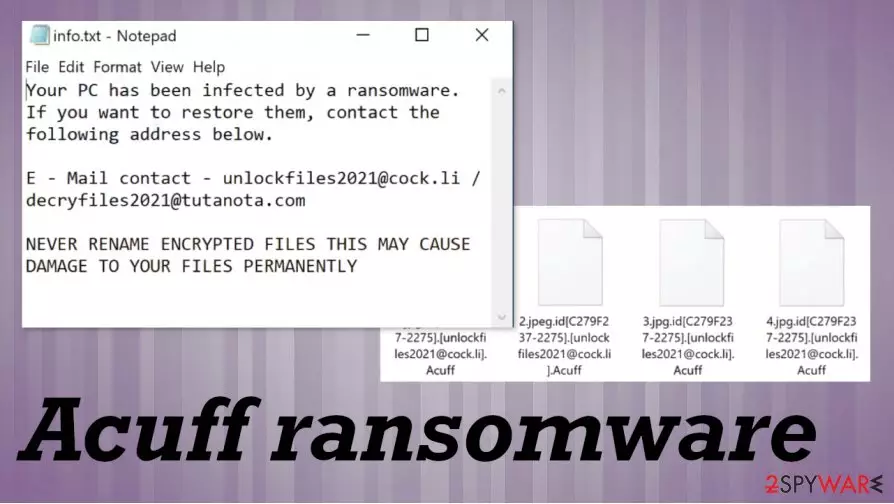
Acuff ransomware is a cryptovirus that locks all non-system files and requests a ransom for the decryption technique. It derives from the infamous Phobos ransomware family. As soon as viruses from this lineage gain access to a targeted computer system, they start their bidding immediately. The first phase is the encryption. The virus locks all files with an army based algorithm so that only the developers will be able to unlock it, and furthermore, it appends all non-system files with a three-part extension, consisting of victims' prescribed IDs', criminal email address, and .Acuff. That same appendage technique is used by Dharma family members like RXD ransomware.
Phase two is money extortion – the main goal of such malicious actors like the ones who released Acuff file virus. Right after the encryption process completion, two different ransom notes are created: one as an info.txt file, the other one as an irritating pop-up window (info.hta). The first one is very short and consists only of a concise explanation that the victim files were encrypted, and two emails (unlockfiles2021@cock.li, decryfiles2021@tutanota.com) are provided to establish contact.
The latter one is much more explanatory, full of instructions on what to do and warnings of what shouldn't be attempted, guidelines on how to buy cryptocurrency Bitcoin (cybercriminals in most cases ask for Bitcoins as ransoms), and a free 5 file decryption guarantee. With it, developers of the Acuff ransomware virus want to prove to the victims that they really possess the decryption software required to unlock their files. You can find both ransom notes disclosed at the bottom of this paragraph.
| name | Acuff ransomware |
|---|---|
| type | Ransomware, Cryptovirus |
| ransomware family | Phobos ransomware |
| ransom note | A pop-up window (info.hta) and a text file (info.txt) are created and opened after successful encryption of victims data |
| appended file extension | Like all its dirty ransomware family, the Acuff virus appends all non-system files with a three-part extension – victims ID, criminal contact email (unlockfiles2021@cock.li), and .Acuff |
| criminal contact details | unlockfiles2021@cock.li, decryfiles2021@tutanota.com |
| issues | All personal files (photos, video/audio files, documents, archives, etc.) are renamed and inaccessible |
| malware removal | Trusty anti-virus software should be used to automatically remove Acuff ransomware |
| system restore | To undo whatever the virus has done to the system, its files, and setting, we strongly advise using the FortectIntego tool to tune-up your device |
Although, at times that paying the requested ransom is the only possible way to get your files back – we strongly advise against that. There are numerous documented cases that victims of cyberattacks who agreed with the demands were either scammed for more money or never heard back from the cybercriminals. That wouldn't necessarily happen with Acuff ransomware developers, but we advise focusing on your systems being virus-free instead.
Using robust anti-malware software is a must in this day and age. Anti-virus applications should be able to detect incoming threats, isolate, and delete them instantly. To safely remove Acuff ransomware, we advise using MalwarebytesMalwarebytes or SpyHunterCombo Cleaner apps.
Unfortunately, anti-virus software can't fix your computers' registry and other settings that the virus changed to thrive. Experts[1] advise using the FortectIntego tool, after Acuff ransomware removal, to automatically scan and fix whatever the crypto infection got its dirty hands on.
These security programs also cannot fix files that get encoded after Acuff ransomware virus attack. You need to properly clear the infection and eliminate any related files, programs, so you can recover files by using data backups stored on an external drive or the cloud database.

Ransom note from Acuff ransomware developers delivered via in info.hta reads:
All your files have been encrypted!
Your PC has been infected by a ransomware. If you want to restore them, contact the following address below.
E – Mail contact – unlockfiles2021@cock.li / decryfiles2021@tutanota.com
Write this ID in the title of your message –
Free decryption as guarantee
Before paying you can send us up to 5 files for free decryption. The total size of files must be less than 4Mb (non archived), and files should not contain valuable information. (databases,backups, large excel sheets, etc.)
Where to buy bitcoins?
The easiest way to buy bitcoins is LocalBitcoins site. You have to register, click 'Buy bitcoins', and select the seller by payment method and price.
https://localbitcoins.com/buy_bitcoins
Also you can find other places to buy Bitcoins and beginners guide here:
http://www.coindesk.com/information/how-can-i-buy-bitcoins/
Attention!
NEVER RENAME ENCRYPTED FILES THIS MAY CAUSE DAMAGE TO YOUR FILES PERMANENTLY
Do not try to decrypt your data using third party software, it may cause permanent data loss.
Decryption of your files with the help of third parties may cause increased price (they add their fee to our) or you can become a victim of a scam.
Ransom note in info.txt contains this message:
Your PC has been infected by a ransomware. If you want to restore them, contact the following address below.
E – Mail contact – unlockfiles2021@cock.li / decryfiles2021@tutanota.com
NEVER RENAME ENCRYPTED FILES THIS MAY CAUSE DAMAGE TO YOUR FILES PERMANENTLY
Avoid becoming a cybercriminals victim
Cybercriminals are looking to unleash their creations not only on big corporations but on everyday people too. They are indifferent about where their income comes from. There's malware hidden everywhere on the internet, and so computer users should be aware of these most common methods of its spread:
- File-sharing platforms
- Mischievous email hyperlinks
- Malicious email attachments

These three ways to infect your computer seem so obvious but yet again, people ten to forget them and become victims of cybercrimes. The best precaution is to have backups and powerful anti-malware software protecting your devices. By all means, not visiting torrent or any other fishy sites, not opening any emails that your sure the sender is who he says he is, and not downloading any email attachments without scanning them first, would do wonders for the security of your devices.
Removal guidelines for the Acuff ransomware virus
There are various kinds of malware[2], but believe us, there's no malware you'd like to keep. It should be deleted from all infected devices immediately after detection.[3] It is our recommendation to remove Acuff ransomware with SpyHunterCombo Cleaner and MalwarebytesMalwarebytes anti-virus programs. Keeping those apps update could save you from cyber headaches in the future.
Although, Acuff ransomware removal with anti-malware software is just the first step to getting your device into a pre-contaminated state. To fully restore your computer to a normal state, you should use the FortectIntego. It will automatically locate any changes done to the system by the virus and reverse them. Only then you can move on to data backup options.
Did this guide help?
Be the first to comment