

MUST ransomware – cryptovirus with the sole purpose of money extortion
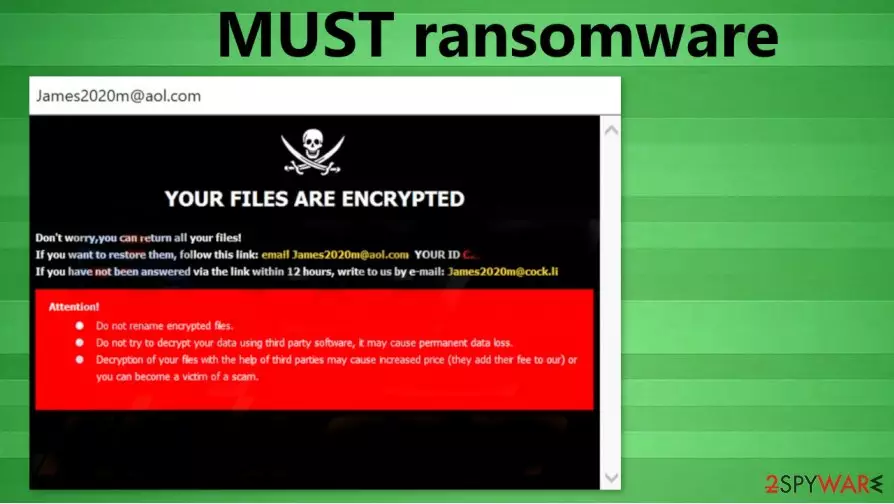
MUST ransomware is a computer virus that locks victims' all non-system files and demands a ransom to be paid to its creators for a decryption tool. MUST virus originates from the infamous Dharma ransomware family. Members of this family are bullying computer users since 2016 when they were first spotted. All encryption is done using the AES[1] algorithm.
While locking files, MUST ransomware virus renames all personal victims' data (archives, documents, pictures, etc.). A triple extension is added to each file – a unique assigned victim ID, criminals' contact email address (in brackets), and .MUST appendix. By doing this, the virus makes all files inaccessible.
| name | MUST ransomware |
|---|---|
| Type | Ransomware |
| Family | Dharma ransomware |
| appended file extension |
A three-part extension is added to all non-system files – unique victim ID, perpetrators' email address, . MUST appendix |
| Ransom note | A pop-up window named James2020m@aol and a text file FILES ENCRYPTED.txt |
| Criminal contact details | Two emails are provided – James2020m@aol and James2020m@cock.li |
| Malware removal | You must remove MUST ransomware using a dependable anti-malware software, so the system is cleared properly |
| System tune-up | Once MUST ransomware removal is finished, we advise using the FortectIntego tool to scan and fix any issues the virus might have caused to system core files and settings |
Like its “brothers” Roger and 259, the MUST ransomware creates two ransom notes after encryption – one as a pop-up window, titled James2020m@aol, the other one as FILES ENCRYPTED.txt text document. As always, with the Dharma family ransom notes, the text file is very brief, with just two email addresses (James2020m@aol, James2020m@cock.li) to establish contact with the criminals.
The pop-up message is slightly more informative, stating that all files have been locked, providing the same two email addresses, giving the victim his/her unique ID, and threatening that any tries to rename or decrypt the files will cause permanent data loss. No info or ransom size or preferred payment method is disclosed, but MUST file virus creators might demand sums up to thousands of dollars.
Although paying the criminals to regain locked files might seems like the easiest out of this situation, but the FBI thinks differently[2]. Meeting the demands of the developers of the MUST ransomware doesn't guarantee that the victim will receive the promised decryption tool, but it will more than likely fuel the cybercriminal's future attacks. When the criminals receive ransom payouts, their empire gets larger, and motivation spikes.

Instead of dealing with the criminals, victims should concentrate on virus removal and system health. To remove MUST ransomware, users should use a reliable SpyHunterCombo Cleaner or MalwarebytesMalwarebytes antimalware software. Perform a full system check and immediately delete the virus and all its allocations.
System files and settings usually get altercated to help the viruses do their bidding. So after MUST ransomware removal, we suggest using the FortectIntego tool to automatically detect any changes and restore the devices' files and settings to a pre-contamination phase.
MUST ransomware developers ransom demanding pup-up states:
YOUR FILES ARE ENCRYPTED
Don't worry,you can return all your files!
If you want to restore them, follow this link:email James2020m@aol.com YOUR ID –
If you have not been answered via the link within 12 hours, write to us by e-mail:James2020m@cock.li
Attention!
Do not rename encrypted files.
Do not try to decrypt your data using third party software, it may cause permanent data loss.
Decryption of your files with the help of third parties may cause increased price (they add their fee to our) or you can become a victim of a scam.
The extremely short message from FILES ENCRYPTED.txt:
all your data has been locked us
You want to return?
write email James2020m@aol.com or James2020m@cock.li

Techniques used by cybercriminals to infect computers
Cybercriminals are a creative bunch. They use deceptive and social engineering techniques to reach their goals. Computers without the latest operating system (OS) updates and without proper anti-virus software are their primary targets.
Most of the ransomware is spread in two ways – spam emails and file-sharing platforms. Soon to be victims might receive a legitimately-looking email from their shipping company, bank, or hospital, but actually, it could be a spam email riddled with infections. The malicious content could be hidden in the hyperlink or the email attachment. Either way, once opened – infection is initiated.
The same goes for torrent sites. These websites are crawling with different malware kinds because cybercriminals can upload anything and name it whatever they think will allure computer users to download it. Our advice is to stay away from such file-sharing platforms.
To stay safe on the internet, users should always be aware that cyber thieves are trying to outthink them. Use a reliable anti-malware software, update it regularly, and scan your devices at least once a week with it. Open emails from senders you're absolutely sure you know. Don't download attachments without scanning them first.
Using anti-malware software to remove MUST ransomware virus
Everyone agrees that malware should be eliminated from an infected device as soon as possible. The longer MUST virus or any other malware stays in your machine, the worse it could get. Manual removal could be too challenging even for highly-experienced computer users, so it should be entrusted to professionals.
To remove MUST ransomware, we suggest using either SpyHunterCombo Cleaner or MalwarebytesMalwarebytes anti-malware software. Many threats are lurking on the internet, and either of these apps will detect, isolate, and delete in as swiftly as possible. Just keep it updated, and you can be saved from a massive headache.
Anti-virus programs are great for virus detection and removal, but they can't fix computer system-related problems that ransomware usually inflicts. After MUST ransomware removal, experts[3] recommend using the FortectIntego tool to automatically detect any altercations that the virus has done to the system files and settings and restore them.
Did this guide help?
Be the first to comment