

YOUF ransomware – computer virus created to extort money from its victims
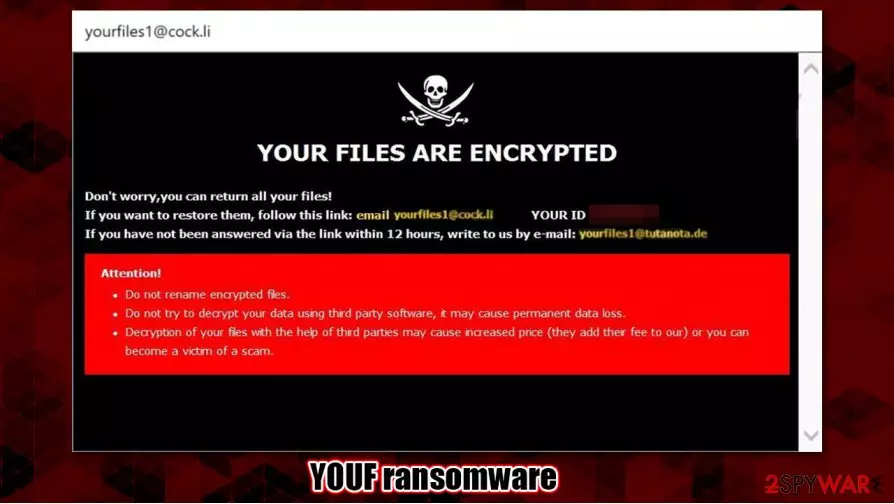
YOUF ransomware is a computer virus that encrypts[1] all non-system user files and demands a ransom for a decryption tool. The virus belongs to the Dharma ransomware family. All viruses from this family append complex three-part extensions to personal data when it's encrypting it. The triple extension consists of a unique user ID, criminal contact email (yourfiles1@cock.li) and .YOUF appendix.
When the YOUF virus is done with the encryption – two kinds of ransom notes are generated – one as a pop-up window, the other one as text files (titled FILES ENCRYPTED.txt) dropped in all affected folders. These notes are almost identical to its previous versions (R3f5s, RXD). Within the text file ransom note, the criminals just state that if the victims want their files back they should contact the criminals via two provided emails – yourfiles1@cock.li or yourfiles1@tutanota.de.
The message in the pop-up window is a bit more enlightening. Within it the .YOUF virus creators provide the same two email addresses to establish contact but also present the unique user ID and warn the victims not to rename the encrypted files and not to try any third-party decryption software as that might lead to permanent data loss. No details about the preferred payment method for the ransom or its size is specified.
| name | YOUF ransomware, .YOUF file virus |
|---|---|
| Type | Ransomware |
| Family | Dharma ransomware |
| Appended extension | A tricky triple extension is appended to all non-system files: 1. appointed personal ID, 2. criminal contact email (yourfiles1@cock.li), 3. .YOUF extension |
| ransom note | A pop-up window and text files, titled FILES ENCRYPTED.txt |
| Distribution | Spam emails, file-sharing platforms |
| criminal contact details | yourfiles1@cock.li, yourfiles1@tutanota.de |
| Virus removal | Get rid of YOUF ransomware with the help of a professional anti-malware software |
| System tune-up | A powerful tool like the FortectIntego should be used after YOUF ransomware removal to make sure system files and setting are in order |
As tempting as it might seem to meet the criminal demands and forget about this nightmare, that's the absolute worst thing any victim could do. When cybercriminals like the developers of YOUF ransomware get paid, that money fuels their whole dirty operation, meaning that they acquire funds to seek out more sophisticated attack options and create more refined malware.
Users should remove YOUF ransomware from their devices immediately. The longer any malware stays on a device, the more harm it could do. We suggest using powerful security apps such as SpyHunterCombo Cleaner or MalwarebytesMalwarebytes to uninstall the virus and protect your devices from attacks in the future.
With YOUF ransomware removal complete, you're not out of the woods yet. Before restoring your data from backups, experts[2] recommend making a full system scan with the FortectIntego app to undo any changes the virus might have caused to system files and its settings.
A short message from the cybercriminals in the FILES ENCYPTED.txt file:
all your data has been locked us
You want to return?
write email yourfiles1@cock.li or yourfiles1@tutanota.de

The message from developers of YOUF ransomware to the victims (from the pop-up window):
YOUR FILES ARE ENCRYPTED
Don't worry,you can return all your files!
If you want to restore them, follow this link:email yourfiles1@cock.li YOUR ID 1E857D00
If you have not been answered via the link within 12 hours, write to us by e-mail:yourfiles1@tutanota.de
Attention!
Do not rename encrypted files.
Do not try to decrypt your data using third party software, it may cause permanent data loss.
Decryption of your files with the help of third parties may cause increased price (they add their fee to our) or you can become a victim of a scam.
Malware spreading techniques used by the cybercriminals
There are various types of malware,[3] and so its distribution differs. But there are two most frequently used methods for malware spread – spam emails and file-sharing platforms. We're here to help you, so please read thoroughly and try and stick to some of our suggestions.
Spam emails are send sent out during so-called spam email campaigns. Some of these letters might slip by your email provider's security and land not in your spam folder, but in your inbox. These emails might look like legitimate notices from your bank or a shipping company. Please don't click on any hyperlinks, because in most cases these hyperlinks redirect unaware users to some malicious sites where payload files are downloaded onto a computer automatically. Also, please never download any email attachments without scanning them with a powerful anti-malware app first.
People should avoid file-sharing platforms like torrent sites. They are crawling with all kinds of viruses camouflaged as pirated software, software cracks, game cheat codes, and so on.
Cleaning and tweaking your computer
Manual removal of viruses from an infected computer is a tall task even for tech-savvy users, so we suggest trusting this lengthy and complicated process of YOUF ransomware removal to professional anti-malware software like SpyHunterCombo Cleaner and MalwarebytesMalwarebytes. Keep any of these apps' virus databases up-to-date, and they might protect your devices from future perils.

After you remove YOUF ransomware from your computer system is virus-free, you should take care of its health. An app like FortectIntego will automatically find any alterations that the virus might have done to system settings and core files and revert them. If left unattended, these changes might cause your device to exhibit abnormal behavior, such as performance loss, lag, crashing, etc.
Did this guide help?
Be the first to comment