

Fireee ransomware – cryptovirus that appends triple extension to all non-system files
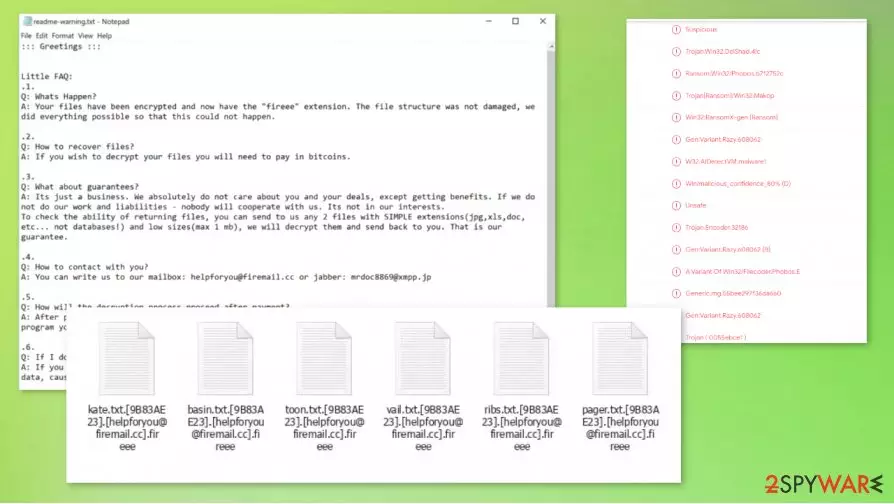
Fireee ransomware is a file-locking virus that encrypts[1] all non-system files on the infected computer and then demands a ransom for the decryption toolkit. These are the main principles of how almost all ransomware works. When this virus gets access to a computer it encrypts all personal data (such as pictures, documents, archives, etc.) and renames it by appending a complicated three-part extension (see details in the table below).
When the encryption is completed, Fireee ransomware creates ransom notes, titled readme-warning.txt in all affected folders so that the victims would find literally everywhere. Within them, the ransomware creators are playing a little Q&A game, where they answer their own questions.
| name | Fireee ransomware, .fireee file virus |
|---|---|
| type | Ransomware |
| Family | Makop ransomware |
| appended file extension | A tricky three-part extension is added to all non-system files: 1. appointed victims' ID in brackets; 2. email of the cybercriminals in brackets; 3. .fireee extension |
| Ransom note | readme-warning.txt is created and can be found in all folders with encrypted files |
| Criminal contact details | One email – helpforyou@firemail.cc, and one Jabber ID – mrdoc8869@xmpp.jp, are provided to establish contact |
| preferred payment method | The ransom would have to be paid in Bitcoins |
| Virus removal | This and any other malware should be eliminated with the help of professional anti-malware software |
| System repair | When Fireee ransomware removal is complete, users should take care of their computer systems overall health with a powerful system tune-up tool like the FortectIntego |
In short, the creators of Fireee ransomware virus explain that all personal data on the computer was locked and that only they possess the necessary tools to decrypt it. They provide two means of contact, one email – helpforyou@firemail.cc, and one instant messaging service called Jabber ID – mrdoc8869@xmpp.jp.
To build some fake trust, the hackers offer the victims to send them two files (not exceeding 1Mb) for a free decryption, thus proving that the needed tools really exist. Although the ransom amount isn't specified, it ought to be paid with cryptocurrency Bitcoins. It is no surprise because criminals behind such threats like Fireee ransomware mainly go for Bitcoin.
The last part of the Fireee ransomware ransom note, as with pretty much all cryptocurrency extortion based threats, consists of threats and warnings not to try renaming the files or decrypting them with third-party software as that might lead to permanent data loss.
Victims should never contact the criminals or even worse – pay the ransom. Each time that the cybercriminals, like the developers of Fireee ransomware, get paid, it motivates them to attack more innocent everyday computer users, and the ransoms finance their research into more effective ways to do that.

Furthermore, there is no guarantee that hackers will keep their word and send decryption tools. There are cases[2] where the victims lost their data and their money too. Fireee ransomware might be no exception, in this case.
Don't doubt for a minute to remove Fireee ransomware from an infected computer. Trustworthy antimalware apps like SpyHunterCombo Cleaner and MalwarebytesMalwarebytes might be useful for this cryptovirus elimination. Furthermore, if you keep them updated they could protect computers from future cyberattacks.
Experts[3] recommend performing a full system scan with the FortectIntego tool right after the Fireee ransomware removal, to find and fix any issues that the virus might have caused to the system registry, core files, and other settings.
Creators of Fireee ransomware sent this message within the ransom notes:
::: Greetings :::
Little FAQ:
.1.
Q: Whats Happen?
A: Your files have been encrypted and now have the “fireee” extension. The file structure was not damaged, we did everything possible so that this could not happen..2.
Q: How to recover files?
A: If you wish to decrypt your files you will need to pay in bitcoins..3.
Q: What about guarantees?
A: Its just a business. We absolutely do not care about you and your deals, except getting benefits. If we do not do our work and liabilities – nobody will cooperate with us. Its not in our interests.
To check the ability of returning files, you can send to us any 2 files with SIMPLE extensions(jpg,xls,doc, etc… not databases!) and low sizes(max 1 mb), we will decrypt them and send back to you. That is our guarantee..4.
Q: How to contact with you?
A: You can write us to our mailbox: helpforyou@firemail.cc or jabber: mrdoc8869@xmpp.jp.5.
Q: How will the decryption process proceed after payment?
A: After payment we will send to you our scanner-decoder program and detailed instructions for use. With this program you will be able to decrypt all your encrypted files..6.
Q: If I don’t want to pay bad people like you?
A: If you will not cooperate with our service – for us, its does not matter. But you will lose your time and data, cause only we have the private key. In practice – time is much more valuable than money.:::BEWARE:::
DON'T try to change encrypted files by yourself!
If you will try to use any third party software for restoring your data or antivirus solutions – please make a backup for all encrypted files!
Any changes in encrypted files may entail damage of the private key and, as result, the loss all data

Getting your cybersecurity level up with simple steps
Nowadays, the internet is crawling with different kinds of malware. From annoying adware to money-extorting ransomware like Lisp. it can be hidden almost everywhere, from malicious websites to email attachments. Unaware everyday computer users can become victims with a wrong push of a button. But we're here to help you, so stick with our suggestions and you might evade the dirty deeds of hackers.
- Always keep backups of all essential data. It's cheaper to invest in a good backup system, then to pay the criminals. Keep them on at least two separate locations/devices, one of them should be an offline storage.
- Always keep your operating system up-to-date. Download and install the latest updates as soon as they come out.
- Purchase a trustworthy anti-malware software. Constantly renew its virus database and perform regular full system scans.
- Use a system tune-up tool to get rid of old tracking cookies and keep your system registry cristal clean.
- Don't visit high-risk websites.
- Don't use file-sharing platforms like torrent websites, because they are riddled with malware.
- Don't open any hyperlinks in emails that you're not 100% sure you know the sender.
- Don't download any email attachments without scanning them first with a reliable anti-malware app.
Removing Fireee ransomware virus from infected computers with proper AV engines
As we mentioned before, people should never give in to the demands of criminals. The same goes for the victims of the culprit of this article. There's no guarantee that after the ransom is paid the hackers will hold up their end of the bargain. So victims should focus on Fireee ransomware removal and restoring their computer system to the pre-contamination phase.
To remove Fireee ransomware we recommend using time-tested anti-malware apps like SpyHunterCombo Cleaner and MalwarebytesMalwarebytes. These powerful anti-virus programs might protect you from future perils like these and detect/remove additional threats that might damage your machine without causing symptoms.
When the computer system is virus-free, victims still need to do one thing – perform a system tune-up to restore any changes that the Fireee file virus might have caused to system files and its settings. An app like the FortectIntego will do the trick perfectly. If left unattended these changes might lead to abnormal device behavior, such as crashing, severe lag, etc.
Did this guide help?
Be the first to comment