

World ransomware – a file-locking parasite made for money extorsion
World ransomware is a type of malware[1] that prevents the victims from accessing their personal files after the virus encrypts them and demands a ransom. When this cryptovirus is encrypting files, it appends a three-part extension to them, just like it's previous versions (Dex, Sss) from the Dharma ransomware family.
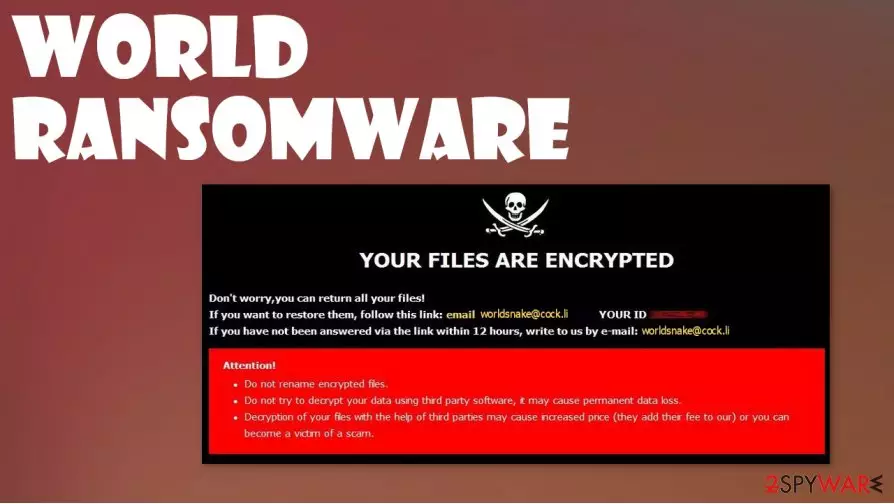
When the file encryption[2] is done, World ransomware virus creates two types of ransom notes – one appears as a pop-up window (named worldsnake@cock.li), the other one as text files (titled FILES ENCRYPTED.txt) found on all contaminated folders. As always with the viruses from this lineage, the text file ransom note is short and uninformative, consisting mainly of just one email, intended for victims to establish contact.
| name | World ransomware, .world cryptovirus |
|---|---|
| type | Ransomware |
| Family | Dharma ransomware |
| Ransom note | A pop-up window and numerous text files, named FILES ENCRYPTED.txt |
| Appended file extension | A triple extension is appended to all non-system files: 1. appointed victim ID; 2. email address of the criminals (in brackets); 3. .world appendix |
| Criminal contact details | Only one email is given to establish contact – worldsnake@cock.li |
| Virus removal | Ransomware like .world virus should be removed with a powerful anti-malware app that can detect, isolate and delete the virus with all of its allocated files |
| System Repair | Ransomware is known to modify system settings in order for it to thrive. To undo all these changes, after World ransomware removal, use the reliable FortectIntego tool |
The pop-up window is a bit more instructive. Creators of .World ransomware explains to the users that their files were encrypted and that they can get them back. They provide the victims with their unique IDs and give two emails for contact, although both provided emails are the same – worldsnake@cock.li.
At the end of the note is the usual warning message – not to rename the files or try to decrypt them with third-party decryption tools because that could lead to permanent data loss. And that's it, no more details about the ransom amount or preferred payment methods, no free .world file virus decryption guarantee to establish a short-term trusting relationship, nothing.
Whatever the case is, paying the ransom to the cybercriminals is the worse thing any victim can do. First of all, meeting their demands doesn't guarantee that you will ever receive the promised decryption tool, so you'd lose your data AND your money to test World file virus creators.
Second of all, hackers follow the money, if you've paid once, that means you might pay once more, thus encouraging them to attack you again. And finally, the developers of the World ransomware could send you more malware instead of the decryption tool, thus just prolonging this nightmare.

All malware should be dealt with swiftly with the help of professional anti-malware software, that could not only remove World ransomware, and viruses alike, but prevent them from gaining access to the devices. We recommend using SpyHunterCombo Cleaner and MalwarebytesMalwarebytes apps to solve this unpleasant issue.
Getting rid of the malware is an important step, but .world virus victims should take another one – system clean up. Ransomware is known to damage and modify system files and its setting to help it with its purpose. After World ransomware removal, we advise using the FortectIntego tool to restore corrupted system files and revert any changes done to system settings.
The pop-up ransom note states:
YOUR FILES ARE ENCRYPTED
Don't worry,you can return all your files!
If you want to restore them, follow this link:email worldsnake@cock.li YOUR ID –
If you have not been answered via the link within 12 hours, write to us by e-mail:worldsnake@cock.li
Attention!
Do not rename encrypted files.
Do not try to decrypt your data using third party software, it may cause permanent data loss.
Decryption of your files with the help of third parties may cause increased price (they add their fee to our) or you can become a victim of a scam.
The short message from the creators of World ransomware in the text ransom note files:
all your data has been locked us
You want to return?
write email worldsnake@cock.li

Evading most common method of computer infections – the spam emails
In this day and age, malware is hidden throughout the internet, it's hidden in malicious sites, file-sharing platforms, torrent websites, etc. But the most common way the cybercriminals are infecting computers is by spam emails. They're being sent out in tens of thousands during spam email campaigns.
We've all received spam emails in our lifetimes. There's even a separate folder for that in most email providers. But sometimes, some spam letters bypass the email providers' security and end up in our inboxes. People should never open any of these emails because there might be infections hidden within them.
The letters might contain either mischievous hyperlinks to malicious websites or infected attachments. Please never click on any hyperlinks in spam emails, and never download any email attachments without scanning them first with reliable anti-malware software first.
System tune-up and World virus removal guide
Victims of ransomware should never consider paying the ransom. Don't even contact the cybercriminals to find out the price for the promised decryption tools. These actions just encourage the hacker to increase their dirty operations. Deal with the World ransomware virus as with all malware – get rid of it immediately.
To remove World ransomware, we advise using trustworthy anti-malware applications like SpyHunterCombo Cleaner and MalwarebytesMalwarebytes. These apps will automatically locate, isolate, and delete the virus and, furthermore, protect your devices from future cyberattacks.
World ransomware removal won't decrypt your files. But all is not lost. You can retrieve your sensitive data from backups. If you didn't keep any, then export all data to an external storage device and wait for a public decryption key to be made available.
Prior to restoring your data from backups, experts[3] recommend using the FortectIntego system tune-up tool to run a full system scan and undo any changes that the World file virus might have caused to system core files, system registry, etc.
Did this guide help?
Be the first to comment