

yoAD ransomware – a computer virus that's created to extort cryptocurrency for decryption tools
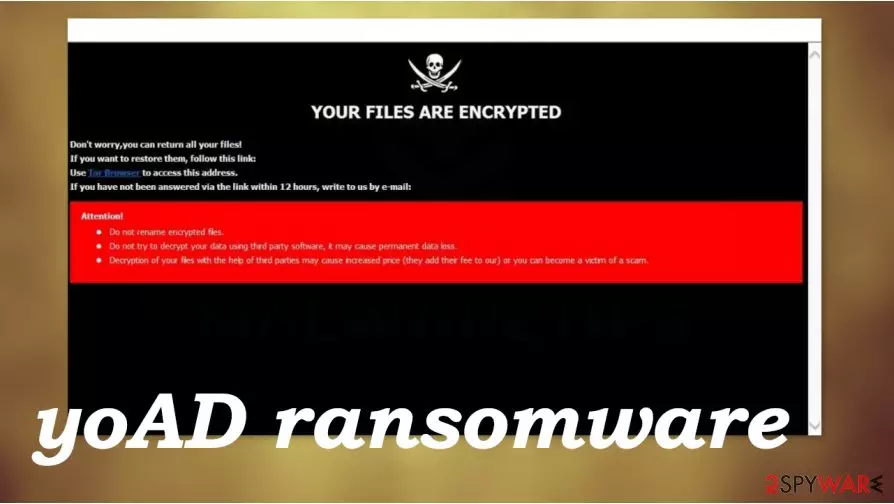
yoAD ransomware is malicious software that demands a cryptocurrency ransom for deciphering the data that it encrypted. This file-locking virus belongs to the iniquitous Dharma ransomware family, which has been first detected in 2016 but has become really active since the beginning of 2019.
When the payload file of yoAD virus gets access to a computer, it starts the file encryption immediately, during which all non-executable files, such as archives, documents, pics, and so on, get appended with a .id-(appointed user ID).[yourfiles1@cock.li].yoAD extension and are rendered inaccessible, i.e., users can't open them.
Afterward, two types of ransom notes (pop-up window (info.hta) and text files (FILES ENCRYPTED.txt)) are created by yoAD file virus, which, like all notes of this kind from cyber infections of this lineage, are almost identical. Mainly, only the criminal contact information differs, which in this case is yourfiles1@cock.li or adresspower@tutanota.com.
| name | yoAD ransomware |
|---|---|
| type | Ransomware |
| family | Dharma |
| Appended file extension | All original filenames are appended with .id-xxxxxxxx.[yourfiles1@cock.li].yoAD extension (appointed user ID is replaced by the xs') |
| Ransom note | FILES ENCRYPTED.txt and info.hta |
| Distribution | File-sharing platforms, malicious sites, spam email attachments |
| criminal contact details | Threat actors provide two emails to establish contact with them – yourfiles1@cock.li or adresspower@tutanota.com |
| Virus removal | Use a trustworthy anti-malware program to eliminate the cryptovirus with all of its components safely |
| System repair | System files and settings might sustain damage when the malware is doing it's bidding. Use the FortectIntego system repair tool to restore all settings to normal and ensure regular device performance |
Dharma family is well-known to the cybersecurity community as it very regularly introduces new variations of its ransomware. In fact, new file-locking parasites from this lineage are presented each week or even more frequently. Here's a few examples of cryptoviruses caught since the beginning of 2021:
As we've stated before, ransom notes of yoAD ransomware are very similar to those of its previous versions. The text file, titled FILES ENCRYPTED.txt, for the most part, contains only contact info:
all your data has been locked us
You want to return?
write email yourfiles1@cock.li or adresspower@tutanota.com
The message from the creators of yoAD ransomware virus in the pop-up window (info.hta) contains a bit more information but is still short and uninformative. The same two emails are provided to establish contact with the assailants and some threats on what not to do to lose encrypted files permanently. No information about ransom amount or the preferred payment method is included:
YOUR FILES ARE ENCRYPTED
Don't worry,you can return all your files!
If you want to restore them, follow this link:email yourfiles1@cock.li YOUR ID –
If you have not been answered via the link within 12 hours, write to us by e-mail:adresspower@tutanota.com
Attention!
Do not rename encrypted files.
Do not try to decrypt your data using third party software, it may cause permanent data loss.
Decryption of your files with the help of third parties may cause increased price (they add their fee to our) or you can become a victim of a scam.

Victims of cyberattacks are urged not to contact their assailants, even to feed their curiosity. There's only one right thing to do, and that is to remove yoAD ransomware from infected devices ASAP. Reliable anti-malware tools such as SpyHunterCombo Cleaner or MalwarebytesMalwarebytes should be used to accomplish that.
If users didn't keep backups, before taking on yoAD ransomware removal, they should first extract all necessary encrypted files to an offline storage device like a USB drive or similar. Because there's always hope that sooner or later, a decryption tool will be created for this strain of malware.
Once the files are copied and the virus eliminated, it's time to take care of the computer system itself because file-locking parasites usually mess up its file and settings. We recommend performing a system tune-up with the FortectIntego system repair tool to undo any changes. This app will ensure stable device performance.
Prevent cyber infections by increasing cybersecurity level
Malware infections aren't going anywhere. In fact, ransomware attacks are getting more and more common.[1] With that in mind, everyday computer users should consider investing some time and money to improve their cybersecurity level, which might evade ransomware and other types of malware.[2]

First of all, all computer users that regularly use their devices to browse the internet must acquire a trustworthy anti-malware tool. These types of apps prevent all kinds of malware from entering the device and might even block malicious sites. Then a proper system repair tool should be obtained to keep all system files and settings maintained.
Also, users have to remember to install all the latest updates to their software, especially operating systems, as soon as they come out because cybercriminals tend to exploit out-dated software vulnerabilities. One of the most crucial things to do is to backup all essential files, preferably on two separate devices/locations, e.g., cloud, USB flash drive, etc.
Remove yoAD ransomware virus with reliable AV tools
Contacting the criminals and meeting their demands might seem like the easiest way out predicament, but we advise highly against that. There's no guarantee that after the victims pay the requested amount that they will ever receive a decryption tool or that it will work. Moreover, the cybercriminals could send additional malware, which could prolong this nightmare.
That's why we here at 2-spyware.com recommend all victims to remove yoAD ransomware from their devices immediately. The longer it stays in an infected device, the more damage it could do. If you don't have powerful enough anti-malware tools to eliminate the cryptovirus, use either SpyHunterCombo Cleaner or MalwarebytesMalwarebytes. Remember to keep either of these apps updated so they could prevent such perils in the future.
Once you're done with yoAD ransomware removal, you should take care of your machine's overall health. Experts[3] recommend doing that by running a full system scan with such system repair apps like the FortectIntego or similar to locate any system irregularities and restore them to normal.
Did this guide help?
Be the first to comment