

Gopher ransomware – a file-locking parasite that demands $400 in Bitcoins to restore access to encrypted files
Gopher ransomware is malicious computer software that, upon infection, encrypts all personal data, including documents, archives, pics, audio/video files, etc. It also renames it by appending a .gopher extension to all original file names. Thus if you had a file named 1.jpg, it would now appear as 1.jpg.gopher. Although the file names are changed, and they're inaccessible, their contents aren't changed.
To regain access to locked data, a specific decryption tool must be used. Hackers behind Gopher ransomware virus claim that that can be done only by using their tools which can be obtained by forwarding $400 in Bitcoins to their crypto-wallet (3MwjrWZaDyPY1eybS8dZrweEhQVwVCv1ye). While they might be right, victims are advised against contacting the criminals or paying the ransom.
All demands of the assailants are displayed in a generated ransom note. They state that after a payment is completed, users should contact them via a provided email (manager@outlookpro.net) to receive the necessary decryption tools. Criminals are criminals for a reason, and thus they should never be trusted. This article provides a brief summary of the culprit, its possible spreading methods, removal, and recovery options.
| name | Gopher ransomware |
|---|---|
| Type | Cryptovirus, file-locker |
| Affected System | Windows computers |
| Appended file extension | .gopher |
| Ransom amount | $400 |
| Criminals crypto-wallet | 3MwjrWZaDyPY1eybS8dZrweEhQVwVCv1ye |
| Criminal contact details | manager@outlookpro.net |
| Distribution | Spam emails, fake Flash Player updates, torrent websites, deceptive ads |
| Malware removal | It would be best if you eliminated all cyber threats, no matter how severe, by using trustworthy anti-malware software |
| System health check | Ransomware usually alters system files and settings to establish persistence and prolong its unwelcomed stay. Repair any damage that the system sustained by performing a full system scan with the all-in-one FortectIntego system tune-up tool |
Multiple new ransomware variations are created each and every day. There are even ransomware families spewing out new versions weekly. Although file-lockers bear many similarities, such as the coding algorithms, Bitcoins as the preferred payment method, distribution techniques, etc., they also have many differences.
Some of them, like Ribd virus, Cosd virus, Cadq virus, etc., are targeting everyday computer users, while others can be aimed at big companies. Gopher virus can infect any Windows computer that doesn't have proper cybersecurity software, and although its ransom note is written in English, people from all over the world can get their devices infected.
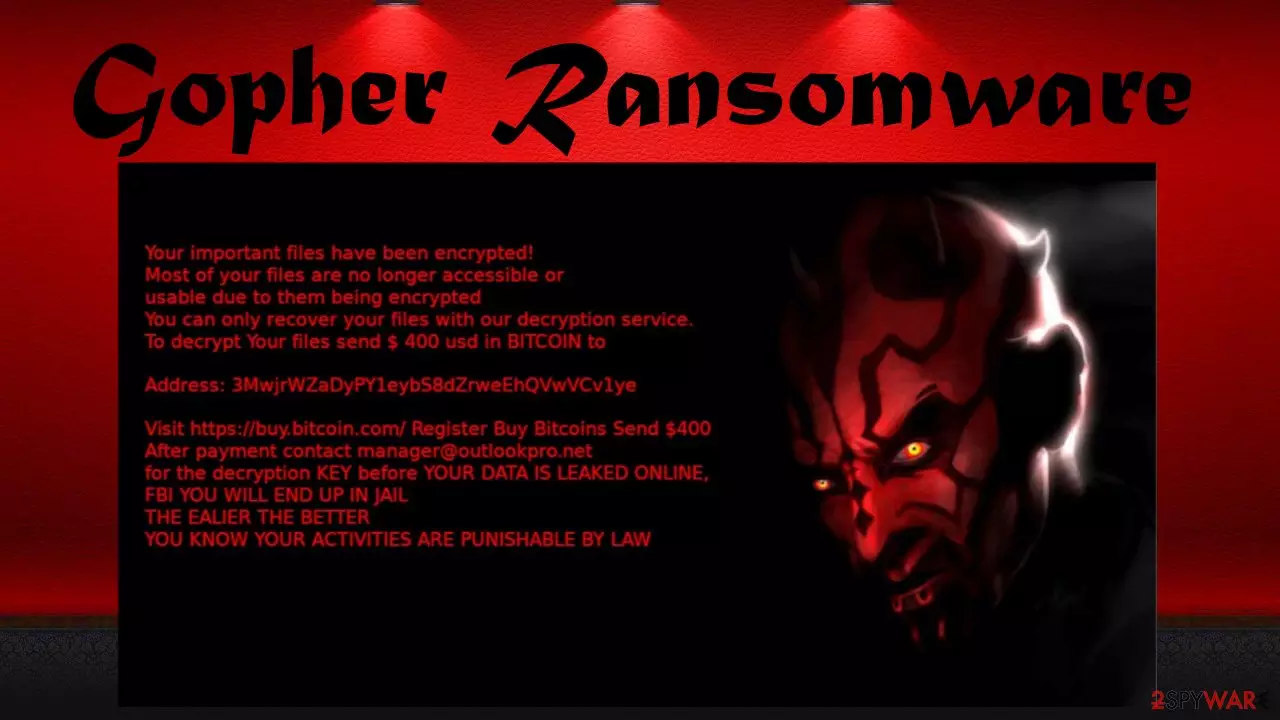
Gopher file virus ransom note is quite short but detailed. The perpetrators state that the only way to regain access to encrypted files is by paying them $400 in Bitcoins to a provided crypto-wallet. The last part of the message is quite hard to understand, as you can see here:
Your important files have been encrypted!
Most of your files are no longer accessible or
usable due to them being encrypted
You can only recover your files with our decryption service.
To decrypt Your files send $ 400 usd in BITCOIN toAddress: 3MwjrWZaDyPY1eybS8dZrweEhQVwVCv1ye
Visit https://buy.bitcoin.com/ Register Buy Bitcoins Send $400
After payment contant manager@outlookpro.net
for the decryption KEY before YOUR DATA IS LEAKED ONLINE,
FBI YOU WILL END UP IN JAIL
THE EARLIER THE BETTER
YOU KNOW YOUR ACTIVITIES ARE PUNISHABLE BY LAW
If you were unlucky enough and your device got infected with Gopher ransomware, the main thing is to stay calm and not make any rash decisions. The worse thing you could do in this uncomfortable situation is succumbing to the assailants' demands and pay them. If you do that, either of these scenarios might come to life:
- No decryption tool is ever delivered,
- criminals ask for more money,
- instead of the decryptor, additional malware is sent,
- the delivered software doesn't work,
- perpetrators disappear altogether.
Money that you would send to the criminals would only motivate them to attack more innocent people. In addition, it would finance the development of more sophisticated malware and new, more efficient ways to distribute it. So for everyone's sake, please don't consider agreeing with the hacker demands.

Instead, download trustworthy anti-malware software like SpyHunterCombo Cleaner or MalwarebytesMalwarebytes and remove Gopher ransomware by performing a full system scan. Keep either one of these free security tools updated at all times so they can prevent various potentially unwanted programs and malware from gaining entry to your devices.
Computer infections can cause BSoDs,[1] freezing, severe lag, and other system irregularities. Since AV tools can't fix these issues, you should consider using a time-proven system diagnostics tool such as FortectIntego. It will automatically fix any system-related issues and clean up junk files for you.
Avoid malware infections by withholding from using file-sharing platforms
There's a myriad of ways that ransomware, Trojans, and other severe malware[2] can be spread. And although file-sharing platforms are an easy and comfortable way to share various data with your friends or coworkers, cybercriminals exploit their lack of end-to-end security.
Many hackers prefer this method as it requires the least work. All they have to do is to think of a name that would attack the soon-to-be victim to download the file and upload it. Once a payload file is downloaded and executed, the infection initiates instantly.
Our research has suggested that most ransomware was hidden in unlocked commercial software and the latest game cracks. Thus it would be best if you think twice the next time you want to download anything from a popular torrent portal, as you might end up with a lot more than you expected.

Remove Gopher virus safely by using reliable security tools
As we've pointed out in the first part of this article, no one should ever pay cybercriminals. With the received money, developers of Gopher ransomware virus would attack more people and expand their illegal empire. Thus the only reasonable thing to do is to get rid of any infection and improve your cybersecurity level so such perils can be averted.
You should start Gopher removal process by either trying our suggested data recovery methods below or by extracting your encrypted files to an offline storage device. There's no decryption tool specifically for this virus, but one could be made available sooner or later.
Then download free but powerful anti-malware tools such as SpyHunterCombo Cleaner or MalwarebytesMalwarebytes. Update their virus database and perform a full system scan. When that's finished, choose to remove Gopher ransomware with any other unknown or suspicious entries that the anti-malware software recommends.
And lastly, cybersecurity experts from LosVirus.es[3] highly recommend using the FortectIntego system diagnostics tool. It will locate any changes that .gopher file virus has made to system files and settings and restore them. If left unattended, these modifications could lead to various abnormal computer behavior, such as the inability to visit security pages, performance issues, crashing, freezing, overheating, etc.
Did this guide help?
Be the first to comment