

Seeing Gamezonenews.net ads? Here's what you need to know

Some users reported that they suddenly started being redirected to the Gamezonenews.net on their Google Chrome web browser, while others mentioned that they see pop-up ads marked under the same name. If you are one of those people, you came to the right place, as we will help you understand what is happening with your browser and how to stop this unwanted activity once and for all.
If you have been seeing suspicious ads that you know do not belong to a website you visit, adware has likely infiltrated your device. The ad-supported software is relatively common and specializes in taking users to predetermined websites, all while providing financial gains to its developers. You should not tolerate the presence of adware, as it might not only compromise your web browsing experience but also put your online security at risk.
| Quick facts | |
| Name | Gamezonenews.net |
| Type | Rogue website |
| Distribution | Ads and redirects are commonly caused by adware which is usually not installed intentionally, as software bundling or deceptive ads are used for its distribution |
| Operation | Delivers intrusive ads, redirects to various scam and ad-filled websites |
| Removal | Perform a full system scan with anti-malware and then clean your web browsers accordingly |
| Registry fix | Some adware might meddle with Windows registry, so we strongly recommend you run a scan with FortectIntego after the virus is eliminated |
There are several aspects of adware that are not apparent to many regular computer users. It can affect Windows and macOS, as well as other operating systems, it can modify system files to retain persistence and do so much more. Other potentially unwanted programs are just a nuisance – these typically get installed as browser extensions and can be easily removed as required.
Most commonly, users are not even aware that they have a PUP installed on their systems. This is due to a deceptive technique known as software bundling, where several apps are compiled into a single installer. It means that if you do not untick certain checkboxes or skip the installation steps, adware might slip in without you noticing. Here's one of the examples how a fine print text may look like:
By clicking Next, you agree to install XXX and set XXX as your homepage, new tab, and the search engine of your web browser.
Therefore, never skip through steps and read the fine print. Otherwise, you might unconsciously agree to install apps that you never would otherwise, some of which might even be malicious.
In some cases, you might immediately recognize what the culprit of annoying banners, pop-ups, and other intrusive behavior is. For example, if you have recently installed DNS Unlocker or EasyCalendar, and only then noticed the ads, you simply need to uninstall these programs. If you need help, here's how to do it on Windows 10:
- Enter Control Panel into Windows search box and hit Enter.
- Under Programs, select Uninstall a program.
- From the list, find the entry of the suspicious app.
- Right-click on the it and select Uninstall.
- If User Account Control shows up, click Yes.

- Wait till uninstallation process is complete and click OK.

Macs can also commonly be infected with adware, despite popular belief. In fact, even today, there are plenty of users who say that malware on these operating systems is almost impossible to get infected with. If you are on a Mac and are seeing Gamezonenews.net redirects, you probably tried to move suspicious programs to Trash already.
However, it is common for adware to insert malicious .plist files into various folders within the system. Here is how you should deal with it:
- Select Go > Go to Folder.
- Enter /Library/Application Support and click Go or press Enter.
- In the Application Support folder, look for any dubious entries and then delete them.
- Now enter /Library/LaunchAgents and /Library/LaunchDaemons folders the same way and terminate all the related .plist files.


Gamezonenews.net removal explained
When it comes to eliminating ads, users commonly attempt to run a scan with anti-malware software – and it is precisely what you should do. If you have no security software installed on your system, you should get yourself SpyHunterCombo Cleaner, MalwarebytesMalwarebytes, or another reputable tool and perform an in-depth scan with it.
Security software is engineered to find all the malicious or potentially malicious files and eliminate them at once. For that, it uses various techniques, and the heuristic is one of the most common ways how adware is detected. It is important to keep in mind that you will not find the “Gamezonenews.net adware” detection name anywhere, as redirects to this and potentially other websites are just a symptom of an infection.
In some cases, security software might not be able to eliminate the infection automatically, as ruminants of the potentially unwanted program or malware might remain within the web browser, Windows registry or the Task Scheduler. If a scan did not help you, access the Task Scheduler and then proceed to the next section:
- Type in Task Scheduler in Windows search and hit Enter.
- Go to Task Scheduler Library on the left.
- On the right side, you should see plenty of entries.
- Scroll down until you find an entry marked as MS – right-click and select Delete.

Deal with ads on Chrome
Some adware is more aggressive than its counterparts – it might change your shortcuts, add new or modify existing Windows registries, and much more. This part of the problem is usually dealt with by security software but, due to integrated Google account functionality and other sync settings, it might not be possible to do.
Therefore, if Gamezonenews ads do not go away, we suggest you clean the web data and cached files:
- Click on Menu and pick Settings.
- Under Privacy and security, select Clear browsing data.
- Select Browsing history, Cookies and other site data, as well as Cached images and files.
- Click Clear data.


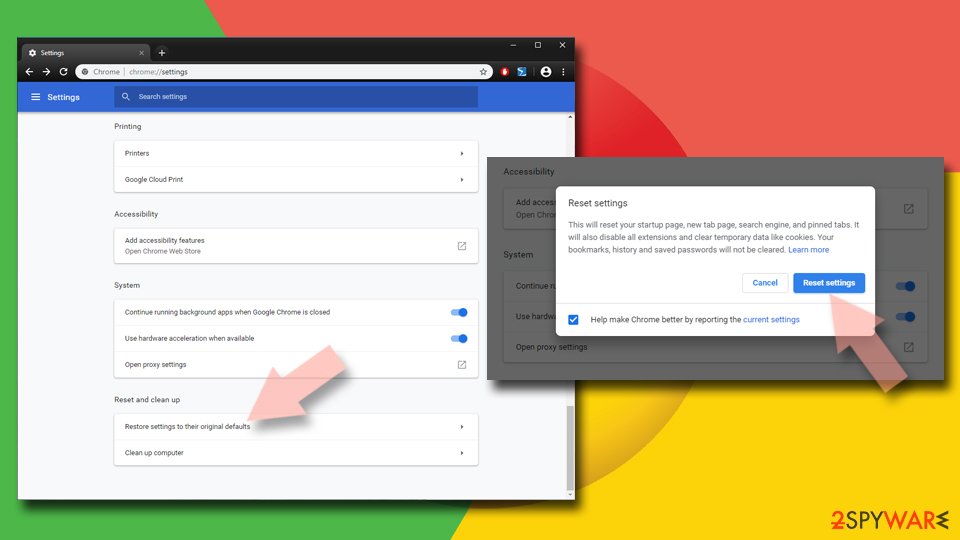
Finally, you can also reset your browser:
- Click on Menu and select Settings.
- In the Settings, scroll down and click Advanced.
- Scroll down and locate Reset and clean up section.
- Now click Restore settings to their original defaults.
- Confirm with Reset settings.

In some cases, the adware may persist on the browser even after a browser reset. If that is the case, you should disable Chrome sync and then clear all the synced data. Here are more detailed instructions on how to fix corrupted Google Chrome sync.
If you want to avoid meddling with your system, we recommend employing FortectIntego repair software. Not only can it clean your web browsers automatically, but it can also delete useless Windows registries that might have been created malware or adware. If you are using Windows operating system, the app can also fix common issues related to Blue Screens, DLL errors, and much more.
Privacy and other issues
Adware is not always installed unintentionally. In some cases, users deliberately install an app knowing that it specializes in ad delivery – this monetization model is also known as freeware. As you already know, there are thousands of applications that you can download and use for free. This is especially common for Android and iOS operating systems, although PC and Macs also accommodate such apps.
If you are willing to install free programs (especially when they come from less recognized sources), you should acknowledge the risks. Here are a few that might change your mind:
- Torrent and similar sites that host pirated programs can be used to deliver ransomware and other treacherous malware. In fact, Djvu is one of the most successful ransomware strains in the wild, and it is known to be spread almost exclusively via software cracks and torrent sites.
- Adware is likely to track your data. Cookies and other tracking technologies are commonly used for that purpose.
- By buying software produced by reputable developers, not only do you support their work, but you have a piece of mind – app developers will ensure that flow of security and feature updates.
- Freeware is commonly monetized via ads, and these can be a nightmare to deal with. Unwanted browser changes, redirects to potentially dangerous sites, and much more can be things you'd have to deal with on a regular basis as soon as you installed adware on your machine.
To sum it up, there are plenty of untrustworthy people on the internet that are willing to compromise your web browsing experience and your safety for the sake of profits, so you should always keep that in mind next time you head to 1337x or The Pirate Bay to download an otherwise paid app for free.
Did this guide help?
Be the first to comment