

Lqqw ransomware is a threat capable of affecting the machine besides the direct encryption

Lqqw ransomware – the virus that aims to get money from victims, so it starts the attack with file encryption. It delivers the _readme.txt file once all the files receive the indicational .lqqw appendix. These pictures, documents, audio, or video files become locked and unopenable but not fully damaged. Hence, criminals claim to offer the decryption tool that should possibly recover affected parts after the payment of $980 gets transferred in the form of Bitcoin.
The _readme.txt file, which is the ransom note for the Lqqw ransomware virus, provides contact and payment information to its victims. The price of a decryption tool and key depends on how fast they will contact cybercriminals behind this ransomware campaign. Their price can be $490 or $980, respectively depending on whether users want their data encrypted soon and contact the gang within or after 72 hours from the attack. Attackers offer free decryption if the victim sends one encrypted file so that it could prove itself trustworthy in front of potential customers who may have doubts. However, this is only a method for faking legitimacy and trust.
The ransomware variant Lqqw is one of the variants that belong to the Djvu family. This variant encrypts files and appends the unique extension onto their filenames. For example, 1.jpg becomes 1.jpg.lqqw. Cybercriminals behind the ransomware attack can be contacted via manager@mailtemp.ch or managerhelper@airmail.cc. This is not the method that any experts[1] would recommend because the people behind such threats are not trustworthy. Especially considered that this is the version of a known and dangerous, non-decryptable threat from creators that recently released Orkf, Iwan, and Muuq.
| Name | Lqqw ransomware |
|---|---|
| Type | Cryptovirus, file-locker malware |
| Appendix | .lqqw |
| Family | Djvu/STOP ransomware |
| Distribution | Files with the virus payload get distributed via pirating services, torrent sites. Such infection happens with the software or game crack gets added on the machine. File attachments on spam emails might also contain these infections |
| Ransom note | _readme.txt |
| Elimination | You need to rely on anti-malware tools, so these infection pieces get removed properly |
| Restoring the system | The machine gets damaged, so apps like FortectIntego can help to deal with system files that got altered or corrupted |
A possible solution for versions of the DJVU family
Emsisoft’s ransomware removal tool can potentially decrypt files, but it will not work for all versions of the malware. If your computer has been infected with a version that the decryption does not support yet, then you may be out of luck as far as file recovery goes. The family is called one of the most dangerous in the field, and later updates make decryption impossible, so no existing tools are able to recover them, or they need to be using the offline ID vs. online ID formation method. Suc h versions can often have t1 at the end of the identification key.
Even if your case meets this condition, somebody from the victims has to pay criminals, retrieve an offline key, and then share it with security researchers at Emsisoft. As a result, you might not be able to restore the encrypted files immediately. Thus, if the decryptor says your data was locked with an offline ID but cannot be recovered currently, you should try later. You also need to upload a set of files – one encrypted and a healthy one to the company’s servers before you proceed.
- Download the app from the official Emsisoft website.
- After pressing Download button, a small pop-up at the bottom, titled decrypt_STOPDjvu.exe should show up – click it.
- If User Account Control (UAC) message shows up, press Yes.
- Agree to License Terms by pressing Yes.
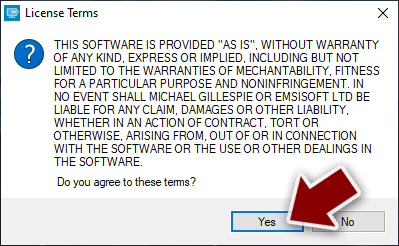
- After Disclaimer shows up, press OK.
- The tool should automatically populate the affected folders, although by pressing Add folder at the bottom, you can also do it.

- Press Decrypt.



The virus removal is required
Victims of Lqqw ransomware cannot decrypt their files for free unless there’s a decryption tool available on the Internet. In most cases, those who don’t have their files backed up will need to pay cybercriminals to recover their data since it is impossible otherwise. That is not recommended because criminals focus on getting money or other valuable profit from people. You might receive additional malware via email after contacting these criminals.
Unfortunately, victims hoping that they can gain access to their files without paying are out of luck because there isn’t any such thing as a “free lunch” when it comes to ransomware. These attacks are seriously damaging, and people won’t be able to get what they’re looking for. Some tools may exist online which could assist against certain types or variants. Still, unfortunately, the Lqqw virus falls into the category of cryptocurrency-extortionists, so you might find yourself having no choice instead of removing the threat and loosing data.
The removal process can seem impossible when the threat manages to block some tools or disable features needed for the detection[2] of the infection. However, you can achieve the needed results with applications like SpyHunterCombo Cleaner or MalwarebytesMalwarebytes that are designed to find and eliminate various types of malware.

Without the proper threat removal procedures, any activity on the machine can lead to issues with performance, security, and file recovery. If the virus is still active, your recovered files can get encrypted again or newly, and the Lqqw ransomware virus takes over the system fully. Besides the encryption, this infection can damage and corrupt pieces in system folders, so there are a few additional steps when you want to restore the computer after the attack.
We highly recommend using a one-of-a-kind, patented technology of FortectIntego repair. Not only can it fix virus damage after the infection, but it can also remove malware that has already broken into the system thanks to several engines used by the program. Besides, the application can also fix various Windows-related issues that are not caused by malware infections, for example, Blue Screen errors, freezes, registry errors, damaged DLLs, etc.
- Download the application by clicking on the link above
- Click on the ReimageRepair.exe

- If User Account Control (UAC) shows up, select Yes
- Press Install and wait till the program finishes the installation process
- The analysis of your machine will begin immediately
- Once complete, check the results – they will be listed in the Summary
- You can now click on each of the issues and fix them manually
- If you see many problems that you find difficult to fix, we recommend you purchase the license and fix them automatically.



By employing FortectIntego, you would not have to worry about future computer issues, as most of them could be fixed quickly by performing a full system scan at any time. Most importantly, you could avoid the tedious process of Windows reinstallation if things go very wrong for one reason or another.
Ways to restore encrypted files after Lqqw file virus attack
The encryption[3] process, that these file-lockers use relies on changing the original code of the particular file, so it is not possible to open the document or a photo to see the content at all. It is difficult to decide which files you need to restore which ones are not that valuable, but it is crucial to terminate the virus before any file recovery. Especially when you use backups to replace affected pieces. Lqqw ransomware can damage those files permanently.
Cybercriminals may not send tools for decryption even after payment, and victims who paid ransom were at risk of getting scammed. Therefore, it is strongly recommended to remove ransomware as soon as possible so that the virus does not encrypt more files or infect other computers on your local network.
Since many users do not prepare proper data backups prior to being attacked by ransomware, they might often lose access to their files permanently. Paying criminals behind Lqqw ransomware is also very risky, as they might not fulfill the promises and never send back the required decryption tool.

While this might sound terrible, not all is lost – data recovery software might be able to help you in some situations (it highly depends on the encryption algorithm used, whether ransomware managed to complete the programmed tasks, etc.). Since there are thousands of different ransomware strains, it is immediately impossible to tell whether third-party software will work for you.
Therefore, we suggest trying regardless of which ransomware attacked your computer. Before you begin, several pointers are important while dealing with this situation:
- Since the encrypted data on your computer might permanently be damaged by security or data recovery software, you should first make backups of it – use a USB flash drive or another storage.
- Only attempt to recover your files using this method after you perform a scan with anti-malware software.
Install data recovery software
- Download Data Recovery Pro.
- Double-click the installer to launch it.
- Follow on-screen instructions to install the software.
- As soon as you press Finish, you can use the app.
- Select Everything or pick individual folders where you want the files to be recovered.

- Press Next.
- At the bottom, enable Deep scan and pick which Disks you want to be scanned.

- Press Scan and wait till it is complete.
- You can now pick which folders/files to recover – don’t forget you also have the option to search by the file name!
- Press Recover to retrieve your files.



Did this guide help?
Be the first to comment