

Ultimate-sweepstakes.biz tries to scam users with fake prize winnings and asks to enable push notifications

You might use the internet for many purposes – access your favorite social media, download certain files, communicate with your friends, or stream a video online. Typically, this experience is unhindered by any issues, and users find their way where they initially intended to end up. For some people, this experience can be spoiled by unexpected browser redirects to the Ultimate-sweepstakes.biz website.
Usually, people end up on the site after clicking a suspicious link somewhere else, e.g., on an illegal video streaming site. Such places are poorly regulated, hence malicious ads are commonly inserted by cybercrooks, while on other occasions, website authors themselves insert booby-trapped links everywhere. Fake “Download” or “Play” buttons are commonly used for this purpose.
Once on the Ultimate-sweepstakes.biz site, users are immediately presented with various components of it. The website can incorporate a variety of different phishing messages – “Amazon Gift Card,” “Dear Facebook User,” “Congratulations, you have won” are just a few examples.
The main purpose is to make people believe that they are eligible for an expensive gift, and all they have to do is participate in a short survey or spin a fortune wheel. With the help of clever messages and cheap tricks, malicious actors manage to trick users to later provide their sensitive information, subscribe to useless services, or download scareware on their machines.
Likewise, the website asks users to enable notifications. If they do, they later might be shown more unsafe content directly on their screens, thanks to the legitimate push notification feature. This increases the scope of the scam and enables crooks to earn even more money from ad clicks and views.
If you have interacted with this website in any way, check out the removal instructions, as we explain how to stop the intrusive notifications, check the device for the adware that might be causing the redirects, and how to remediate the situation if you were scammed by these fake messages.
| Name | Ultimate-sweepstakes.biz |
|---|---|
| Type | Scam, phishing, adware |
| Goal | Make people provide personal information, subscribe to useless services, download malicious software or subscribe to push notifications |
| Distribution | Redirects from other malicious websites, adware |
| Dangers | Redirects to malicious websites can result in unwanted site notifications, personal information disclosure to unknown parties (cybercriminals), monetary losses, installation of other potentially unwanted programs/malware |
| Removal | To get rid of unwanted apps manually, you can follow our removal guide below. If the unwanted ads and other disruptive behavior does not stop, you should scan your computer with security software and delete all threats automatically |
| Further steps | Malware or adware infections can diminish the performance of your computer or cause serious stability issues. Use FortectIntego to remediate your device and ensure that the virus damage is fixed |
Ultimate-sweepstakes.biz in detail
Social engineering[1] is the art of exploiting users' ignorance or lack of knowledge about a particular topic related to computing. Internet is very vast, and you are bound to enter a site that is not completely legitimate in one way or another. What is important is to recognize the deception and not give in to crooks' fake promises.
There are plenty of different versions of the Ultimate-sweepstakes.biz scams you might encounter. Here's one example:
Congratulations, Facebook App user!
You are one of the 7 people selected today to get a chance to win! You could get one out of 4 gifts! Click “OK” to start!
In the background, users would see a fake spinning wheel that is meant to make users either win or lose the promised gift. As a general rule, people here would be shown the “winning” and redirected to another page to allegedly reclaim the won item. There is a lot of personal information that people are asked about here – it could be the name, home address, email, phone number, and more. In some cases, even credit card details are required to allegedly reclaim the prize.

However, as soon as users fill in all the details, they are presented with all sorts of excuses why the item can no longer claim, e.g., that the stock ran out. In the end, people do not receive the promised item, although the valuable information is already leaked. This could easily result in further phishing attempts, monetary losses, or even identity theft.
Gift scams are very common, so please be wary about that. Nobody gives out expensive items for free, even if the message says otherwise – it is all fake and designed to steal your personal data or make you subscribe to useless services.
Remove adware
While there might or might not be adware installed on your system, it is better to stay safe than sorry. The infection is more likely if you are experiencing more common symptoms like ads, redirects, changed browser settings, and similar. However, some infections can be particularly stealthy, and identifying them might be difficult. Thus, performing a full system scan with SpyHunterCombo Cleaner or MalwarebytesMalwarebytes anti-malware software can ease the burden for you.
Nevertheless, if you would like to try removing PUPs automatically, you can follow the instructions below. Please be aware that malware is unlikely to be removed manually, as it might leave leftover files that might interfere with normal computer functions or even damage some system files. If your computer starts crashing or experiencing errors after malware elimination, use FortectIntego to fix virus damage automatically.
Windows
- Enter Control Panel into Windows search box and hit Enter or click on the search result.
- Under Programs, select Uninstall a program.

- From the list, find the entry of the suspicious program.
- Right-click on the application and select Uninstall.
- If User Account Control shows up, click Yes.
- Wait till the uninstallation process is complete and click OK.



macOS
- From the menu bar, select Go > Applications.
- In the Applications folder, look for all related entries.
- Click on the app and drag it to Trash (or right-click and pick Move to Trash)


To fully remove an unwanted app, you need to access Application Support, LaunchAgents, and LaunchDaemons folders and delete relevant files:
- Select Go > Go to Folder.
- Enter /Library/Application Support and click Go or press Enter.
- In the Application Support folder, look for any dubious entries and then delete them.
- Now enter /Library/LaunchAgents and /Library/LaunchDaemons folders the same way and terminate all the related .plist files.


Keep in mind that adware can take the form of browser extensions as well. Therefore, you should access the settings of your browser and remove all the suspicious extensions from there. In some cases, even long-used apps might become untrustworthy and start engaging in malicious activity, so it is best for your to delete them all unless you know that the extension can be trusted 100%.
Even trustworthy sources, such as Google Chrome Web Store, might sometimes contain untrustworthy applications. This happens because Google uses an automatic upload process from creators, and some functions can not be noticed by used scanners. While this is a rare occasion, tech giants were forced to remove various adware and malicious extensions from their stores many times by now.[2]
Stop the intrusive push notifications
As we previously mentioned, the Ultimate-sweepstakes.biz scam consists of several components, and one of them is the push notification feature. While it can be useful when allowed on reputable websites, scammers are willing to misuse it for their malicious deeds. In this case, they would expose users to even more misleading and malicious content, putting them in danger.
If you have noticed that suspicious pop-ups from this site are showing up on your desktop without being triggered by anything in particular, you should perform the actions below to remove them once and for all. Note that these instructions can be used to stop the notifications from any type of website.
Google Chrome (desktop):
- Open Google Chrome browser and go to Menu > Settings.
- Scroll down and click on Advanced.
- Locate Privacy and security section and pick Site Settings > Notifications.
- Look at the Allow section and look for a suspicious URL.
- Click the three vertical dots next to it and pick Block. This should remove unwanted notifications from Google Chrome.


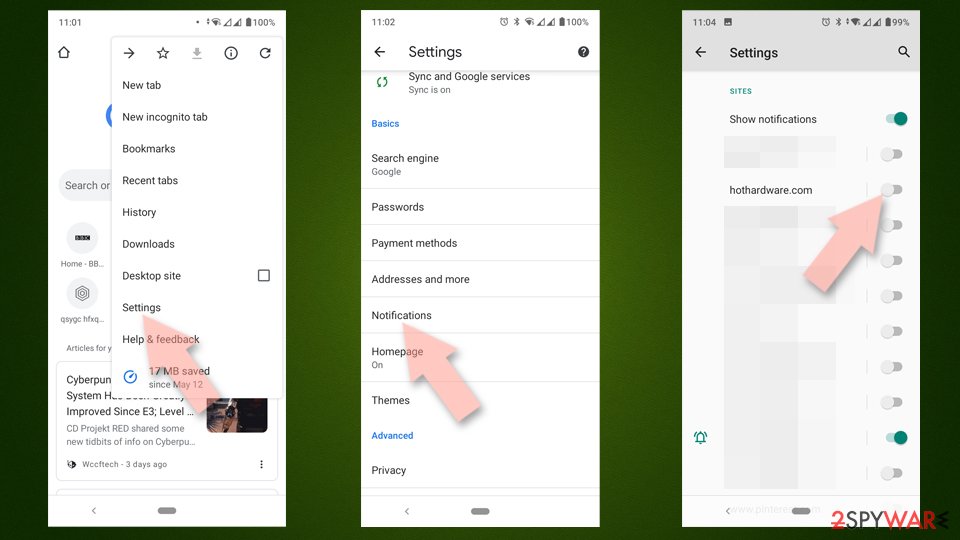
Google Chrome (Android):
- Open Google Chrome and tap on Settings (three vertical dots).
- Select Notifications.
- Scroll down to the Sites section.
- Locate the unwanted URL and toggle the button to the left (Off setting).

Mozilla Firefox:
- Open Mozilla Firefox and go to Menu > Options.
- Click on Privacy & Security section.
- Under Permissions, you should be able to see Notifications. Click the Settings button next to it.
- In the Settings – Notification Permissions window, click on the drop-down menu by the URL in question.
- Select Block and then click on Save Changes. This should remove unwanted notifications from Mozilla Firefox.


MS Edge (Chromium):
- Open Microsoft Edge, and go to Settings.
- Select Site permissions.
- Go to Notifications on the right.
- Under Allow, you will find the unwanted entry.
- Click on More actions and select Block.


Safari:
- Click on Safari > Preferences…
- Go to the Websites tab and, under General, select Notifications.
- Select the web address in question, click the drop-down menu and select Deny.


How to recover from being scammed online
Online scams are plenty – they try to imitate legitimate services or brands, they try to intimidate users by showing fake malware infection alerts, and much more. In other words, there are plenty of ways you could get scammed online, especially if you are not that familiar with how they work. Hopefully, the information we provided here will help you in preventing being a victim of an online scam in the future.
However, there is a great deal of anxiety that people feel after they get scammed online. They are worried about their personal information, bank accounts, monetary losses, and other issues. Do not worry, however, as there are always ways to improve your online security.
The recovery steps depend on how you interacted with the scam, what information you provided and what files you have downloaded. Below you will find several tips that should help you to deal with the situation:
- Perform a full system scan with SpyHunterCombo Cleaner, MalwarebytesMalwarebytes, or another powerful security software to check your system for malware;
- If you have entered your password anywhere on one of the phishing[3] websites, you should immediately change it (if you reuse it, change it everywhere else; never reuse your passwords in the future);
- Contact your bank if you paid for anything – the transaction might be reversible as long as you explain your situation;
- Monitor your online banking to ensure there's no illegal activity is going on
- Clean your browsers from cookies, caches, and other web data to prevent tracking. You can employ FortectIntego for maintenance purposes.
Did this guide help?
Be the first to comment