

Sismscoldne.xyz asks users to allow notifications to allegedly receive sports news

The first encounter with push notifications might not always be a great one – it all depends on which website is behind them. Sismscoldne.xyz developers abuse the feature for a quick monetary gain, all while putting affected people in danger. If you have been seeing pop-ups on your screen at random times, it means that you allowed the site to send you them, be it intentionally or not.
The scam starts from a simple browser redirect – users might click on some malicious link or be rerouted by automated scripts once they reach some page. Alternatively, they might also be redirected by a potentially unwanted program or malware that could be installed on the device, which should be investigated.
Once Sismscoldne.xyz is reached, users are presented with information that is misleading, to say the least. There is no actual content on the page to explore, but instead, a picture of a robot, allegedly loading video, or something else, is shown in the background. These messages are there in order to trick people into pressing the “Allow” button within the notification prompt, allowing notifications to be shown.
The trick lies with the fact that the “Allow” button is presented as means for something else, e.g., visitors are promised a video or that it simply serves as a verification process many websites use for DDoS[1] attack protection. In other words, the messages shown are completely fake, and those who oblige allow notifications from the site to be received.
At some point later, users start receiving intrusive Sismscoldne.xyz pop-ups that would show up at random times and include misleading information or malicious links within. They also appear on top of all running apps and aren't triggered by anything that the user does. Clicking these ads might result in various negative consequences for the user, including malware infections, sensitive information disclosure to cybercriminals, and more.
We strongly advise you not to interact with this scam website or click links it provides. The best way to go around this is to ignore all the notifications and terminate them once and for all. This can be done by accessing web browser settings and altering permissions within the site settings section. Check the instructions below for more details.
| Name | Sismscoldne.xyz |
|---|---|
| Type | Push notifications, ads, pop-ups, scam |
| Distribution | Intrusive pop-ups can start showing up at some point after the “Allow” button is pressed within the notification prompt |
| Symptoms | Intrusive pop-ups show up directly on the screen, covering all the other opened apps or websites |
| Dangers | Push notifications sent by the site might result in you visiting dangerous websites; as a consequence, you might suffer from malware infections, financial losses, or personal data disclosure to malicious parties |
| removal | Notifications can be disabled via the browser settings; in case you experience more ads and redirects to suspicious sites, you should also get rid of adware – use SpyHunterCombo Cleaner antivirus for quick elimination |
| additional steps | It is important to clean your browsers after removing potentially unwanted programs from your system – use FortectIntego to do it automatically |
The “original” website
In some rare cases, people might actually type in the URL into their browsers, and they would see a completely different view. Instead of seeing misleading messages and pictures mentioned above, users would be presented with what seems to be a typical site that specializes in sports news. The first thing users see is this:
Get The Latest Sports Updates From Around The World
The red flags are visible immediately, as the background of the page does not match the statements. Instead, there're pictures of popular Hollywood actors, which shows that there's some confusion here. The truth is, there are thousands of websites under different names (e.g., Ymenthejuiassa.xyz, Ucationininanceen.xyz, Educationakasulba.xyz, and many others) that are generated automatically, thus they might not even make sense in terms of what's said there.
Regardless, the main goal of these websites is to make users believe that them clicking the “Allow” button would enable access to stops, movies, or other types of news. These are all fake and should be ignored, as the only thing they'd send is intrusive and sometimes even malicious ads.

Redirects might be caused by adware
Many people wonder how the Sismscoldne.xyz notifications end up on their screens seemingly out of nowhere. As we already explained, the issue lies within users being fed the wrong information about what the “Allow” button within the notification prompt does. Alternatively, people might click it by accident.
In order for the scam scheme to succeed, users somehow need to end up on the site in the first place. Often, the redirects come from adware installed on the system, as malicious websites, untrustworthy ad networks, and potentially unwanted programs are related in one way or another – they feed each other's success. Unfortunately, that success puts users' security and computer safety in danger.
Therefore, if you frequently see ads while browsing the web (keep in mind that some ads might be embedded within a website and are triggered as soon as it is entered – this is normal), there is a high chance that adware is installed on your system. Potentially unwanted programs are commonly spread using deceptive techniques, hence users don't even know that they have some type of infection on their devices.
The easiest way to terminate adware is by scanning the system with powerful anti-malware, for example, SpyHunterCombo Cleaner or MalwarebytesMalwarebytes. These security apps can check the system thoroughly and ensure that no intrusive adware or malware is present. Besides, antivirus software is an important tool that can keep you safe from more devastating infections such as Iisa ransomware or Trojan.Downloader.
After you remove all the infections from your system, don't forget that cleaning web browsers is an important part of better and more secure browsing. Cookies, web beacons, and other technologies are commonly used by adware and third-party websites to track your information. Likewise, in some cases, malicious actors could steal cookie sessions[2] and manage to access all your accounts without you even knowing.
To clean your browser quickly and effortlessly, we recommend using FortectIntego. This app can also fix virus damage automatically, preventing the system from crashing or showing errors.
Access browser settings to remove Sismscoldne.xyz ads
Many users who deal with intrusive notifications for the first time have no clue what they are and how they ended up on their screens. The natural reaction is people assuming that the reason for this is some type of virus infection. This assumption is not uncommon because intrusive pop-up ads are commonly associated with adware, as we already explained in the previous paragraphs.
After making this conclusion, users typically start scanning their systems with security software (which is a correct thing to do regardless) but to no avail. The intrusive notifications simply don't go away.
This is not surprising as soon as you delve into what push notifications are, as they are not malicious by themselves, as they are a simple API (Application Programming Interface).[3] In fact, there are millions of websites that ask people to enable notifications in order to receive relevant information from the site. Unfortunately, not all websites use this permission for something positive and instead choose to insert malicious or irrelevant ads into them.
This is why it is important to be attentive while browsing the web, as the more links you click, the more times you encounter suspicious browser redirects, the more likely you are to be a victim of a scam or malware infection.
Luckily, undoing push notification permission is really easy – all you have to do is access the settings of your browser. Below you will find the step-by-step guide for all modern web browsers.
Google Chrome
- Select Menu > Settings > Advanced.
- Click on Site Settings > Notifications.
- Check the Allow section and find the address of the site.
- Select More Actions and pick Block.


Mozilla Firefox:
- Go to Menu and then select Options.
- Go to Privacy & Security > Notifications > Settings.
- Choose Block after picking this option from the drop-down menu.
- Confirm with Save Changes.


MS Edge (Chromium)
- Go to Menu and pick Settings.
- Select Site permissions.
- Click on Notifications.
- Find the site URL, and click More actions.
- Pick Block.


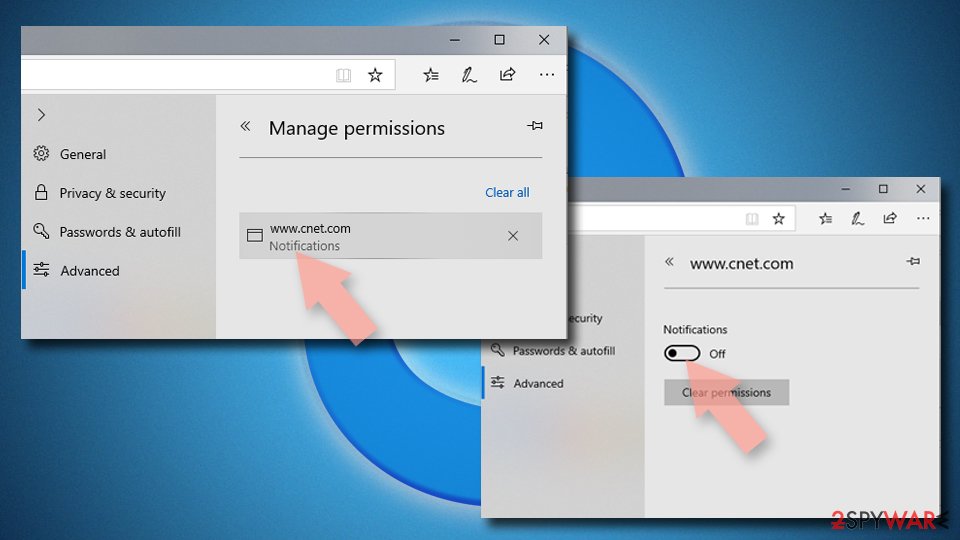
MS Edge (legacy):
- Open Microsoft Edge, and click the Settings and more button (three horizontal dots) at the top-right of the window.
- Select Settings and then go to Advanced.
- Under Website permissions, pick Manage permissions and select the URL in question.
- Toggle the switch to the left to turn notifications off on Microsoft Edge.

Safari
- Click on Safari > Preferences…
- Go to the Websites tab and, under General, select Notifications.
- Select the web address in question, click the drop-down menu and select Deny.


Did this guide help?
Be the first to comment