

Fopa ransomware is a cyber infection that might result in complete data compromise

Fopa ransomware is a virus that attacks Windows computers by using various infiltration methods. Once inside, it uses an encryption algorithm to lock up all documents, archives, videos, music, and other files, adding .fopa extension to them. After that, ransomware delivers a ransom note _readme.txt text file, which includes instructions on how to recover the encrypted data.
According to Fopa virus authors, victims need to contact them via support@sysmail.ch, helprestoremanager@airmail.cc email, and provide their personal ID. Once that is done, users should receive further instructions to proceed with the payment, provided in bitcoin cryptocurrency. Nonetheless, we do not recommend contacting the attackers because they might not deliver the required decryption tool. Check out the alternative methods we provide below instead.
Fopa ransomware is a cryptovirus that belongs to a malware family known as Djvu ransomware. This malware encrypts all the important files on a Windows computer and restricts access to them. While it is true that Fopa virus files require a unique decryption key to unlock them, experts[1] recommend not paying the ransom, as cybercriminals might not keep their promises, resulting in financial losses.
Especially when the family is known for creating new versions that are no longer decryptable. Criminals controlling the behavior can create various issues and are evolving. In this article, we will explain how to get rid of malware and use alternative methods for data recovery.
| Name | Fopa file virus |
| Type | Ransomware, crypto-virus, file locking virus |
| Malware family | Djvu ransomware |
| Extension | Files appended with .fopa |
| Ransom note | _readmetxt |
| Contact | support@sysmail.ch, helprestoremanager@airmail.cc |
| Malware removal | Perform a full system scan with powerful security software, such as anti-malware tools and antivirus applications. Such programs can find the threat and related files. Try SpyHunterCombo Cleaner or MalwarebytesMalwarebytes for this |
| Distribution | Files triggering the payload launch can be spread with pirating software and via spam email campaigns and the attachments |
| System fix | Malware can seriously tamper with Windows systems, causing errors, crashes, lag, and other stability issues after it is terminated. To remediate the OS and avoid its reinstallation, we recommend scanning it with the FortectIntego repair tool |
Details on the infection and the virus family
Fopa is a type of virus that is classified as ransomware. These threats are known for accessing user machines without permission and encrypting all files on them. This way, cybercriminals behind the attack can ask for a ransom payment in return for a unique key.
Fopa ransomware – a computer infection that encrypts all personal files found on the machine and marks them with the unique extension, restricting access to them. Malware then drops a ransom note with a direct message from criminals, which claims that the only way to securely return data is by paying a ransom – it should be delivered using digital bitcoin currency.
The criminal group even offers a discount to trick people or scare them into paying the ransom amount of $980 or $490 in the form of Bitcoin cryptocurrency. These threat families nowadays even use triple or double extortion methods[2] to ensure that people are paying them and criminals can make money from victims worldwide.
This virus derives from a well-known family Djvu/STOP, which was first spotted in 2019 and since then released multiple variants, including Iiof, Qbaa, Vyia. In this article, we will provide alternative methods for .fopa file recovery and safe ways of deleting the infection from a Windows computer.

Decryption possibility is slim, but there for some users
The family of Djvu viruses is one that has been known for years now, and it's no stranger to threats. The new versions come out each week with different names or infection methods, which makes tracking them down difficult as well. The newer types of encryption are more secure than their predecessors because they affect how you can decipher data.
However, both offline keys and online ones may be in use. There's a difference between them that determines the recovery success, though. When servers cannot communicate with the virus, offline ids become necessary, which means each version has one ID used by all devices affected by it. The different versions of Dis are created when the file virus relies on online IDs. This is the case with Fopa ransomware.
You can try to check if the version that you encountered is possible to decrypt or not. The tool below is still working sometimes. This file virus might not connect to servers and use offline ids for your device, so it's important to know how these work before starting anything else!
If your computer got infected with one of the Djvu variants, you should try using Emsisoft decryptor for Djvu/STOP. It is important to mention that this tool will not work for everyone – it only works if data was locked with an offline ID due to malware failing to communicate with its remote servers.
Even if your case meets this condition, somebody from the victims has to pay criminals, retrieve an offline key, and then share it with security researchers at Emsisoft. As a result, you might not be able to restore the encrypted files immediately. Thus, if the decryptor says your data was locked with an offline ID but cannot be recovered currently, you should try later. You also need to upload a set of files – one encrypted and a healthy one to the company's servers before you proceed.
- Download the app from the official Emsisoft website.
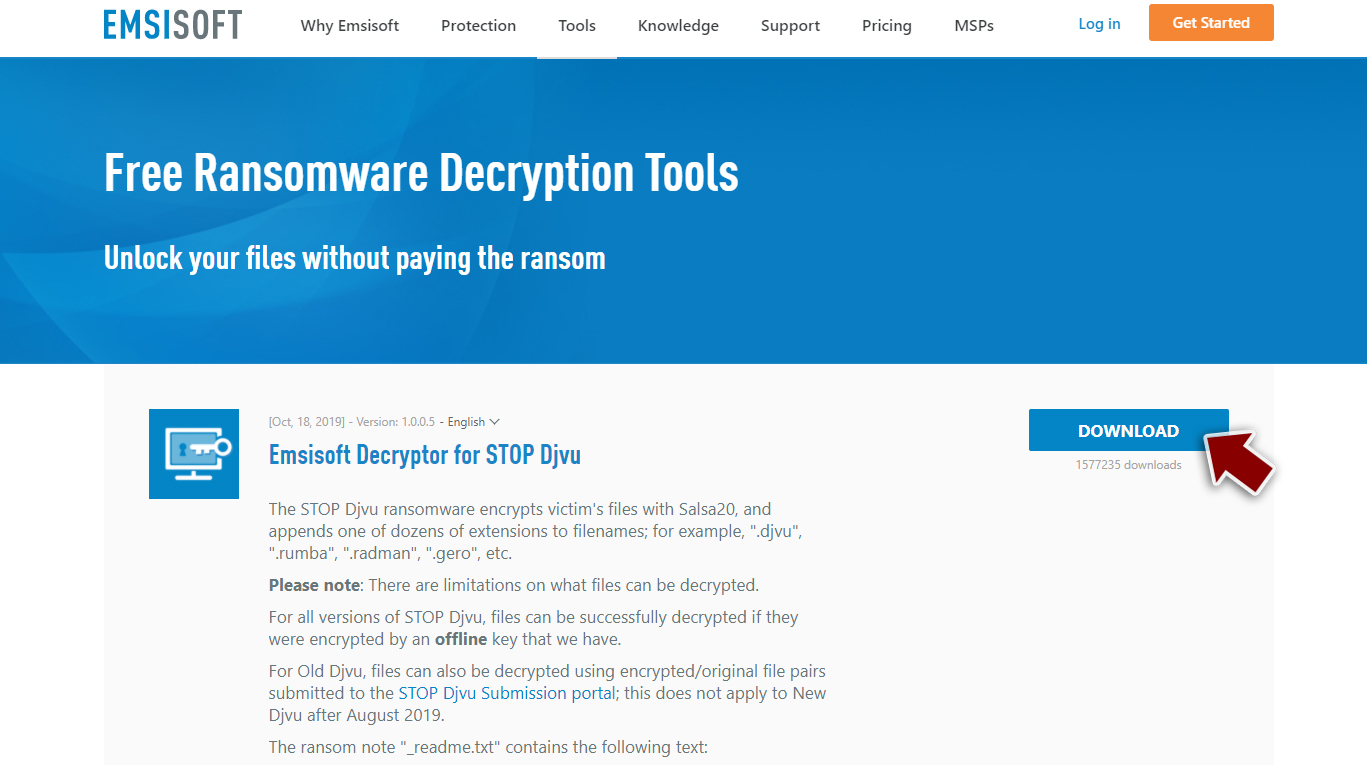
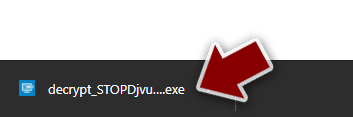
- After pressing Download button, a small pop-up at the bottom, titled decrypt_STOPDjvu.exe should show up – click it.
- If User Account Control (UAC) message shows up, press Yes.
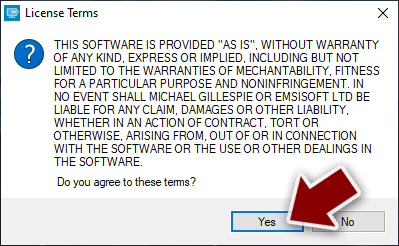
- Agree to License Terms by pressing Yes.
- After Disclaimer shows up, press OK.
- The tool should automatically populate the affected folders, although you can also do it by pressing Add folder at the bottom.
- Press Decrypt.



Removing the threat should be a priority
The infection is created with the main purpose of getting funds from victims, so there is no guarantee that payment transfer could help with file recovery. However, consider the threat as dangerous and extremely malicious. You need to remove the Fopa file virus first before you even attempt file recovery using backups or third-party programs for data recovery.
Removing the infection is not the same as decrypting data or repairing system issues, so you need anti-malware tools like SpyHunterCombo Cleaner or MalwarebytesMalwarebytes and a full system scan. Detection rates[3] can indicate that VA engines are successful in such operations, so you can eliminate the threat and properly clear the machine from any leftovers of the virus.
However, there are additional issues related to the infection of this sort because Fopa ransomware can damage processes, disable programs, features to keep the infection running on the machine and trigger the particular background processes. This program is capable of damaging various programs and keeping them from running to ensure that Fopa virus and other malware are not affecting the machine.
Therefore, we highly recommend using a one-of-a-kind, patented technology of FortectIntego repair. Not only can it fix virus damage after the infection, but it is also capable of removing malware that has already broken into the system thanks to several engines used by the program. Besides, the application is also capable of fixing various Windows-related issues that are not caused by malware infections, for example, Blue Screen errors, freezes, registry errors, damaged DLLs, etc.
- Download the application by clicking on the link above
- Click on the ReimageRepair.exe
- If User Account Control (UAC) shows up, select Yes
- Press Install and wait till the program finishes the installation process

- The analysis of your machine will begin immediately

- Once complete, check the results – they will be listed in the Summary
- You can now click on each of the issues and fix them manually
- If you see many problems that you find difficult to fix, we recommend you purchase the license and fix them automatically.



Did this guide help?
Be the first to comment