

BlackToxic ransomware is a file-locking virus that changes the desktop background and delivers a note

BlackToxic is a ransomware-type virus that locks all personal files upon installation and then demands a ransom to be paid in return for a decryption tool. It stems from an established malware family known as Chaos – we have already covered its previous versions, including Odaku and LockData. BlackToxic is the newest version that was first spotted at the end of May 2022.
Once installed, the malware looks for the most commonly used files, including pictures, databases, documents, videos, etc. During the encryption process, the virus locks all files with the help of a strong encryption algorithm,[1] which makes the unlocking process almost impossible without a unique key.
During this time, all files are appended with a randomly-generated file extension, consisting of alphanumeric characters, for example, .JriKd8f6. They are also stripped of their original file icons, which only leaves a blank sheet icon instead. This points out that BlackToxic files are no longer as they are used to be – they can't be modified or even opened. At this point, malware delivers the read_it.txt file and changes the background wallpaper.
Crooks claim that a ransom needs to be sent to 1NScbuZLaqt88Q3qr6baeiJVmZNuNSdS7k crypto wallet, although they don't specify the sum. We do not recommend cooperating and instead use alternative solutions provided below.
| Name | BlackToxic virus |
|---|---|
| Type | Ransomware, file-locking malware |
| File extension | A combination of random characters is appended to each of the files, for example, a picture.jpg is turned into picture.jpg.JriKd8f6 |
| Ransom note | read_it.txt |
| File Recovery | The only secure way to restore files is by using data backups. If such is not available or were encrypted as well, options for recovery are very limited – we provide all possible solutions below |
| Malware removal | Disconnect the computer from the network and internet and then perform a full system scan with SpyHunterCombo Cleaner security software |
| System fix | Once installed on the system, malware might seriously damage some system files, resulting in crashes, errors, and other stability issues. You can employ FortectIntego PC repair to fix any of such damage automatically by replacing system corruption |
The ransom note
Most ransomware strains, such as Djvu, are very consistent when it comes to their versions. Most commonly, changes are made to contact email addresses and a few other variables. While BlackToxic uses the same ransom note title as its previous versions (read_it.txt), the contents of the ransom note vary greatly.
In this note, for example, contact details and the sum which should be paid to the provided wallet are abundant and is also not clear. Crooks also resort to trying to frighten victims in various ways:
+ ( (:{You Been Hit By The BlackToxic RansomNote}:) )
========================================= ========================================
To get your files back you must pay in btc dont delete this ransom or else your files wil be gone ========forever!!!!!!!!=========== also your files will be recoverd when you pay the blacktoxic
=======> ramsomnote<========= and your files will be uploaded to our database
this could be the fBI or someone spying in you as a hitman if you dont want this to happen you must
++ pay our ransomenote to this address in btc only!!!! =================>1NScbuZLaqt88Q3qr6baeiJVmZNuNSdS7k <=================
========================================= ========================================
Hacked+By+BGT-BlackToxicRansome=================Note
you must pay within 48hrs or your files is not going to be recoverd by this ransome unless you pay
otherwise as we have the decryption key that will help you to revover your important files!!!!!!!
Why you shouldn't pay
The main goal of cybercriminals of almost every ransomware is to ensure that victims pay money in digital currency, usually Bitcoin. They use all types of tactics for this to happen – threatening to disclose the found files publically, delete the decryption key within a certain amount of time, or even trying to seem friendly and nice.

In the case of BlackToxic ransomware, hackers even resort to phishing techniques by claiming that the FBI or hitmen could be saying on the stolen files, which is absolutely a ludicrous statement and just another attempt to frighten users and make them pay the ransom.
Paying cybercriminals is always risky – they are not obliged to send you a decryption tool, so there are no guarantees. While some malware strains are known for delivering what they promised, some don't, and it can also vary on a case-to-case basis. By paying, you are risking losing your files and money.
Besides, it would only prove to crooks that their illegal business scheme works well and encourage them to continue developing ransomware, infecting even more people worldwide.
Ransomware removal
As soon as the BlackToxic virus infiltrates a Windows system, it soon establishes a connection with a remote C2 server.[2] With the help of this connection, cybercriminals might start sending commands for execution, change various parameters, or even result in further malware infections.
Therefore, before you proceed with malware removal, it is mandatory to disconnect your computer from the internet. The easiest way to do that is by disconnecting your ethernet cable or stopping the WiFi connection via the task manager. If you have several computers or/and they are connected to a network, use the following instructions:
- Type in Control Panel in Windows search and press Enter
- Go to Network and Internet
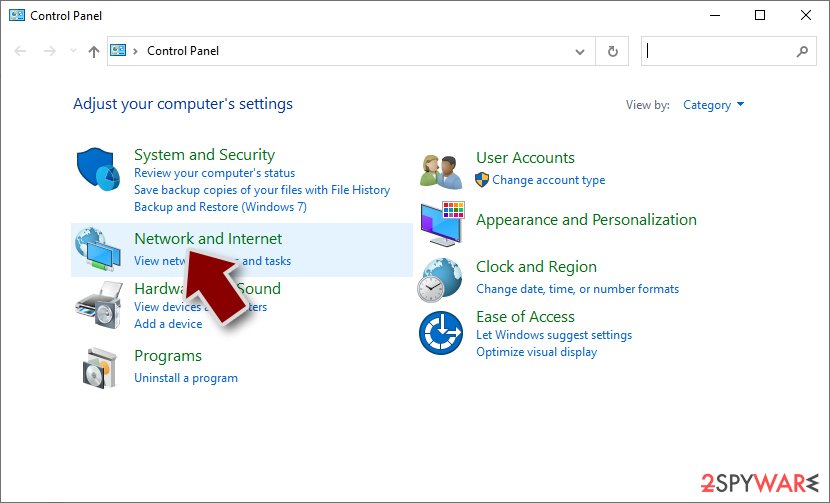
- Click Network and Sharing Center
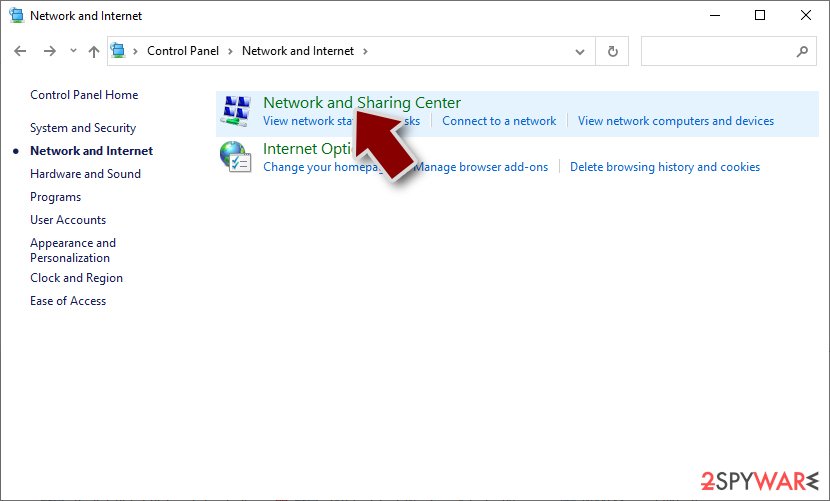
- On the left, pick Change adapter settings
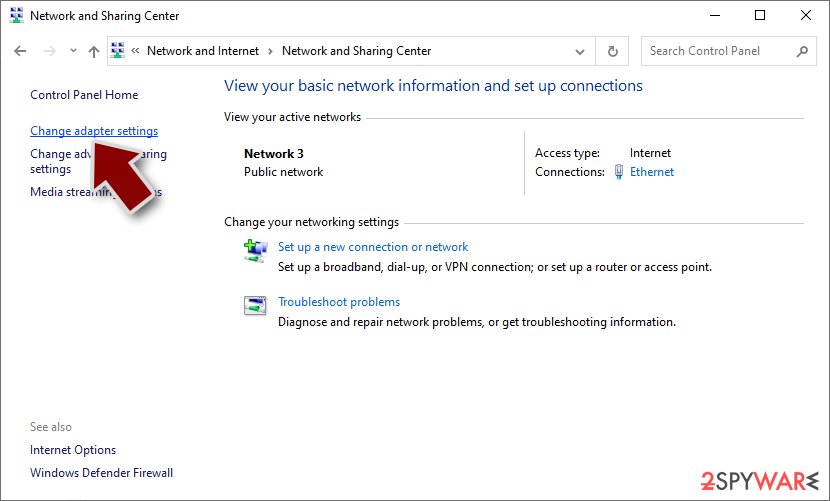
- Right-click on your connection (for example, Ethernet), and select Disable
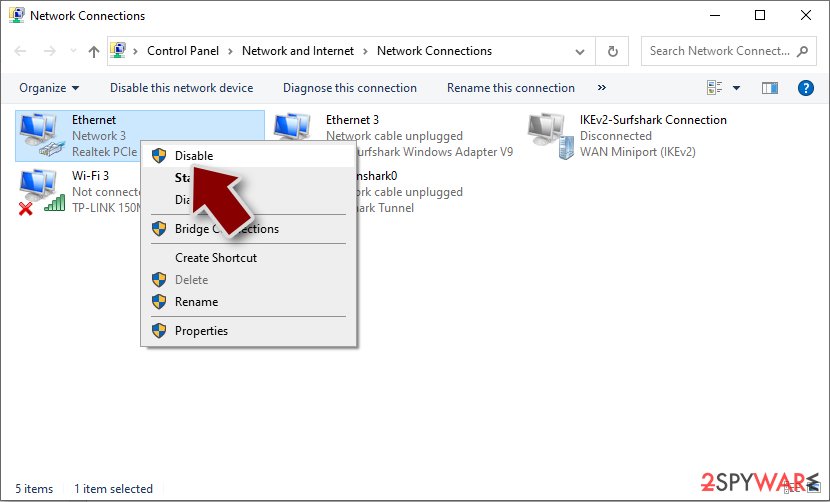
- Confirm with Yes.


Once you are sure that the system is not connected to the network, you should use powerful anti-malware software and perform a full system scan with it. Security software, such as SpyHunterCombo Cleaner or MalwarebytesMalwarebytes, can find and remove all the malicious components from the system at once and any secondary payloads that might be present on the system.
Data recovery options
There are two types of virus victims affected by ransomware: some of them get scared and believe that their files have been permanently damaged, and the other part of users think that they can get the BlackToxic ransomware encrypted files with the help of security software. Unfortunately, none of these statements are true.
Encryption is a complex process that uses a unique key for each of the victims. This means that, without it, people are unable to unlock the data – it is important to keep in mind that files are not corrupted in any capacity, they are just inaccessible without the decryptor. Security software is not designed for the recovery of files encrypted by ransomware, so while a scan will remove the infection, it would not restore personal files to a working condition.
Luckily, there are a few alternative options available, although the success rate is relatively low. You can try using data recovery software or waiting for a decryptor.
- Download Data Recovery Pro.
- Double-click the installer to launch it.

- Follow on-screen instructions to install the software.
- As soon as you press Finish, you can use the app.
- Select Everything or pick individual folders which you want the files to be recovered from.

- Press Next.
- At the bottom, enable Deep scan and pick which Disks you want to be scanned.

- Press Scan and wait till it is complete.
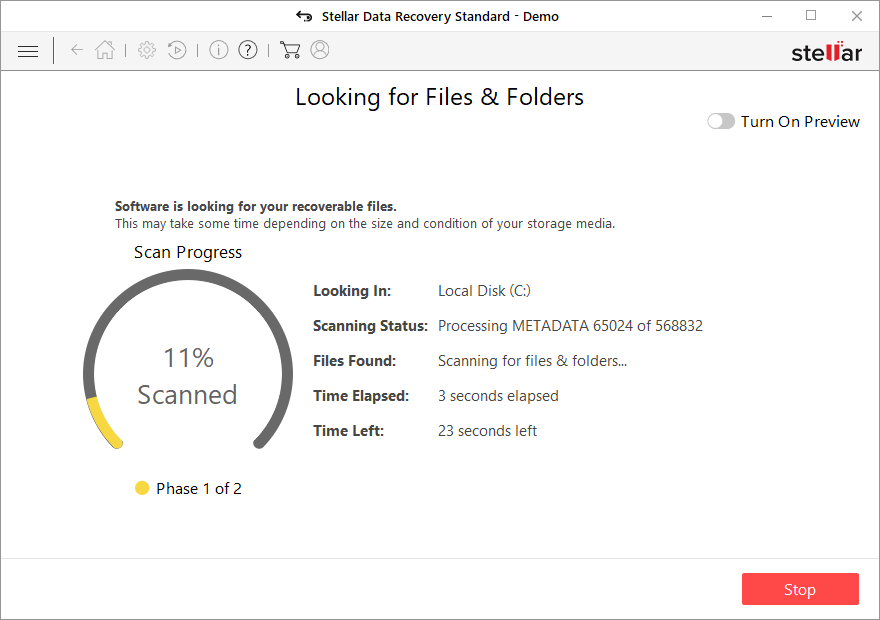
- You can now pick which folders/files to recover – don't forget you also have the option to search by the file name!
- Press Recover to retrieve your files.


If security researchers manage to find bugs within the ransomware encryption process or if the attackers' servers get seized by the authorities, a free decryptor can be released to victims. This might or might not happen in the future; the below links can provide you with more information.
- No More Ransom Project
- Free Ransomware Decryptors by Kaspersky
- Free Ransomware Decryption Tools from Emsisoft
- Avast decryptors

System fix
After malware infection, Windows is no longer the same, as some system files might get damaged or even destroyed. This can result in system instability – crashes, failure to launch programs, BSODs,[3] and many other issues. If you are suffering from these problems after eliminating the infection, use data recovery software as explained below.
- Download FortectIntego
- Click on the ReimageRepair.exe

- If User Account Control (UAC) shows up, select Yes
- Press Install and wait till the program finishes the installation process

- The analysis of your machine will begin immediately

- Once complete, check the results – they will be listed in the Summary
- You can now click on each of the issues and fix them manually
- If you see many problems that you find difficult to fix, we recommend you purchase the license and fix them automatically.



After all these steps are completed, you should ensure to prepare backups of your personal files to avoid devastating ransomware attack consequences. Likewise, reporting the incident to the authorities can help it to tackle cybercrime and increase the probability of cybercriminals' server seizures.
Did this guide help?
Be the first to comment