

Venolock ransomware is a virus that holds all personal files hostage until a ransom is paid
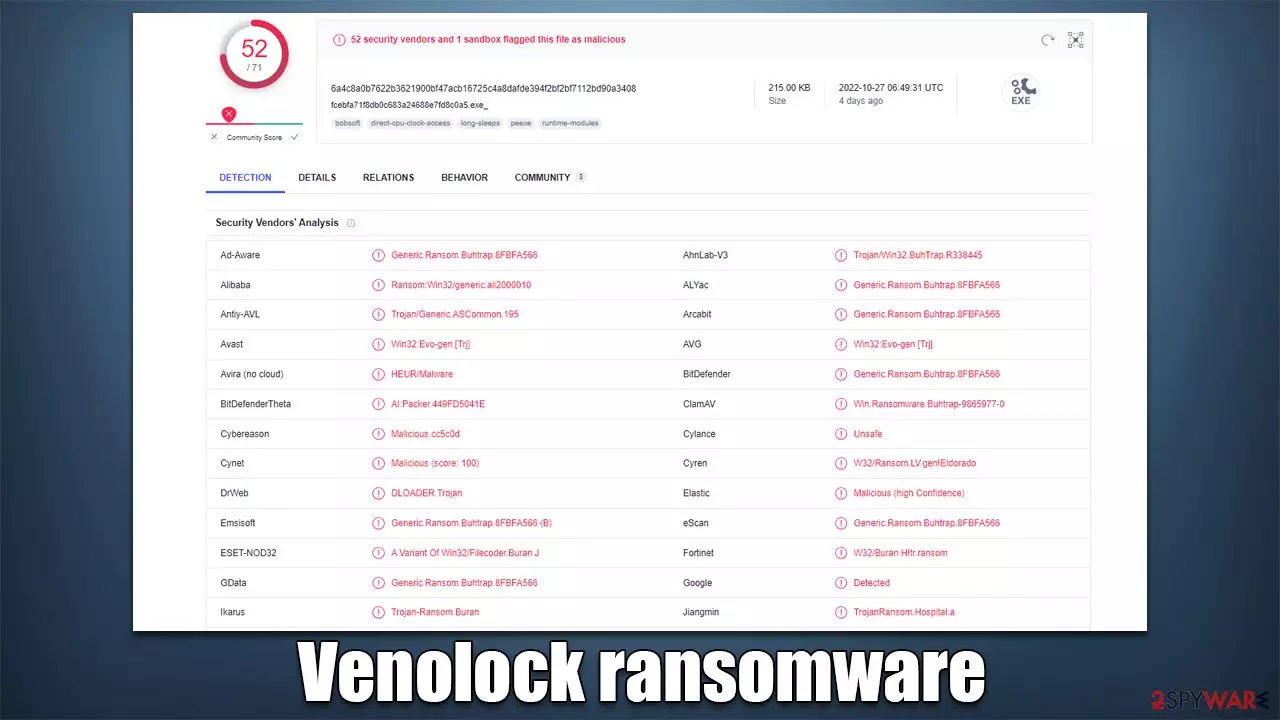
Venolock is a malicious Windows program designed by cybercriminals to profit from innocent users whose files get locked in the process. After entering the system using deceptive methods, such as spam emails or phishing messages, this malware begins encryption,[1] appending each file with the .vn2 extension and the user ID, making them unreadable. This process is known as encryption, where complex algorithms are used to prevent data from being opened.
Once that is finished, the Venolock virus delivers a ransom note ALL YOUR FILES ARE ENCRYPTED.txt, which is essentially a message from cybercriminals. Malware authors explain that victims have to pay a ransom in bitcoin for a private key that would decipher all the locked files. They also provide a contact email venolockdate1@rape.lol for communication purposes.
Venolock ransomware stems from a well-known family of Zeppelin, which is known to mainly target corporate networks, lock all files on them, and steal sensitive information in the process.[2] Crooks also claim that if the demands are not fulfilled in time, they will disclose corporate information on the dark web.
| Name | Venolock virus |
|---|---|
| Type | Ransomware, file-locking malware |
| File extension | .vn2 + User ID |
| Malware family | Zeppelin |
| Ransom note | ALL YOUR FILES ARE ENCRYPTED.txt |
| Contact | venolockdate1@rape.lol |
| File Recovery | The only secure way to recover data is through backups. If such isn't accessible, or if it has been encrypted, recovery alternatives are extremely limited; we'll go over all of them below |
| Malware removal | Remove the computer from the network and the internet, then run a comprehensive system scan using SpyHunterCombo Cleaner security software |
| System fix | If malware is installed on your system, it could potentially delete or damage vital system files, which often leads to crashes, errors, and other stability issues. You can use PC repair FortectIntego to fix any of these problems automatically |
The ransom note
Zeppelin is one of the more known malware strains out there – it has been operated by cybercriminals for many years now successfully, and numerous variants of the virus have been spotted in the wild, including ORCA, CRYPTCAT, Loplup, and many others. While it may differ from version to version, the main operating principles remain the same.
Once installed on the device, Venolock ransomware would first alter how the system operates, steal various valuable information from the network, lock files, and only then would it deliver a ransom note, ALL YOUR FILES ARE ENCRYPTED.txt, which reads as follows:
ALL YOUR FILES ARE ENCRYPTED
***All your data has been compromised. Documents, photos, databases and other important files are encrypted.
***You cannot decipher them yourself! The only method for recovering files is by purchasing a unique private key. Only we can provide you with this key and only we can restore your files.
***The decryption key fee is charged only in bitcoins, we CAN assist in buying bitcoins by giving instructions on how and where to buy.
***In case of non-payment, all data will be put up for auction on the darknet. Beware of data leaks.
***To make sure we have a decryptor and it works, you can send an email to venolockdate1@rape.lol or venolockdate1@rape.lol and decrypt one not important file for free, DO NOT send files containing databases, any XLS / XML documents for the test.
***Beware of dishonest middlemen. as well as buying a decryption key through intermediaries increases the final cost of the key.
***Do you really want to restore your files?
Write to email: venolockdate1@rape.lol
Your personal ID: –Attention!
* Do not rename encrypted files.
* Do not try to decrypt your data using third party software, it may cause permanent data loss.
* Decryption of your files with the help of third parties may cause increased price (they add their fee to our) or you can become a victim of a scam.
Additionally, according to this statement, users shouldn't rely on alternative data recovery strategies. This is understandable, given that hackers have no need to employ these techniques other than to receive payment. As communicating with the attackers would simply serve to confirm that their illegal operation is successful, we strongly advise against doing so. Check out the information below to learn how to get rid of the Venolock virus from your system before attempting to recover files using different methods.

Malware removal and system fix
A PC can no longer be regarded as secure to use once malware has been installed on it. If a network is available, the infection may spread through it and possibly start the installation of further malicious software. Under specific conditions, criminals may even access users' PCs remotely by using a remote connection over the internet. Dropping this link is, therefore, essential before continuing with ransomware removal.
- Type in Control Panel in Windows search and press Enter
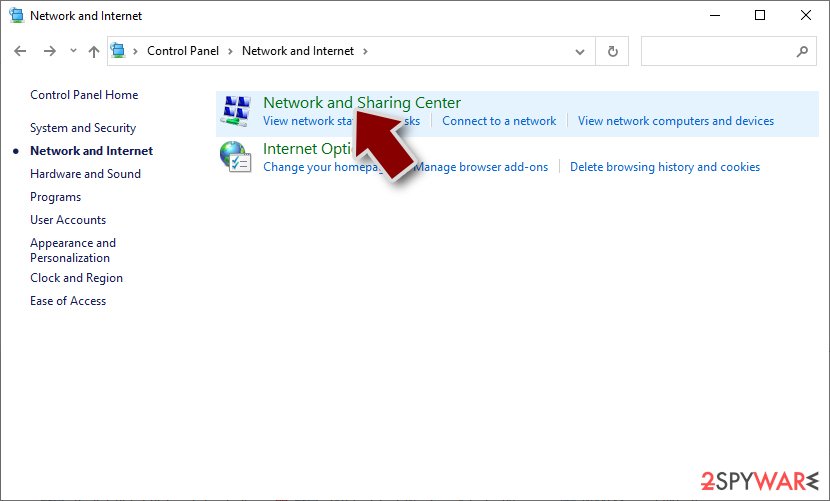
- Go to Network and Internet
- Click Network and Sharing Center
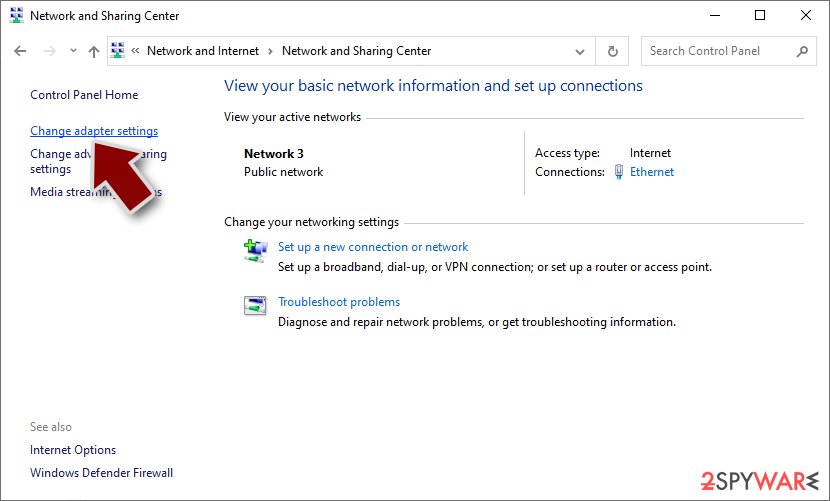
- On the left, pick Change adapter settings
- Right-click on your connection (for example, Ethernet), and select Disable
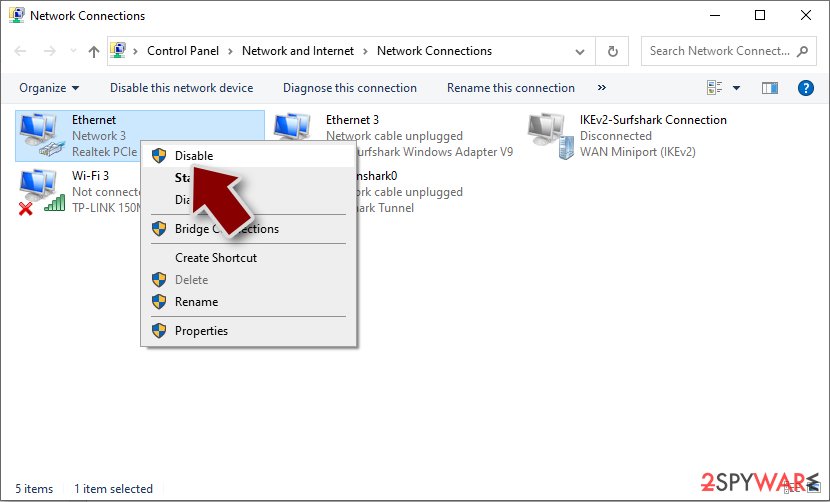
- Confirm with Yes.


Although it is doable, manual malware removal is not advised; security software is the best choice. You can use SpyHunterCombo Cleaner or MalwarebytesMalwarebytes to automatically detect and remove all harmful components from your system. Your primary line of defense against malware attacks should be security software, however, it's always preferable to try to prevent infection in the first place.
After the infection has been removed, we strongly suggest you utilize the FortectIntego PC repair tool. Malware may corrupt Windows system files, and security applications may not be able to fix it. Users may consequently encounter system crashes, BSODs,[3] errors, and other typical technical issues as a result of malware cleanup. The repair program has the capacity to add new system files in replacement of corrupted ones.
How to restore .vn2 files without paying
Once the malware is gone, and your system recovered, the encrypted data cannot be changed back to its original state. The reason is that decrypting uses a unique key that is only held by ransomware creators on their remote servers.
The most foolproof method to avoid being locked out of your data in a ransomware attack is to have backups of everything important. If you don't already have copies, attempting to get access to your information could be very difficult, if not impossible. However, you should not immediately lose all hope.
If you don't have backups, your options are to wait for a decryptor tool to become released or employ data recovery software. Remember that it's best to make copies of all encrypted data if you don't already have functional backups in order to avoid accidentally corrupting them while trying to retrieve them.
- Download Data Recovery Pro.
- Double-click the installer to launch it.

- Follow on-screen instructions to install the software.

- As soon as you press Finish, you can use the app.
- Select Everything or pick individual folders where you want the files to be recovered from.
- Press Next.
- At the bottom, enable Deep scan and pick which Disks you want to be scanned.

- Press Scan and wait till it is complete.
- You can now pick which folders/files to recover – don't forget you also have the option to search by the file name!
- Press Recover to retrieve your files.



There are hundreds of security companies and organizations working to stop ransomware creators. In some cases, they have been successful in seizing servers containing decryption keys, which allows the keys to be released to the public. Below you will find a list of the most prominent parties involved in free data decryption services; these services have already helped millions of victims worldwide. Please keep in mind that an alternative decrytpion tool might take a while to create – sometimes it isn't possible even after years of waiting.
- No More Ransom Project
- Free Ransomware Decryptors by Kaspersky
- Free Ransomware Decryption Tools from Emsisoft
- Avast decryptors

Did this guide help?
Be the first to comment