

Definition of Adobe Flash Tech Support Scam virus
Adobe Flash Tech Support Scam virus can knock on your door shortly after installing an a particular software package. Typically, this computer infection arrives in a software bundle with fake Adobe Player updates, so users should be extremely careful when installing them. If a certain website suddenly triggers a pop-up message asking you to update your Flash or Java in order to see certain content, do not rush to click that “Update” or “Download” button situated on the same pop-up. We suggest you visit official websites of these programs and check for updates there. You will be surprised because in most cases official websites state different information that those suspicious sites you have previously visited. If so, you should know that you have been visiting a website that promotes bogus downloads, which are likely to be filled with spyware or even malware-type components.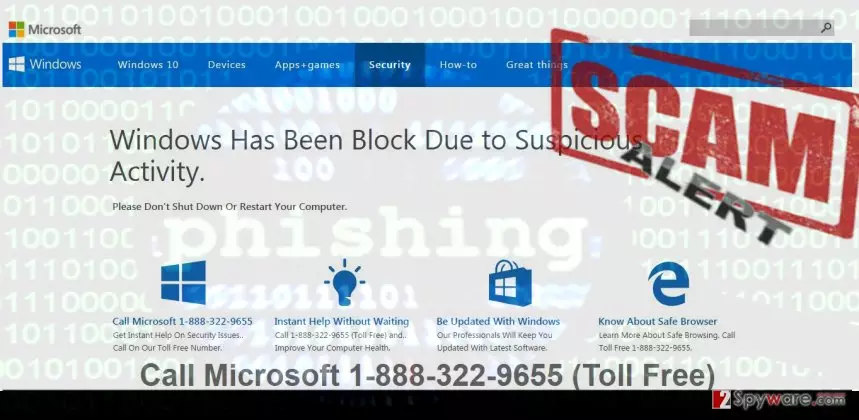
If the user agrees to install the bogus update, Adobe Flash Tech Support Scam virus infiltrates the computer and shortly triggers the first deceptive pop-up. It launches a phony Microsoft page, which says that “Windows has been block due to suspicious activity.” As you can see, this line is written with a mistake, and it should be a red sign to you already. Microsoft specialists NEVER leave such foolish mistakes on their website – it would be simply unprofessional. Another red sign is the line urging the user to “call Microsoft 1-888-322-9655 (Toll Free).” You should never call this number! It connects to a fake tech support line, and the person who is going to pick up the phone for you isnt going to be a Microsoft employee, but a filthy scammer. Such scammers generally have two aims – either to convince the victim to provide credit card details (when purchasing some useless services or programs) or ID and password of a remote access tool to get full access to user’s computer. Do not give them access to such data, and hang up as soon as they ask you to provide it via the phone. Make sure you do not enter your personal information into the aforementioned phishing website in “Security” section, or scammers might try to call you by themselves or contact you via email. Remove Adobe Flash Tech Support Scam virus as quickly as possible using FortectIntego or another anti-malware tool you can count on. If you cannot launch your antivirus software, carry out Adobe Flash Tech Support virus removal instructions that are presented under this post.
Where did you get this virus from?
As we have already stated, Adobe Flash TSS virus spreads with the help of software bundles, so the best thing you can do is to always choose reliable download sources and install your downloads using Custom or Advanced installation options. These can reveal additional items added to your download and allow you to drop them off. Also, avoid installing software updates from unknown websites – they are likely to be fake and might contain malicious attachments! Beware of annoying pop-ups trying to push certain software to you. If you receive such ads even when you are not browsing the Internet, you should check the system with anti-spyware software and see if the system is infected with some kind of adware program.
How to deactivate and remove Adobe Flash Tech Support Scam virus?
Instructions provided below are meant to help computer users defeat this malicious program and completely remove it from the system. Our suggested malware removal tool can not only remove Adobe Flash Tech Support Scam virus, but also all suspicious programs that could be installed alongside it or earlier. To start Adobe Flash Tech Support Scam virus removal software, follow these instructions:
Did this guide help?
3 comments
disclosure
Oh, I see these fake ads in almost every gaming portal i go to.
Marwev
Thankies for your help - I have tought my brother how to avoid such viruses, he barely knows anything about tech support scammers...
diane
Removed the virus quickly with Reimage. It works ;]