

AiraCrop – crypto-ransomware virus keeps attacking people since 2016
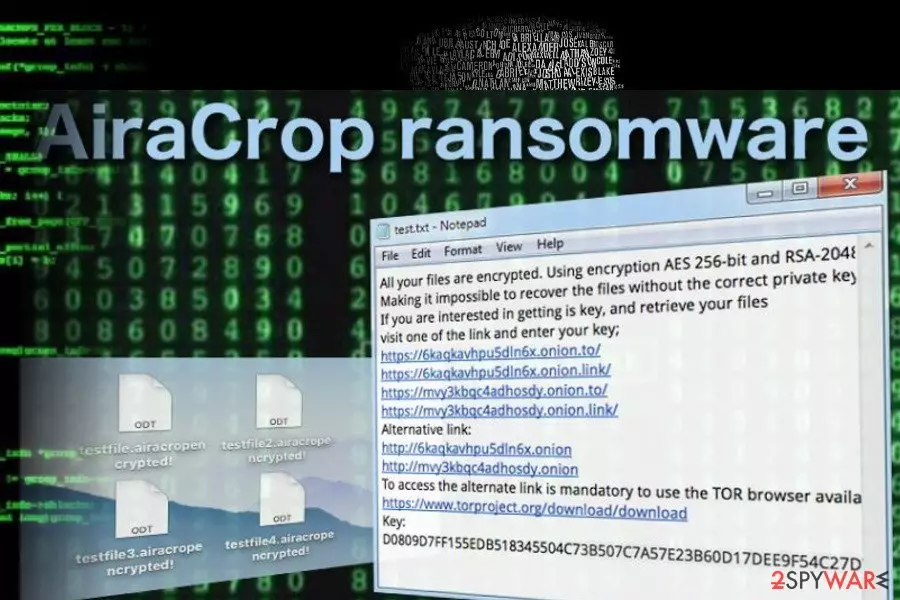
AiraCrop is a ransomware virus[1] that has been first detected at the end of 2016. Currently recognized as Win32/Filecoder.AiraCrop.A Trojan by most of the reputable AV engines, it seems to be kinship with the infamous NMoreira ransomware. According to ransomware research team from Dieviren.de[2] , AiraCrop ransomware uses a combination of AES-256 and RSA-2048 encryption algorythms and appends ._AiraCropEncrypted! file extension to each locked file. Following the encryption, ransomware payload generates a ransom note, which instructs the victim to download Tor browser, heed to the required website by clicking on one of the links, and indicate the unique identification number to get payment instructions. In the beginning of April 2018, experts warned about AiraCrop reborn after they found a new variant Aira circulated on the net.
| AiraCrop | |
|---|---|
| Type | Ransomware |
| Danger level | High. Locks personal files. Can cause permanent data and money loss |
| File extension | ._AiraCropEncrypted! |
| AV detection | Win32/Filecoder.AiraCrop.A Trojan |
| Encryption used | AES-256 and RSA-2048 |
| Removal | Possible with a professional anti-malware only. Download FortectIntego and run a scan. |
AiraCrop ransomware did not manifested as one of the most sucessful cuber threats from the perspective of its developers. Although initially compared to the infamous CrySiS, it did not achieve a half as much as CrySiS did. Nevertheless, it keeps attacking people all around the world since 2016 and managed to collect ransom almost each day.
It has been found that this ransomware likewise its kinsman spreads via Exploit Kits, hacked websites, rogue software downloads, malicious spam email attachments, and similar means. As soon as its payload is being executed, AiraCrop virus starts scanning the system and searching for targeted files. The following are the file types that it is capable of encrypting:
.Png, .psd, .pspimage, .tga, .thm, .tif, .tiff, .yuv, .ai, .eps, .ps, .svg, .indd, .pct, .pdf, .xlr, .xls, .xlsx, .accdb, .db, .dbf, .mdb, .pdb, .sql, .apk, .app, .bat, .cgi, .com, .exe, .gadget, .jar, .pif, .wsf, .dem, .gam, .nes, .rom, .sav, .dwg, .dxf, .gpx, .kml, .kmz, .asp, .aspx, .cer, .cfm, .csr, .css, .htm, .html, .js, .jsp, .php, .rss, .xhtml, .doc, .docx, .log, .msg, .odt, .pages, .rtf, .tex, .txt, .wpd, .wps, .csv, .dat, .ged, .key, .keychain, .pps, .ppt, .pptx, .ini, .prf, .hqx, .mim, .uue, .7z, .cbr, .deb, .gz, .pkg, .rar, .rpm, .sitx, .tar.gz, .zip, .zipx, .bin, .cue, .dmg, .iso, .mdf, .toast, .vcd, .sdf, .tar, .tax2014, .tax2015, .vcf, .xml, .aif, .iff, .m3u, .m4a, .mid, .mp3, .mpa, .wav, .wma, .3g2, .3gp, .asf, .avi, .flv, .m4v, .mov, .mp4, .mpg, .rm, .srt, .swf, .vob, .wmv, .3d, .3dm, .3ds, .max, .obj, .r.bmp, .dds, .gif, .jpg, .crx, .plugin, .fnt, .fon, .otf, .ttf, .cab, .cpl, .cur, .deskthemepack, .dll, .dmp, .drv, .icns, .ico, .lnk, .sys, .cfg.
Upon encryption, each file gets ._AiraCropEncrypted! file extension, which cannot be modified or removed manually. It's not very likely that these files will be recovered manually. The only way to retrieve them is to pay the ransom (not recommended) or remove AiraCrop ransomware using FortectIntego, SpyHunterCombo Cleaner or MalwarebytesMalwarebytes security tool and then take advantage of third-party data recovery programs.
AiraCrop ransomware virus demands a ransom, though its size is not clear up until now. Once the system is attacked, the malware locks files and generates a .txt file, which explains what happened and urges to download Tor browser asap. The new Aira ransomware[3] is known for generating a notepad file called How to decrypt your files. Criminals instructs victims to contact them via airacrop@vpn.tg. The AiraCrop ransom note says:
Encrypted Files!
All your files are encrypted. Using encryption AES 256-bit and RSA-2048-bit.
Making it impossible to recover the files without the correct private key.
If you are interested in getting is key, and retrieve your files
visit one of the links and enter your key;
https://6kaqkavh*******.onion.to/
https://6kaqkavh*******.onion.link/
https://mvy3kbqc*******.onion.to/
https://mvy3kbqc4*******.onion.link/
Alternative link:
http://6kaqkavh*******.onion
http://mvy3kbqc*******.onion
To access the alternate link is mandatory to use the TOR browser available on the link
https://www.torproject.org/download/download
Key:
D0809D7FF155EDB518345504C73B507C7A57E23B60D17DEE9F54C27*******
As you can see, the note is rather obscure. The criminals do not provide any detailed information such as the amount of the payment nor the deadline for it to be issued. However, we can see that like the majority of ransomware viruses AiraCrop uses the anonymous TOR network to collect payments.

We can also gather that the criminals use military grade AES 256-bit and RSA-2048-bit encryption algorithms that are also favored by such ransomware giants as Locky and Cerber ransomware.
This only proves that these hackers are not playing games and will not give back your files that easy. And you should not try satisfying their greediness either. Remove AiraCrop from your computer without giving in to the hacker’s plan and, hopefully, this will help decrease the hackers’ motivation to create similar malware at least a little.
Ransomware tricks people into opening malicious email attachments
Most likely, the virus is carried around by a malicious spam campaign that makes sure this malware enters computers without the victims even realizing it.
Typically, malware infected files will end up in the “Spam” section of your email, but beware that they may obfuscate the malicious files and slip them through the security filters straight into your inbox. In such a case, it is beneficial to know how to recognize such malicious emails.
The first thing to pay attention to is the sender — you should not receive emails from unknown third-parties unless you have provided them with your email yourself. Otherwise, it is either a commercial spam or malware. You probably do not want to deal with any of these. You should be especially careful with emails that feature attached documents or links. Investigate these attachments before opening them and double-check whether they were really meant for you.
AiraCrop removal options
Like any other malicious infection, AiraCrop removal should be initiated with the help of a professional malware removal tool, such as FortectIntego or SpyHunterCombo Cleaner.
Actually, there's no other way except as to remove AiraCrop virus automatically. However, you may need to interfere the process in case ransomware blocks your anti-virus. In this case, you'll have to restart your PC into Safe Mode with Networking and try to launch the scan.
After you complete AiraCrop removal, you can proceed to the process of data recovery. A few methods for data recovery techniques are also presented below.
Did this guide help?
Be the first to comment