

Aleta ransomware – a computer virus that follows BTCWare's example
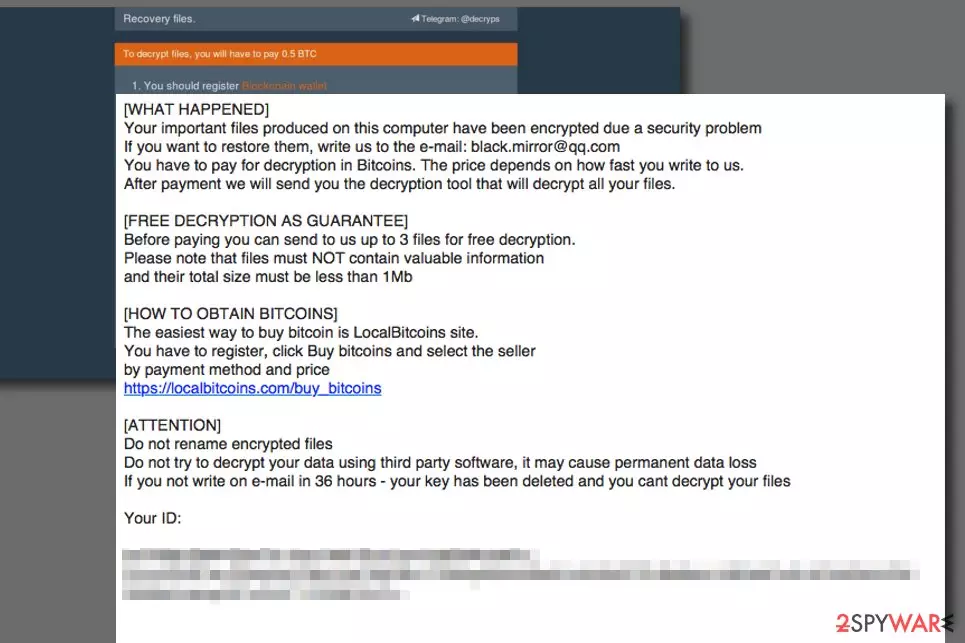
Aleta is a ransomware-type cyber threat that uses AES and RSA encryption algorithms to make files on the affected Windows computers. Malware also appends .[email].aleta file extension to the targeted files and delivers ransom-demanding instructions in !#_READ_ME_#!.inf file. However, it's not a unique virus. It is just a new version of BTCWare ransomware[1]. If you happened to be infected with this virus, we recommend you read this article to find the best way to deal with ransomware and possibly recover your files for free.
| Summary | |
|---|---|
| Name | Aleta |
| Type | Ransomware |
| Malware family | BTCWare |
| Release date | 2017 |
| Most affected countries | Argentina, Belgium, and Spain |
| Cryptography | A combination of AES and RSA |
| Appended file extensions | .[black.mirror@qq.com].aleta .[chines34@protonmail.ch].aleta .[darkwaiderr@cock.li].aleta |
| Ransom note | !#_READ_ME_#!.inf |
| Symptoms | Encrypted files, system slowdowns, Windows errors, unresponsive programs |
| Decryption | Might be possible with BTCWare decryptor |
| To get rid ransomware, install SpyHunterCombo Cleaner and run a full system scan | |
This virus enters the system as a Trojan. On the affected computer, it makes various changes, installs necessary components and starts data encryption procedure. During the encryption, it appends a customized file extension, which strips all the default file icons. Additionally, crooks include one of the following email address in the added suffix:
- darkwaiderr@cock.li
- chines34@protonmail.ch
- black.mirror@qq.com

According to the ransom note, delivered soon after file encryption, victims have to send an email to one of the provided emails in order to recover encrypted files. Hackers provide a detailed guide in the !#_READ_ME_#!.inf:
All your files have been encrypted!
All your files have been encrypted due to a security problem with your PC. If you want to restore them, write us to the e-mail chines34@protonmail.ch in body of your message write your ID
You have to pay for decryption in Bitcoins. The price depends on how fast you write to us. After payment we will send you the decryption tool that will decrypt all your files.
Free decryption as guarantee
Before paying you can send us up to 1 file for free decryption. The total size of files must be less than 1Mb (non archived), and files should not contain valuable information. (databases, backups, large excel sheets, etc.)
How to obtain Bitcoins
The easiest way to buy bitcoins is LocalBitcoins site. You have to register, click 'Buy bitcoins', and select the seller by payment method and price.
hxxps://localbitcoins.com/buy_bitcoins
Also you can find other places to buy Bitcoins and beginners guide here:
hxxp://www.coindesk.com/information/how-can-i-buy-bitcoins/
Attention!
Do not rename encrypted files.
Do not try to decrypt your data using third party software, it may cause permanent data loss.
Decryption of your files with the help of third parties may cause increased price (they add their fee to our) or you can become a victim of a scam.
Your ID –
Attackers use psychological terror and threaten victims to contact them immediately. The sum for the decryptor is said to be set due to the speed of how fast people send the email to crooks. According to victims’ reports, authors of this ransomware suggest decrypting encoded files for 2 Bitcoins[2] which is an enormous sum of money.

The attackers suggest that the victim has an opportunity to test the decrypter by sending three small files to criminals via email, no larger than 1Mb in size. The criminals promise to send back decrypted versions of the files to prove that they actually can decrypt their files.
However, we do not recommend contacting cybercriminals. These dishonest people created this malicious program in order to collect money illegally. So, they cannot be trusted. Once they receive your payment, they might leave you with those two or three decrypted files. They may not provide you a working decryption tool. Thus, paying the ransom might increase your loss.

Instead of thinking about data recovery, you should think about virus elimination. Malware makes the system vulnerable and unstable. So, you will not be able to use your PC safely and properly. In order to remove Aleta ransomware completely, you have to use a decent anti-malware software such as FortectIntego. Trying to delete a ransomware-type virus often results in failure due to lack of computing skills, so if you are an inexperienced PC user, you shouldn’t try to eliminate the virus manually.
You can find informative guidelines on how to restore your data right below the article. In case you are looking for ransomware removal instructions in a different language, such as Polish or German, check out websites like UsunWirusa[3] or DieViren[4].

Ways used for spreading ransomware virus
The described virus typically infiltrates the target system using RDP attacks. Cyber criminals seek to compromise admin accounts that have the right to control organization network remotely, and if they succeed to infect them, they can easily take over the target system and infect all devices with ransomware.
Keep in mind that even the strongest anti-malware programs become useless if you use weak admin passwords. In such case, crooks can brute force these passwords in a day and then fully control the target computer remotely.
There are many ways to fight ransomware; however, the general rules to protect you against ransomware attacks are:
- Install and keep an anti-malware program up-to-date.
- Create data backups regularly. You can find a guide on how to backup your data here.
- Never use weak passwords on your accounts, especially on remote system access software.
- Do not click on vague links while browsing the web and do not open emails sent by unknown people.
Instructions on how to remove BTCWare Aleta ransomware
Remove the ransomware using instructions provided below to continue using the computer safely. Remember that ransomware is a complex cyber threat that is nearly impossible to delete manually. Therefore, you need use reputable anti-malware software to make the system safe again.
For ransomware removal we recommend using FortectIntego, SpyHunterCombo Cleaner or MalwarebytesMalwarebytes. However, you may need to reboot your PC to Safe Mode with Networking. This helps to disable virus' attempts to stop the elimination procedure. We have prepared detailed guide below.
Did this guide help?
Be the first to comment