

How destructive is AnDROid ransomware?
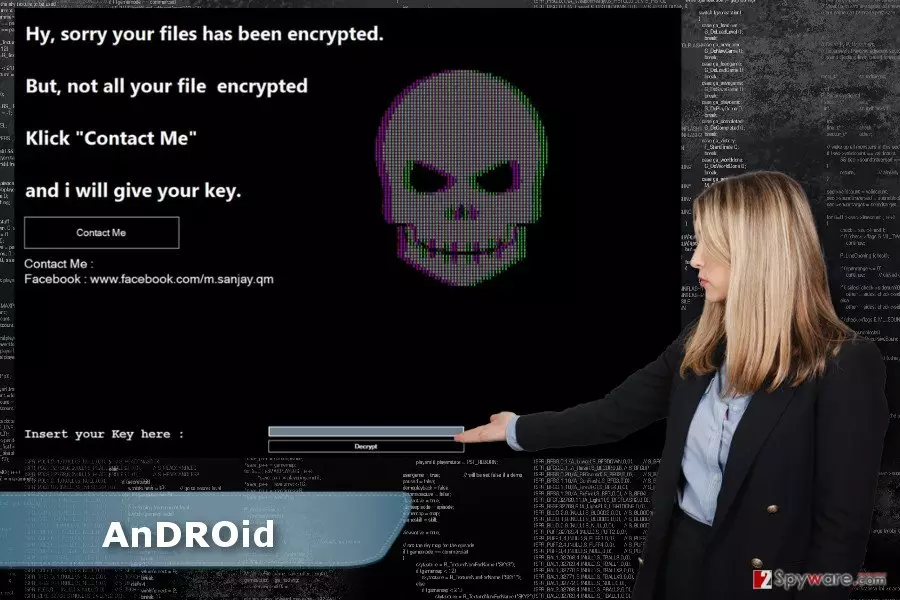
Nevertheless, AnDROid ransomware virus belongs to the category of the most dangerous cyber infections;[1] it’s not as hazardous as the developers wished it to be. Cybercriminals used the name of the famous Android virus that is aimed at the smartphones and mobile devices with Android operating system. However, this piece of malware attacks Windows OS. On the infected computer, malware has the same purpose as any other file-encrypting virus – to damage various image, audio, video, and other files. The recently discovered ransomware appends the .android file extension to each corrupted file. Fortunately, files encrypted by AnDROid virus can be decrypted for free by using this decrypter or entering this key “62698b8ff9e416d9a7ac0fb3bd548b96.” Thus, if you received a black ransom note with a skull asking to contact developers in order to get decryption key, you should not do that. Just enter the unlock code and remove AnDROid from the device. We recommend performing virus elimination with FortectIntego. However, you can use any other malware removal program to complete this task. At the end of the article, you will find detailed instructions how to deal with possible obstacles and get rid of the virus entirely.
In the ransom note, hackers often ask victims to contact them via email. However, authors of the AnDROid ransomware decided to use Facebook as a communication channel. Indeed, it’s strange and uncommon decision. Though, we have already revealed that there’s no need to contact criminals and ask for the mercy. Obviously, they want you to transfer few Bitcoins. Honestly, it’s better to spend your money for more useful tools than shady decryptor provided by the hackers. For instance, you can purchase a reliable antivirus program[2] that would protect your PC from other cyber threats in the future and perform the AnDROid removal.
How does ransomware spread and how can I stop it?
It’s still unknown what specific distribution methods developers of the AnDROid ransomware use. However, they are expected to use traditional techniques,[3] such as malicious email attachments, malvertising, exploit kits or rough software updates or downloads. Thus, there are many ways how cyber criminals might find the entrance to your computer. Though, it’s important to take some precautions to protect your personal files for various file-encrypting viruses. First of all, you should be careful with emails. Crooks might send perfectly crafted emails and pretend to be from the reputable organizations. Thus, you can easily get tricked into opening obfuscated attachment and let AnDROid malware or other ransomware inside. We want to suggest double-checking the information before opening the attached document.[4] What is more, be careful with links and ads as well because they might lead to the malicious website. Thus before clicking on a link provided in the email or on social media make sure that you know the sender, and he or she actually wanted to send it. Also, don’t forget that advertisements placed on the legitimate websites might be infected too. Thus, before clicking on an eye-catching ad, make sure that it’s actually worth a risk.[5] Lastly, if you want to stop ransomware from infiltrating the system, install a professional antivirus program and keep it updated along with other software installed on the PC.
Removal of the AnDROid virus
Nevertheless, AnDROid ransomware virus is poorly written; keeping it on the system is not a good idea. It’s still a cyber infection that makes computer vulnerable and attractive to other malware. Thus, sooner or later your PC might be attacked again with a more dangerous virus. As a result, you might lose your files for good or put your privacy at risk. Hence, unlock your files by entering this key “62698b8ff9e416d9a7ac0fb3bd548b96″ and then remove AnDROid from the device with a help of FortectIntego or SpyHunterCombo Cleaner. If malware prevents you from installing these tools, reboot your computer to the Safe Mode with Networking as shown in the instructions below. Then you will be able to install or access security program necessary to perform the automatic AnDROid removal.
Did this guide help?
3 comments
Ashlyn
Why do they use the name of Android? Strange virus
Juliana
It seems hackers cant stop creating new ransomwares...
Margaux
I hope it wont start spreading widely.