

Arriedstro.work is a fake website that is used as a tool to send ads directly to users' desktops
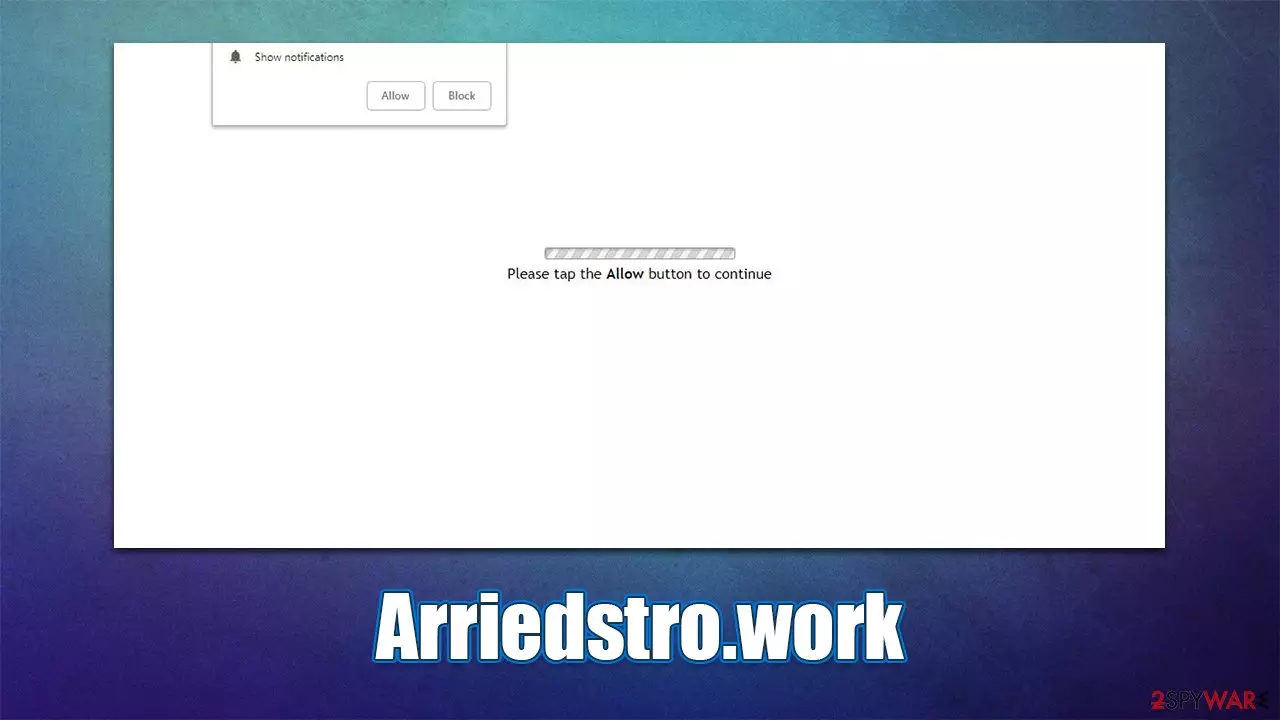
Users have complained about a strange phenomenon that comes on their computer screens – Arriedstro.work pop-ups. They seem not to be triggered by anything, regardless of whether one is streaming a video or simply browsing their favorite websites – as long as the web browser is operational (even in the background). To make matters worse, the ads are visible even if another application is currently being used.
So what's the deal with Arriedstro.work ads, and where are they coming from? The truth is, they are not directly related to any type of virus infection but are rather a result of users being tricked into allowing the website to send push notifications to them without restrictions. To put it simply, various scam techniques are used in order to convince users that doing so would result in something beneficial while, in reality, it is the complete opposite.
That being said, some people might get redirected to the scam website by adware,[1] so the possibility of the infection should not completely be disregarded. Pop-up ads are one of the main signs of adware infection, although push notifications that come from various websites are not directly related to it.
Nonetheless, below we will provide instructions on how to stop these Arriedstro.work ads, as well as how to effectively find and remove adware and malware from your system. Also, you can find some security tips that could help you prevent being a victim of another scam in the future.
| Name | Arriedstro.work |
|---|---|
| Type | Push notifications, ads, scam |
| Distribution | The unwanted activity sometime after the “Allow” button is pressed via the notification prompt |
| Symptoms | Push notifications show on the desktop at random time intervals. These popups show fake notices and push scams. Links can also lead to malware-laden sites |
| Risks | If you click on links provided by the website, you might end up infecting your system with malware/PUPs, disclosing your personal information to cybercriminals, or losing money for useless services |
| REmoval | To stop the intrusive pop-ups, you need to access the settings section of your browser. You should also check your system with SpyHunterCombo Cleaner security software to eliminate adware and malware |
| Additional tips | Make sure you clean your browsers after you delete PUPs from the system. To do that automatically, you can use FortectIntego |
There are two versions of the Arriedstro.work website that users might encounter. If you enter this URL into the address bar of your browser, you will be led to something that looks like a website about celebrities. However, when you start looking around, you can soon see that something is wrong. Namely, the site is offering to “Get the latest sports updates from around the world.” This is something that completely contradicts the theme of the pictures shown.
This is not surprising, however, as it is a fake website, generated from predetermined phrases and pictures. We have already discussed countless other sites, such as Ucationininanceen.xyz or Oundtheco.work, which were generated in the exact same way. Thus, once you see something similar in the future, keep in mind that they are not real sites, and accepting push notifications from them would not provide you with “News” but instead make you receive intrusive pop-ups that show malicious or misleading ads.
In other cases, especially when the reason for a website visit is a redirect from a malicious site, users would see nothing like it but instead would show a fake message along with a picture that seemingly correlates with what it says. Here are a few examples you might expect:
- Click “Allow” if you are not a robot
- Click “Allow” to win the prize and get it in our shop!
- Loading. Please tap ALLOW button to continue
- Click “Allow” to start downloading
- If you are 18+, tap Allow
These messages sometimes try to imply that pressing the “Allow” button would result in the reveal of some type of underlying content, which is a lie. If pressed, the button would allow the site to send notifications without any restrictions. Thus, it is best to leave the Arriedstro.work site immediately, without pressing anything or interacting with any buttons or links.

Find and delete adware
Before you proceed with removing the intrusive push notifications, you should make sure that no system infection is present. The easiest and most efficient way to do so is by performing a full system scan with SpyHunterCombo Cleaner, MalwarebytesMalwarebytes, or another powerful anti-malware software.
If you want to eliminate adware manually, you can try doing that, but it does not guarantee a proper removal. There are so many different adware strains, and all of them operate in a different manner, so it is easy to skip some components during the process. Thus, before you proceed with this, we strongly advise you to perform a full system scan with security software.
Remove unwanted applications
Some programs can be installed on the system level and removing them would require you to uninstall them in a similar manner you do with regular programs.
Windows
- Enter Control Panel into Windows search box and hit Enter or click on the search result.
- Under Programs, select Uninstall a program.

- From the list, find the entry of the suspicious program.
- Right-click on the application and select Uninstall.
- If User Account Control shows up, click Yes.
- Wait till uninstallation process is complete and click OK.



Mac
- From the menu bar, select Go > Applications.
- In the Applications folder, look for all related entries.
- Click on the app and drag it to Trash (or right-click and pick Move to Trash)


To fully remove an unwanted app, you need to access Application Support, LaunchAgents, and LaunchDaemons folders and delete relevant files:
- Select Go > Go to Folder.
- Enter /Library/Application Support and click Go or press Enter.
- In the Application Support folder, look for any dubious entries and then delete them.
- Now enter /Library/LaunchAgents and /Library/LaunchDaemons folders the same way and terminate all the related .plist files.


Get rid of browser extensions
Google Chrome
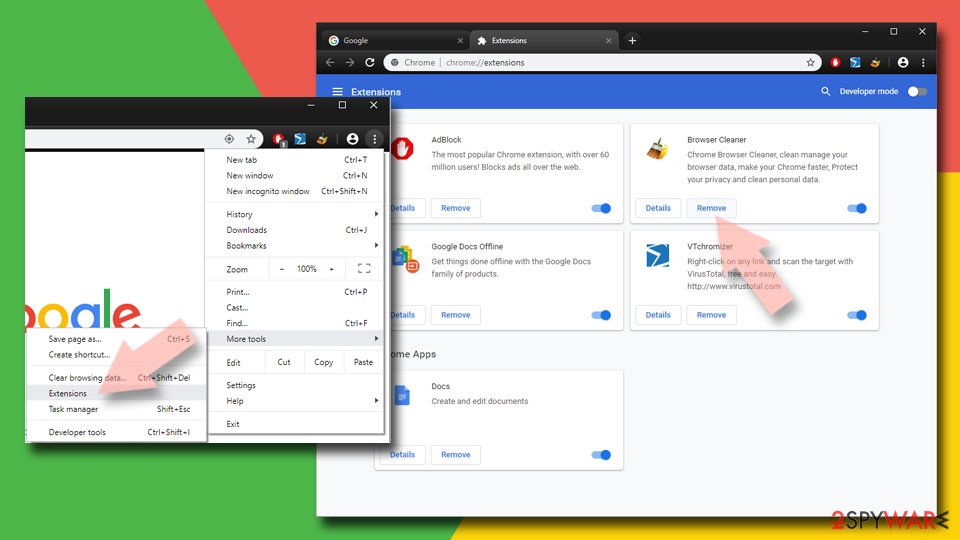
- Open Google Chrome, click on the Menu (three vertical dots at the top-right corner) and select More tools > Extensions.
- In the newly opened window, you will see all the installed extensions. Uninstall all the suspicious plugins that might be related to the unwanted program by clicking Remove.

Mozilla Firefox
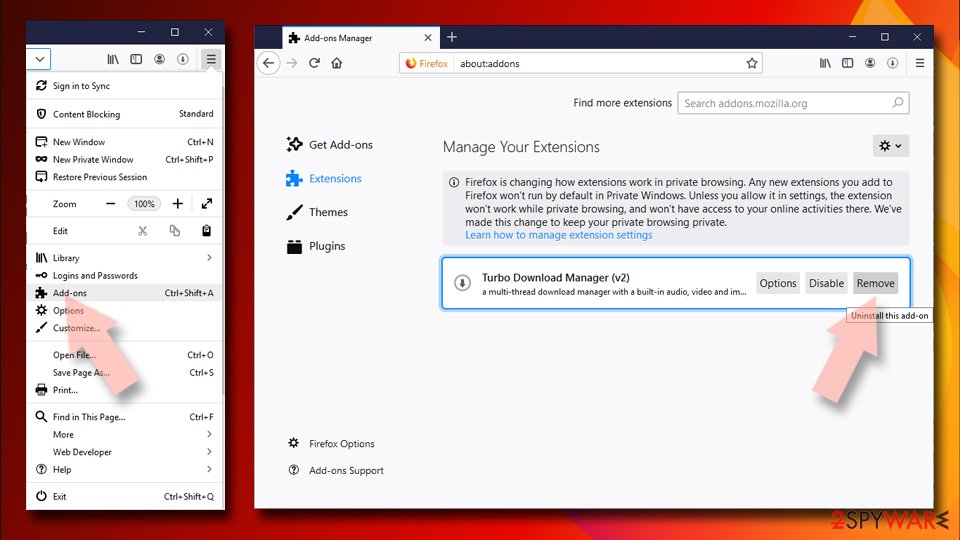
- Open Mozilla Firefox browser and click on the Menu (three horizontal lines at the window's top-right).
- Select Add-ons.
- In here, select the unwanted plugin and click Remove.

MS Edge (Chromium)
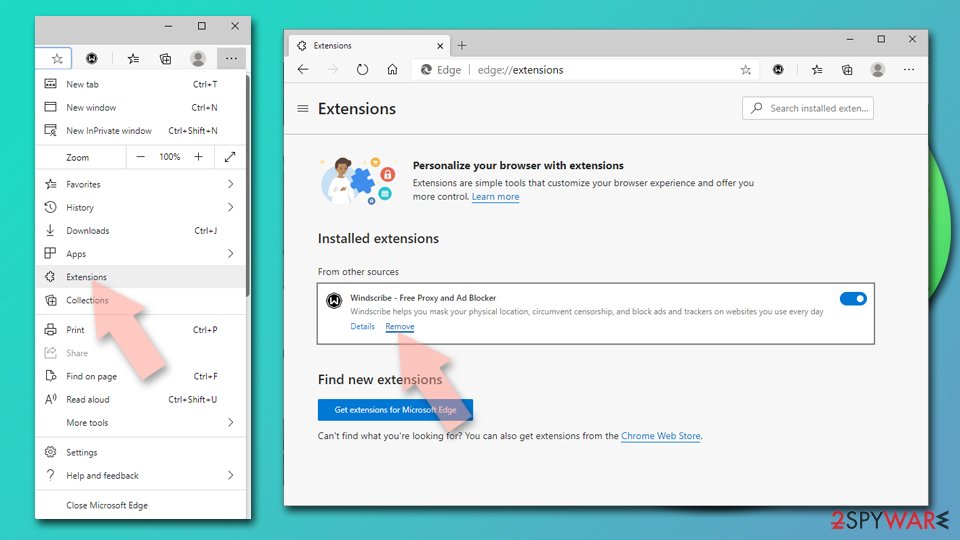
- Open Edge and click select Settings > Extensions.
- Delete unwanted extensions by clicking Remove.

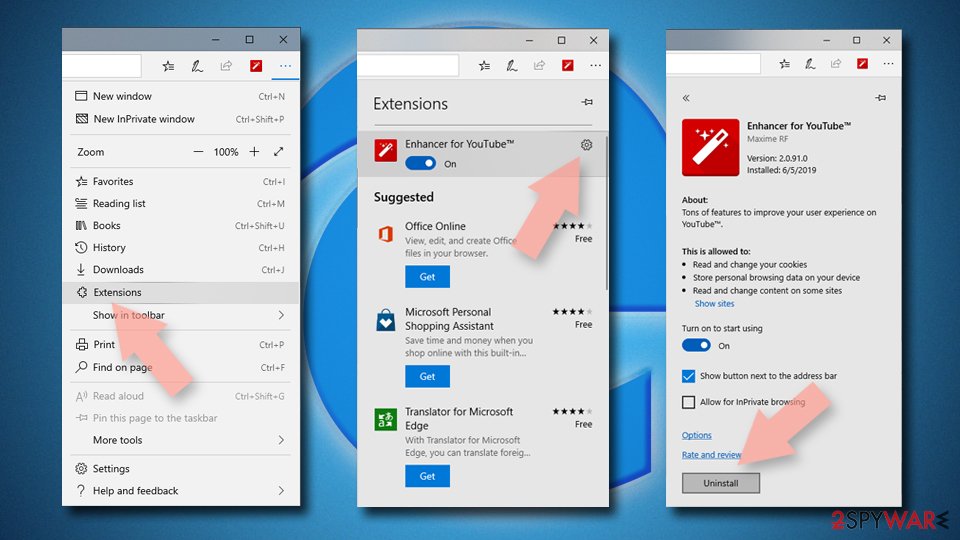
MS Edge (legacy)
- Select Menu (three horizontal dots at the top-right of the browser window) and pick Extensions.
- From the list, pick the extension and click on the Gear icon.
- Click on Uninstall at the bottom.

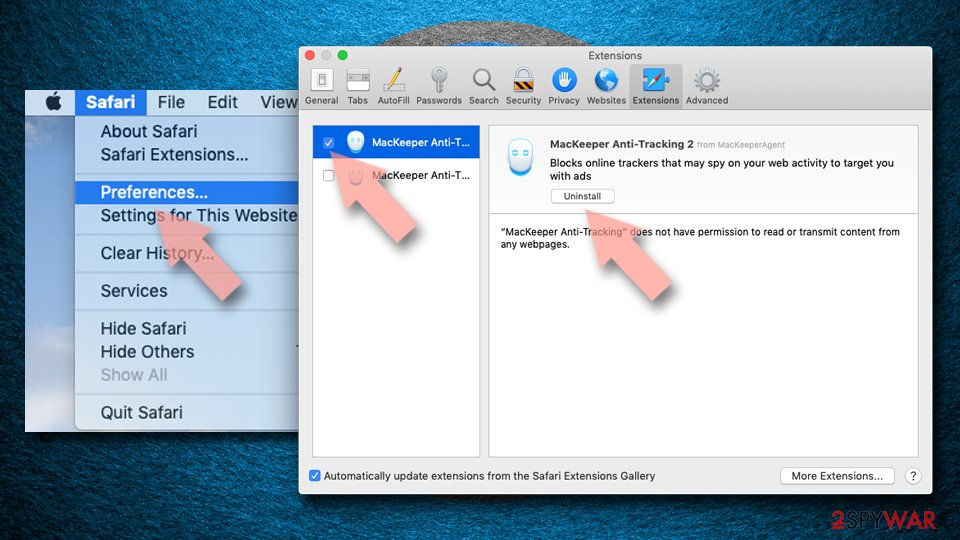
Safari
- Click Safari > Preferences…
- In the new window, pick Extensions.
- Select the unwanted extension and select Uninstall.

It is important to note that adware is commonly programmed to track user data as long as it is operational. For that, it uses cookies, web beacons,[2] JavaScript, and other technologies. Cookies, in particular, can stay on your browser indefinitely, although most of them do have an expiration date, which can be as long as ten years. Thus, removing cookies from time to time is advisable.
Removing web data is also recommended after the elimination of adware, browser hijackers, and other potentially unwanted applications. For a quicker solution, we recommend using FortectIntego PC repair and maintenance utility, which can fix the damage done to the system by malicious software and remove all the junk and other leftover files for you automatically.
Adware avoidance tips
While adware removal from the system is very important, you should also ensure that the infection probability in the future is minimal. Here are a few tips that can help you prevent the unintentional installation of adware:
- Avoid all illegal software distribution websites – torrents, warez, etc.;
- When downloading apps from third-party websites, keep in mind that freeware often comes in a packaged bundle;[3]
- During the installation process, always pick Advanced or Custom installation settings instead of Recommended or Quick ones;
- Watch out for pre-ticked boxes, misleading button placements, fine print text, and deceitful offers;
- Have a powerful security application installed at all times and keep it updated.
How to stop the push notifications from Arriedstro.work or other malicious websites
Once you have made sure that there is no potentially unwanted or malicious software installed on your system it is time to get rid of the annoying push notification problem. Many people try to remove these ads by scanning the system with security software but to no avail. This is because the push notification feature itself is not malicious and can't be removed.
What can be malicious is the contents of these push notifications. In order to stop them, all you have to do is access browser settings and then go to the site settings section. Below you will find the instructions for all major browsers on how to perform these steps.
Did this guide help?
Be the first to comment