

What is BitCryptor virus?
BitCryptor (can also be found as Bit Cryptor virus) is a malicious ransomware, which hails from the same family of ransomwares as Cryptolocker, Crypt0L0cker, Alpha Crypt, CryptoWall, TeslaCrypt and many other cyber threats. Beware that it can easily block each of your important files and then ask you to pay for the decryption key that is needed if you want to decrypt each of these files. If you have ever tried to imagine what the loss of your photos, music files, business or study documents would mean to you, you could realize what the infiltration of this threat would mean to you. That's why you should always double check the protection level of your computer and make sure that it is protected by a powerful anti-spyware. In addition, always make extra copies of your important files because there is no guarantee that BitCryptor ransomware won't appear on your computer. If you don't know how can you do that, there is a post that was dedicated for that: Why do I need backup and what options do I have for that?. If BitCryptor infiltrates the system (it usually does that thru its backdoors), it drops its files and modifies some of its settings. In addition, it runs its scanner and checks the system for these extensions that should be blocked: 3fr, accdb, ai, arw, bay, cdr, cer, cr2, crt, crw, dbf, dcr, der, dng, doc, docm, docx, dwg, dxf, dxg, eps, erf, indd, jpe, jpg, kdc, mdb, mdf, mef, mrw, nef, nrw, odb, odm, odp, ods, odt, orf, p12, p7b, p7c, pdd, pef, pem, pfx, ppt, pptm, pptx, psd, pst, ptx, r3d, raf, raw, rtf, rw2, rwl, srf, srw, wb2, wpd, wps, xlk, xls, xlsb, xlsm, xlsx.
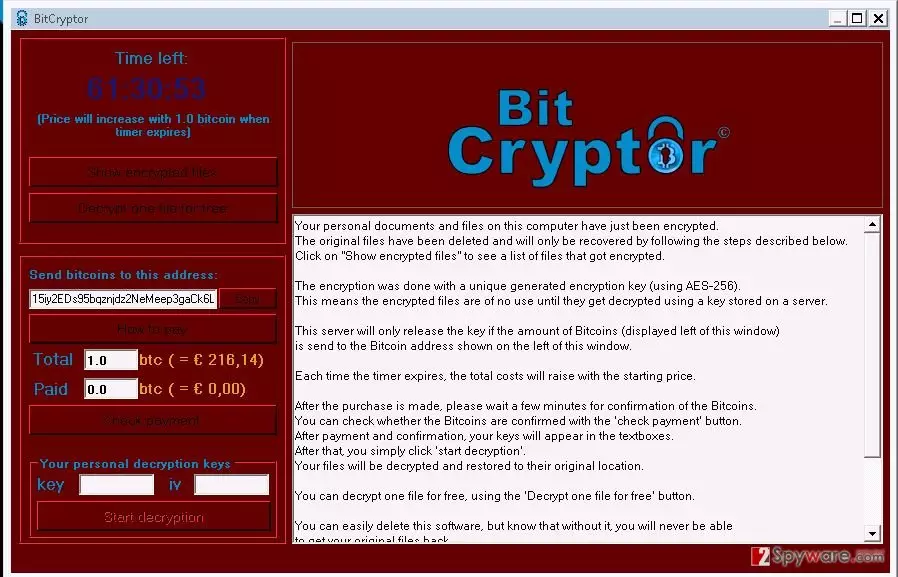
After doing so, it displays a huge warning message that asks to pay the ransom. The new thing about this malware is that it also stops each of these processes in Task manager: shadow, cmd, processhacker, mbam, sh4, spyhunter, msconfig, taskmgr, roguekiller, rstrui, regedit, procexp. So, you may find out that you can't launch Malwarebytes Antimalware, Spyhunter and other legitimate security programs and tools. If you want to recover your files, you should never pay the ransom because there is no guarantee that this will return the connection to your files. For that you should try these tools: R-Studio, Photorec or Kaspesky Ransomware Decryptor. In order to remove BitCryptor from the system, you should use SpyHunterCombo Cleaner or FortectIntego, which is compatible with Windows and Mac OS X.
How can BitCryptor infect my computer?
If you want to avoid BitCryptor ransomware appearance on your PC, you have to keep in mind that it has been actively spread with a help of fake alerts offering people to download the attachment in order to get more information about payments, contests, bills and similar thing. In fact, it's a widely-spread trick that is used for tricking people into downloading infected attachments. In addition, you should always avoid clicking links on such emails or misleading messages that may show up during your browsing. If the message claims that you have to update your Java or Flash Player, you have to ignore it because there is a huge possibility that it is seeking just to infect your computer with BitCryptor or at least a potentially unwanted program. Finally, make sure you stay away from illegal programs, suspicious websites and similar things that can lead you to the infiltration of Bit Cryptor malware or similar ransomware.
How to remove BitCryptor virus?
If BitCryptor ransomware or similar ransowmare has managed to trick you into downloading it to your your computer, you will notice this from blocked files. If you can't open your important documents, photos, music files or similar files, you are infected. The main thing that you should do in this case is to remove malicious threat from your computer. In order to do that, try using these steps.
We highly recommend thinking about the prevention of such infections like Bit Cryptor. For that you can use previously mentioned programs. Besides, don't forget to think about the immunity of your files and backup. For that you can use USB external hard drives, CDs, DVDs, or simply rely on online backups, such as Google Drive, Dropbox, Flickr and other solutions. More information about backups can be found in this post: Why do I need backup and what options do I have for that?
Did this guide help?
Be the first to comment