

BugWare ransom-demanding virus keeps evolving
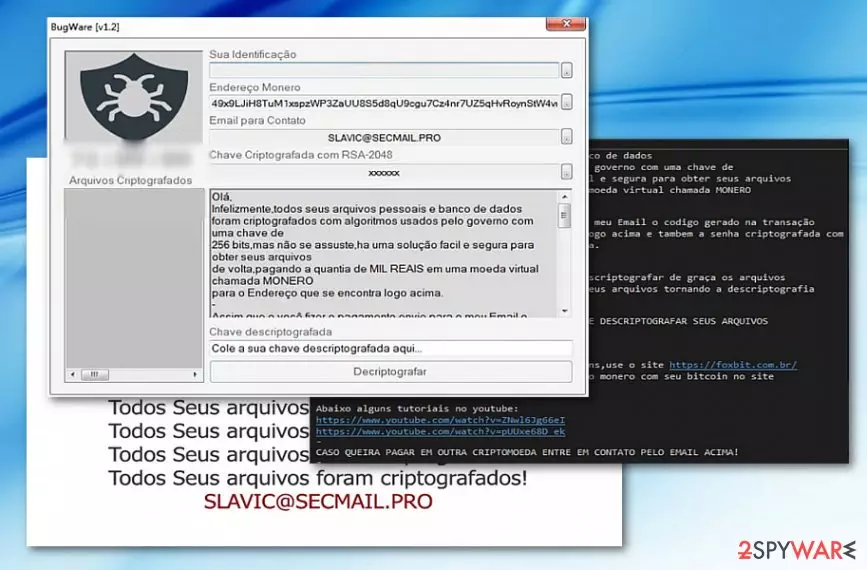
BugWare virus functions as a new file-encrypting threat targeting Portuguese[1] or Spanish speakers as the ransom note is written in the Portuguese and is believed to have originated from Brazil[2]. The malicious software commonly provides slavic@secmail.pro email address in its ransom notes as well as in file extensions it appends to encrypted files. Typically, encrypted files get marked with an additional .[email] + .Bugware or .Criptografado file extension.
Besides the main ransom picture which includes the logo of the virus and the same line “Todos Seus arquivos foram criptografados!” in a text block, it also opens its GUI called BugWare [v1.2] which includes victims’ ID, the email address – slavic@secmail.pro – Bitcoin address, and the ransom text.
The latter prefers the ransom in Monero, though another cryptocurrency is also accepted. Following the manner of older crypto-malware, it gives victims 72 hours for the payment.
What is more, it also includes a couple of links to the Brazilian page about bitcoins. There are also Youtube page links, but at the moment, they do not function. The perpetrators urge victims to pay the ransom as their data is encrypted with RSA-2048 cipher.
Currently, the threat is detectable as Generic.Ransom.CloudSword.5DE49FDD or Generic.Ransom.CloudSword.5DE49FDD, though some anti-virus tools identify it as a sample of HiddenTear. Interestingly, the malware travels via doc_2017100200000-15.pdf.exe file. Therefore, you should be wary that Bugware virus spreads via spam emails.
The perpetrators attempt to deceive users with fake invoices in .doc or .pdf. If this misfortune has already settled on the computer and converted your records into useless .Bugware file extension files, then, make a haste to remove Bugware virus. FortectIntego or MalwarebytesMalwarebytes helps you in this process.
Versions of BugWare virus
.Criptografado file extension virus. Criptografado ransomware emerged on October 12 and quickly proved to be an updated version of BugWare virus. The new version has a slightly improved user interface, although it still provides the same email address for the victims – slavic@secmail.pro. While the previous version asked the payment in Monero currency, Criptografado virus asks for bitcoins.
What is interesting about the new variant is that it added exceptions for several countries including the following: Argentina, Bolivia, Brazil, Chile, Columbia, Ecuador, Guyana, French Guiana, Paraguay, Peru, Suriname, Uruguay, Venezuela, Portugal, Guinea-Bissau, Angola, Cape Verde, Mozambique, Timor-Leste, São Tomé and Príncipe, and finally Equatorial Guinea. Based on the victim's IP address, the Criptografado malware decides whether to encrypt data on the computer or not.
Experts say that currently files locked by this variant cannot be decrypted, so all that is left to do is to remove Criptografado file extension virus using proper malware removal tools.
Ways the virus reaches victims' computers
Regarding the fact that the malware functions via the executable file which disguises as .pdf or .doc file, most likely, BugWare malware developers engage in spam campaigns. They might pretend to be the representatives of a national tax company or post office.
Recently, cyber villains have developed technique how to foist ransomware by breaking into users’ ongoing email conversations. Therefore, double-check the identity of a sender before opening email attachments.
Lastly, beware that ransomware threats also spread via trojans or with the assistance of exploit kits[3]. In order to limit the risk of encountering the malware, install security tools and update them. Below you will find advice how to complete BugWare removal.
Remove BugWare ransomware now
In order to get rid of this threat, you will need the assistance of malware elimination tool. Since the virus may meddle with the system files, you may not be able to launch the program at the first attempt.
In case you encounter BugWare removal difficulties, restart the system in Safe Mode. Then, you should be able to launch the program and eliminate the virus from Windows operating system. Note that the elimination does not recover the data. You may find a few suggestions below to restore your data. This procedure should be done only when you remove BugWare virus completely.
Did this guide help?
Be the first to comment