

Cammora ransomware is the variant of GarrantyDecrypt cryptovirus that appends files using .cammora extension
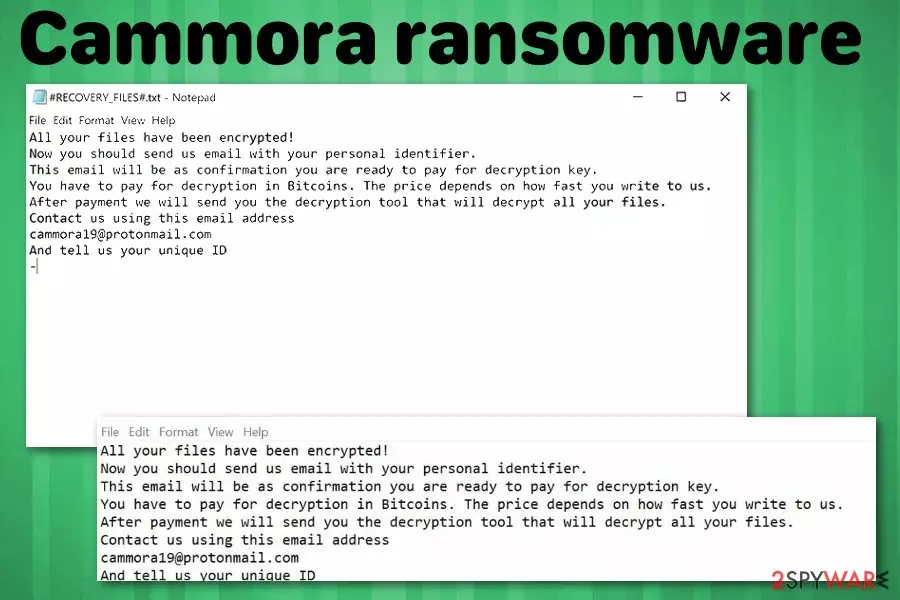
Cammora ransomware is the cryptovirus that appeared in the wild at the end of February. The ransomware that encrypts data using RSA encryption algorithm hails from the GarrantyDecrypt ransomware family which is known since October 2018. When all targeted files get locked and marked using .cammora appendix the ransom demand is generated. Like previous versions, Cammora virus delivers ransom note on the desktop in the form of a text file named #RECOVERY_FILES#.txt. Although instructions in the text file are short and brief, you shouldn't even consider paying the demanded ransom or contacting cybercriminals behind this threat. The ransom amount, based on previous versions can go up to $1500. Cammora19@protonmail.com is the contact email presented in the text file alongside personal identifier which is generated for each victim separately.
| Name | Cammora ransomware |
|---|---|
| Type | Cryptovirus |
| Family | GarrantyDecrypt ransomware |
| File extension | .cammora |
| Preferred currency | Bitcoin |
| Ransom note | #RECOVERY_FILES#.txt |
| Encryption method | RSA[1] |
| Contact email | Cammora19@protonmail.com |
| Other Versions | Cosanostra ransomware |
| Distribution | Spam email attachments with infected files |
| Elimination | Use reputable anti-malware and remove Cammora ransomware. Try FortectIntego for virus damage |
Since Cammora ransomware virus belongs to the category of crypto malware, it is obvious that cryptocurrency is the one that virus developers would like to get from their victims. In this particular case, cybercriminals demand payment in Bitcoin. Although the amount may differ from victim to victim, paying the ransom is never a good idea.[2]
Cammora ransomware developers use a complicated encryption algorithm for the file-locking process. RSA method is changing the original code of photo, video, music or text file and this way makes users' data locked. There is a possibility to get those files decrypted, but official decryption tool for this ransomware doesn't exist.
So you need to remove Cammora ransomware and focus on this process first. Then, you can worry about the encrypted data and recover these files from your backup on the external device. Also, we have a few data recovery methods listed below.
Remember that while Cammora ransomware is focusing on file encryption and ransom demand, it also changed various system settings that include:
- disabling security software;
- altering registry;
- adding new files on system folders;
- installing programs or even malware.
To reverse these changes and to remove virus damage, you should employ anti-malware tools for the proper Cammora ransomware removal. Fortect should be a tool that works for this job because it is based on the Avira antivirus program. This program detects previous versions in this family as malicious and can terminate them.[3]
Make sure to clean the system from Cammora ransomware and associated or related files, programs. Only after the proper malware elimination process, you can safely restore lost data using your backups or file restoring tools. Researchers[4] advise relying on professional tools and performing virus termination as soon as possible.

Cybercriminals deliver malware on safe-looking emails that appear legitimate
Ransomware-type cyber threats are known for the distribution technique that employs various spam email campaigns. Spam emails contain infected attachments and this way ransomware payload gets delivered on the targeted system. Emails look safe and legitimate because names like DHL, FedEx or eBay get used as the official sender and trick users into opening the notification.
Emails often pose as financial information, order receipt details from services and companies but the second you open the document attached to the email, you get an indicator that offers to enable the content. Unfortunately, malicious macros get enabled this way and malware script gets loaded on the machine.
The direct payload gets triggered this way, and ransomware starts encrypting files on the system immediately. However, it is possible that other types of malware get on your device with the purpose of further infecting the system with crypto malware. If you pay more attention to those questionable emails, you can avoid ransomware infiltration.
Eliminate Cammora ransomware and clean the system using the anti-malware program
When you receive a ransom note form Cammora ransomware virus developers, you should react immediately and employ professional help from antivirus programs. The sooner you get rid of the malware the better.
Unfortunately, Cammora ransomware removal requires attention and patience. Since this virus can make additional changes to your system, it can be persistent and difficult to delete. So, enter the Safe Mode with networking before scanning the machine to ensure the proper termination.
Finally, get professional anti-malware software from a trustworthy source and remove Cammora ransomware. FortectIntego, SpyHunterCombo Cleaner, or MalwarebytesMalwarebytes are the programs that we can recommend for this procedure because these tools have been useful for previous versions in GarrantyDecrypt family.
Did this guide help?
Be the first to comment