

How dangerous is Cerberos ransomware virus?
The name of the Cerberos ransomware might resemble the infamous Cerber virus. However, the research revealed that these two cyber threats are not related. Probably, authors of the virus wanted to make their program sound a little bit more dangerous. Talking about developers, it seems that the virus has been created by the same group of hackers who are responsible for Cyber SpLiTTer Vbs ransomware; thus, it is suspected to be an improved version. However, Cerberos malware behaves like an ordinary file-encrypting virus.[1] It usually infiltrates the system via malicious email attachments, and immediately starts data encryption. Virus aims at the home computer users, so it is designed to target the most popular file types, such as documents, images, audio or video files. In this case, ransomware can cause bigger damage to the users and have higher chances to receive demanded ransoms. We clearly understand that ransomware attack might be a shocking experience. But in this unpleasant situation,[2] it’s important to stay calm and focus on Cerberos removal. It’s important to scan the computer with FortectIntego or your preferred anti-malware program in order to secure your computer and personal details from further possible damage.
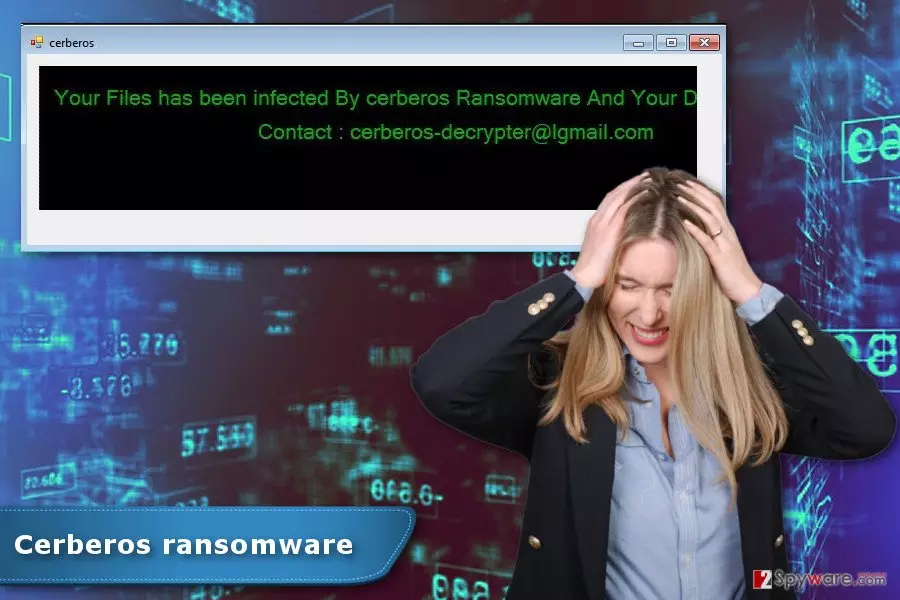
When Cerberos virus finishes encrypting files, it shows a ransom-demanding message in the application window. The window is called “cerberos” and includes few sentences to the victims. Hackers only inform people that their files are encrypted, and they need to contact criminals via cerberos-decrypter@lgmail.com email address. No matter how important your files are to you, you should never communicate with cyber criminals. We can assure that they won’t provide you free data recovery option. You will be threatened to transfer few Bitcoins and wait for the Cerberos decryptor. However, you can never receive this tool, but your money will be used for further cyber crimes.[3] Thus, you should remove Cerberos from the PC as soon as it delivers you a ransom note. Later you can try to use alternative recovery methods and at least get back some of the encrypted data.
How can you get infected with ransomware?
The biggest chances to encounter Cerberos ransomware is to click on a malicious email attachment.[4] Spam emails that include malware executable usually have an infected PDF attachment. The content of the letter always expresses the urge to confirm various details provided in the attached document and respond to the message immediately. However, once people are tricked and click on it, the virus sneaks the system and starts data encryption procedure. Apparently, it’s not the only one method how Cerberos virus spreads. The virus might also be hiding in the file-sharing websites, torrents, and other online sources that allow downloading software or files for free. What is more, malvertising is also widely used ransomware distribution technique. Thus, this crypto-malware might also be hidden under various ads on both insecure and legitimate websites. Therefore, if you want to decrease your chances of meeting file-encrypting virus, you should take some precautions[5] and do not take any harsh actions when browsing the web.
Cerberos removal guidelines
After Cerberos hijack, you might be worried about your files. Losing personal pictures or important documents might look like a disaster. However, you should not focus on paying the ransom and your chances to get back your data. The most important task after the attack is Cerberos removal. Ransomware makes computer’s system vulnerable and might be a reason for other malware attack. Thus, we highly recommend putting your privacy and computer’s safety first instead of encrypted data. Install FortectIntego, MalwarebytesMalwarebytes or other reputable security software and perform automatic malware removal. However, the virus can prevent you from deleting it simply. In this case, the guidelines below will whelp you to remove Cerberos from the system. Once the virus is gone, please use backups or try additional data recovery methods for data recovery. Sadly, official decryption software is not released yet.
Did this guide help?
3 comments
Brocton
I thought its a new version of Cerber. I am relieved.
Margaret
Not a Cerber, but it still looks nasty...
Mowgli
Cerberos encrypted my files...