

CerBerSysLock ransomware tries to impersonate notorious Cerber virus
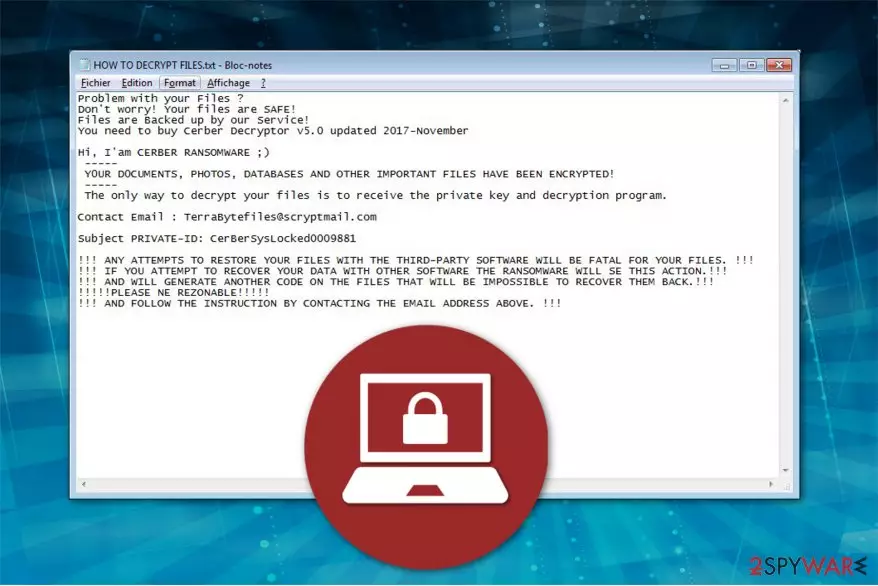
CerBerSysLock virus is a malicious program designed to compromise the most important files on the computer to demand a ransom. Experts spotted its activity in December 2017 — It uses XOR algorithms to encrypt data and appends .CerBerSysLocked0009881 file extension[1]. The victims receive HOW TO DECRYPT FILES.txt ransom note which encourages to contact the criminals via TerraBytefiles@scryptmail.com.
CerBerSysLock ransom note states the following:
Hi, I am CERBER RANSOMWARE;)
YOUR DOCUMENTS, PHOTOS, DATABASES AND OTHER IMPORTANT FILES HAVE BEEN ENCRYPTED!
The only way to decrypt your files is to receive the private key and decryption program.
You need to buy Cerber Decryptor v5.0 updated 2017-November.Contact Email: TerraBytefiles@scryptmail.com
Subject PRIVATE-ID: CerBerSysLocked0009881
Currently, the amount of the ransom is unknown. However, it is stated that the files can only be recovered with Cerber Decryptor v5.0. Note that you should not follow the rules of Xorist-CerBerSysLock since there are numerous reports when victims were asked to pay even more money or left without the decryption tool afterward.
Despite the fact that the virus introduces itself as the infamous Cerber ransomware, it is clear that it is merely an imposter. Experts believe that it is linked to another ransomware family Xorist which already has a CerberImposter called .Cerber_RansomWare@qq.com crypto-virus.

We suggest you not pay the ransom and remove CerBerSysLock immediately since there are alternative ways how you can recover your data. Pick FortectIntego and let it terminate the ransomware. Afterwards, you will be able to use the official Xorist decryptor for free.
You can find CerBerSysLock removal guidelines below this article. You should be aware that ransomware is dangerous. Thus, do not try to uninstall it by yourself. The elimination guide is free, and you should carefully follow it not to skip steps and make sure that your computer is safe.
Hackers send malicious emails to distribute ransomware
Experts from DieViren.de[2] report that users can get infected with file-encrypting viruses via spam emails which hold the malware inside. Usually, the victims are deceived by the letters since they imitate invoiced from famous brands or companies. Thus, once the bogus attachment is opened, ransomware installation begins[3].
Note that malspam campaigns are not the only distribution method employed by the criminals. They might also place the ransomware on sharing sites and trick users into downloading it with the help of a deceptive appearance of the legitimate program. Additionally, sponsored ads can be designed to redirect to a highly suspicious website and infiltrate malware as well.
Therefore, computer users should be extremely careful when browsing the Internet and take every precautionary measure possible. You can protect your computer from infections by following four steps:
- Use a robust security software and make sure that is up-to-date;
- Avoid downloading programs or files from peer-to-peer (P2P) networks;
- Stop clicking on ads which you might encounter on your frequently visited pages;
- Never open spam emails or their attachments if you find the letters suspicious.
Learn how to perform CerBerSysLocked removal
First of all, never try to get rid of the ransomware by yourself. This is a dangerous computer threat, and inappropriate CerBerSysLocked removal can damage not only your files but operating system as well. Likewise, we advise you to get help either from a certified IT professional or employ a powerful security software.
We recommend using FortectIntego, SpyHunterCombo Cleaner, or MalwarebytesMalwarebytes since they are reliable and time-tested. Experts note that it will only take several minutes for you to remove CerBerSysLocked and be able to proceed to the data recovery. However, you are free to use any other antivirus system if you are sure that it is trustworthy.
Also, do not forget to check the decryption instructions below. You will find multiple techniques to recover the corrupted data and finally if they do not help you can try official Xorist decryptor.
Did this guide help?
Be the first to comment