

The menacing behavior of CryptoBlock ransomware
Unfortunately, CryptoBlock ransomware happens to be a file-encrypting malware. It follows the manner of CryptoLocker as the ransom message is the same. Though there have been already multiple imitations of this notorious cyber menace, some of them failed to gain the same success [1]. However, the current malware should not be underestimated. It also exploits RSA asymmetric key for locking the files. Due to its complexity, finding the decryption tool is not an easy challenge. We highly discourage you from paying the money taking into account the profit Cryptolocker collected throughout its existence. Instead, focus on CryptoBlock removal. FortectIntego ensures the complete elimination.
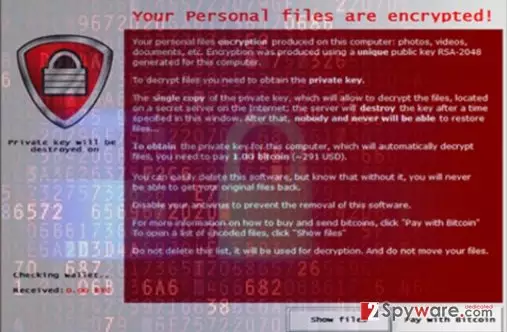
CryptoLocker serves as the source of inspiration for many crooks. While some succeed in making a powerful copy, others‘ creations get quickly terminated by virus researchers. However, such surge of this type of viruses only sparks more worries for the entire virtual community. Some explain such activity as the result of ransomware-as-a-service distribution [2]. In the case, of CryptoBlock ransomware, its key vitality lies in employing RSA-2048 asymmetric algorithm [3]. Like CryptoLocker, the current malware also exploits Command & Control server. Here you can take a look at the portion of ransomware message:
Your personal files are encrypted!
First of all, please do not remove this tool because if you delete it, you will never be able to restore your files again you can quickly remove this tool, but your files will be lost forever. If you want your files back do these steps 1-register a bitcoin account 2-buy bitcoin for yourself 3- send the exactly amount of bitcoin that tool show you, to our wallet. 4- Click the blue button after you send the bitcoin to our wallet. You will receive decryption code as soon as possible (1-3 hours later after purchase).
In order to exert more psychological stress on its victims, the virus sets a time limit for paying the ransom. Every 12 hours, if the gearheads do not receive the money, the size of ransom doubles. In overall, 24 hours are given for transmitting the payment. Otherwise, the files are deleted. At the moment, CryptoBlock malware demands quite a small amount of money – approximately 240 USD (0,3 BTC). Though some companies and users transfer the money, there are few reports whether crooks return the files [4]. Speaking of the file extension pattern, it does not attach any specific one but changes the file name and its format into a set of random numbers. Likewise, you should remove CryptoBlock instead of nurturing hopes about file recovery.
When did the ransomware invade my device?
Most likely, CryptoBlock hijack took place either after opening an infected spam email or visiting the domains full of exploit kits. In addition, Adobe flash plug-ins still remain a common tool for crooks to transfer ominous content to your device [5]. In the first case, you might avoid encountering file-encrypting malware if you restrain from opening spam emails. Keep in mind that crooks have mastered ways how to counterfeit emails so that they would look like an email sent from Office of Personnel Management or eBay. Usually, the crooks disguise ransomware in fake invoices and delivery messages. In order to protect your system from trojans and exploit kits, install an anti-spyware application.
Eliminating CryptoBlock: mission possible?
When it comes to crypto-malware, we recommend combining anti-virus utility with security applications such as FortectIntego or MalwarebytesMalwarebytes. They are more apt in detecting such threats as exploit kits or trojans which disperse ransomware. Either of this tool finishes CryptoBlock removal within a couple of minutes. Only when the threat is fully eradicated, you can proceed to file-recovery. If you cannot remove CryptoBlock due to some non-responding errors, feel free to use the following instructions.
Did this guide help?
Be the first to comment