

Cyspt ransomware – a cryptovirus which might be based on AresCrypt ransomware virus
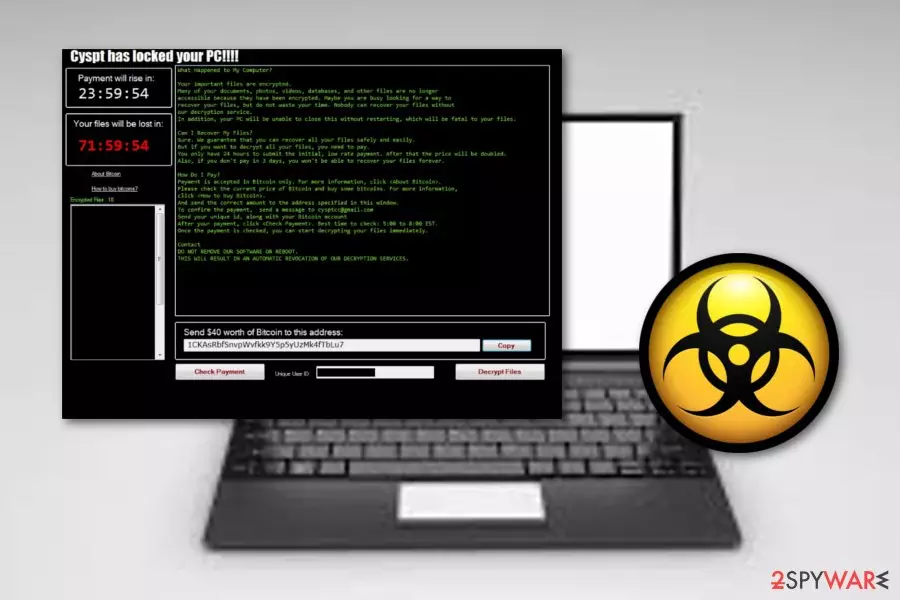
Cyspt ransomware, first discovered by MalwareHunterTeam, appears to be very familiar to an old cryptovirus called AresCrypt. Some researchers have even speculated that it is the same virus which has just been acting under a different name. This malicious program can infiltrate the system via infected files or hyperlinks. After a secret invasion, Cyspt virus performs the encryption process and adds the .OOFNIK extension to each document. Furthermore, the victim receives a message which announces that “Cyspt has locked your PC!!!” and claims that the only way to recover files is paying $40 (what a ridiculous price having in mind ransoms asked by other ransomware viruses) in Bitcoins to the developers. The cybercriminals have been using cysptcc@gmail.com email address as the main way to contact them. According to them, if no contact is made within three days, encrypted files will be permanently lost.
| Name | Cyspt ransomware |
|---|---|
| Type | Cryptovirus |
| Danger level | High. Infects the system and locks all valuable files |
| Related to | AresCrypt |
| Appendix | .OOFNIK |
| Ransom | $40 |
| cysptcc@gmail.com | |
| Detection | Use FortectIntego to determine if your system is infected. Warning: the anti-virus software does not recover encrypted files! |
Even though the urged price might look very funny, crooks have been threatening their victims that the ransom will rise if there will be a 24-hour delay. However, no matter that the ransom price is not big, we still recommend avoiding contact with the Cyspt ransomware developers. There still is a risk of getting scammed, and we guess that you do not want money loss, even if we are talking about the small amount of money.
In most of the cases, criminals have been urging for cryptocurrency transfers such as Bitcoin, Dash or similar cryptocurrency. Such payments do not require any particular details and let the entire process to remain anonymous and uncaught. So, as you can see, the crooks have all the conditions to carry out their illegitimate activities further. Remove Cyspt virus and do not let these people benefit from you.
After you are done with the Cyspt ransomware removal, you should find all malicious content that might be hidden in your system. Such viruses can leave various harmful files and launch unwanted processes behind your back. We recommend using FortectIntego to scan your computer and detect anything related to malware. However, feel free to use another tool if you are like.
Cyspt ransomware uses unique encryption[1] codes such as RSA, AES, or SHA, to lock up documents that are situated on the infected machine. After encryption, crooks store all unique keys on remote servers which makes them hard to identify. However, that does not mean that file recovery is impossible. We have provided some methods that should be helpful after losing files below the text.
After you do everything to get rid of Cyspt ransomware, make sure you prepare your computer and files that are kept there for the future. Install reliable antimalware to avoid other possible infections. Furthermore, gather all important data and copy it to somewhere safe, for example, and cloud,[2] external hard drive or a simple USB drive. Here, you will be the only one to access that information.

Malicious attachments spread ransomware infections silently
According to tech experts,[3] ransomware is mostly spread via infected files or links which come together with a rogue email message. Do not open any suspicious-looking letters if you want to avoid possible danger. Some crooks pretend to be from reliable organizations, however, you still need to consider – were you expecting to receive anything lately or were you not.
Other ways to avoid ransomware infections are:
- by staying away from unsafe pages. P2P networks[4] and other sources often lack recommended protection and might distribute malware anywhere;
- not pressing on every link you overcome as they might be also infected with malware;
- updating software and various applications regularly;
- not downloading any anti-malware tools from untrusted websites.
Get rid of Cyspt virus by using automatic removal option only
Keep in mind that the Cyspt ransomware removal should be performed automatically only. The manual technique is not possible for this case as the infection might be too hard to eliminate on your own, especially for less-experienced users. Nevertheless, these cyber threats are very likely to leave many malicious components, files, and other objects in the system.
Remove Cyspt virus as soon as you spot that your files are locked with the .OOFNIK extension and a ransom note pops out. Furthermore, you can try downloading and installing some tools for fast malware detection. We offer trying one of these programs:
Did this guide help?
Be the first to comment