

What is known about DMA-Locker ransomware virus?
DMA Locker virus (also known as MadLocker ransomware) is dangerous computer infection that takes user’s files to hostage and then asks to pay the ransom. The virus is supposed to be a new version of powerful cyber threat – CryptoLocker virus. Compared to other active ransomware viruses, it has two dangerous and threatening features – it has a Direct memory access (DMA) and asks for enormous ransom for file decryption. Usually, ransomware launches their attacks and rely on their success only by a dropped malicious file on an infected computer. DMA-Locker virus operates on directly in affected computer’s memory. Virus researchers spotted this virus at the beginning of 2016, and since then, hackers have already updated malware several times. Malware can step into a computer as a Trojan horse or might be delivered in malicious spam email. Once inside, it starts scanning computer’s system and looking for important files. Then, it encrypts them using strong algorithm and appends !XTPLOCK5.0 file extension. Virus corrupts the files and makes them useless unless a victim will purchase a decryption key for 15 Bitcoins ($7000). This time hackers became greedy and asked at least five times more money than other cyber criminals. Usually, the ransom varies from 1 to 3 Bitcoins, which is also a huge sum of money. However, we strongly discourage from paying the ransom. No one can guarantee that crooks will help you to get your files back. Instead of looking for money, remove DMA-Locker from the system. For virus elimination you have to employ an anti-malware program, for example, FortectIntego. It finds and deletes all malicious files related to this threat.
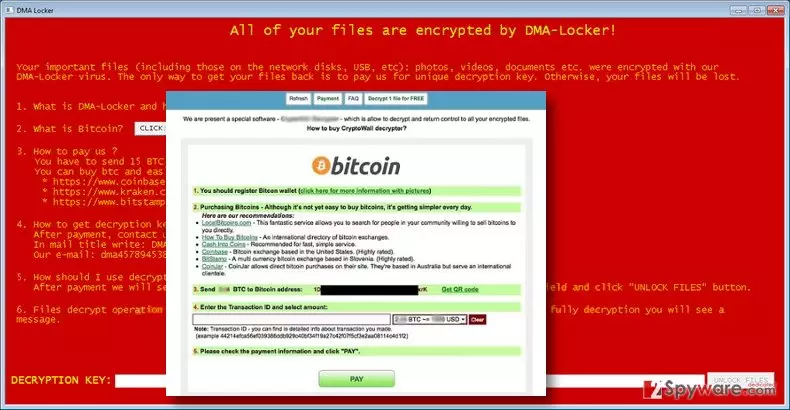
For data encryption ransomware uses combined AES and RSA chippers. It targets personal files that are located on PC and network devices. DMA Locker ransomware encrypts various video, image, text and other types of files, for example: .xls, .tif ,.gif, .png, .jpg, .jpeg, ,.bmp, .raw, .max ,.accdb ,.db ,.dbf, .3dm, .mdb, .sql, .wma ,.ra ,.avi, .mov, .3g2, .pdb, .mp4 ,.3gp, .asf ,.asx, .mpeg, .pdf. After the attack, in each folder that stores corrupted files, you will find a ransom note in .txt and .html formats. Both of them include the same scary information and try to swindle a huge amount of money:
The only way to get your files back is to pay us for unique decryption key. Otherwise, your files will be lost.
Cyber criminals are not worth trusting. Even if hackers provide necessary decryption software, you might also get additional malware with it. After the attack, you should concentrate on DMA Locker removal. Bear in mind that data decryption is not recommended while malware residents in the system. Ransomware might encrypt your files again and ask for more money. Besides, there’s no need to consider paying the ransom, because there are free decryption tools that are created for recovering corrupted data.
Variants of DMA-Locker virus
DMA Locker 3.0. This version of ransomware was discovered in February 2016. It showed up right after IT experts had discovered a DMA Locker decryption tool. Surprisingly, they moved from the first version straight to the third version, which is known to rely on the AES-256 algorithm. Beware that DMA Locker 3 targets a wide range of files and can easily encrypt various documents, images, audio and video files and image file. When it comes to infiltration, the virus uses a trojan horse that infects computers as a legitimate attachment to an email message. The DMA Locker 3.0 decrypt key costs around 4 BTC.
DMA Locker 4.0. The fourth version of DMA Locker was released in May 2016. Reportedly, it spreads via Neutrino Exploit Kit and encrypts a wide range of victims’ files. This version of DMA-Locker virus demands 3 BTC in exchange for the decryption key and promises to increase the ransom if the victim fails to pay the ransom within the given period. Once the time passes, virus increases the amount of ransom to 4.5 BTC. Unfortunately, cyber security experts haven’t presented a DMA Locker 4 decrypt tool, but we hope to see it soon. In the meanwhile, you should make sure that you have extra copies of your most valuable files to prevent their loss.
How does this cyber threat spread?
You can get infected by this virus in case you tend to explore dangerous content on the internet. You have to keep in mind that cyber criminals develop various ways to enter users’ computers. So you have to be prepared and be wary of prevention ways.
- Most commonly, ransomware threats are being spread via malicious e-mails, which contain deceptive attachments. They might look like ordinary documents, PDFs, and other regular files. However, such attachments hold infectious self-extracting components. You should never open such e-mails or attachments!
- Bear in mind that developers of DMA-Locker virus use social engineering tactics, so their messages might be very convincing and persuasive. So, it’s easy tricked by the criminals!
- Viruses might also spread via rogue websites. Do not click on doubtful links on web pages full of gambling and pornographic content.
- Install software on your computer ONLY using “Advanced/Custom” settings and untick suspicious add-ons.
DMA-Locker elimination guide
You need to remove DMA-Locker virus before attempting to do anything else. You must eliminate it completely to be sure that it will not cause harm to your system later. That is why we strongly recommend you to remove DMA Locker automatically. Automatical removal requires employing strong and reputable anti-malware tools such as FortectIntego, SpyHunterCombo Cleaner or MalwarebytesMalwarebytes. Of course, you can use another antivirus program that you prefer. However, sometimes ransomware might block access to security tools or prevent from scanning computer’s system. Below the article you will find instructions how to solve this issue and run the program.
After DMA Locker removal, you can get your files back from a backup, or decrypt them with this DMA Locker decryption tool. If this one doesn’t work, try this DMA Locker decryptor. Use these tools or plug your backup device into your PC only AFTER you remove the virus.
Did this guide help?
4 comments
ChristianSi
Whoa, I need to change my browsing habits. I do not want to get infected...
pitto
scary virus. So how do I know which websites are dangerous and which ones are not?!
ACe
One of my friends got infected by opening an e-mail that came from a FRIEND. How would you explain this, 2-spyware?
2-spyware
Dear user,
we are sure it was a WORM. It is a different kind of malware. For example, one of the most popular worms that has infected massive amount of PC users all over the world was called I LOVE YOU. This worm was spread via e-mail, too, and it silently copied victims contacts list and sent the malicious letter including the LOVE-LETTER-FOR-YOU.TXT.VBS file for them. This ransomware does not do that (at the moment of writing).
2-spyware team.