

Donut ransomware – a virus that packs your files using an encryption algorithm
Donut ransomware is a virus that seems to be based on HidenTear ransomware project. It demands you to pay the ransom after data encryption. For this encryption, process ransomware uses a specific algorithm and during this encoding .donut file extension is placed. These files can be anything and everything: images, photos, videos, text files, archives. Same as other ransomware this one aims to hold on to your data and earn money. After the encryption files become useless and possibly not decryptable. Cybercriminals demand victims to pay 100 US dollar worth in Bitcoin. Virus developer states in their ransom message that this is the only way to get unique decryption key.
| Name | Donut |
|---|---|
| Type | Ransomware |
| File extension | .donut |
| Contact email | donutmmm@tutanota.com |
| Danger level | High. Can access Windows registry key settings, lead to permanent data loss |
| Distribution | Spam email attachments, insecure advertisements. |
| Symptoms | Blocked access to files |
| Elimination | Best tool for virus removal FortectIntego |
Although, the cybercriminals[1] demands money and suggest that this is the only way to get your safety back we do not recommend to pay any ransom to these people and do not contact them in any way. Ransomware can contain other programs, files or tools that could do more damage to your system and work behind your back. Also, this virus can not only encrypt your necessary files but also change Windows Registry key[2]. This is the reason you should do Donut ransomware removal as soon as possible.
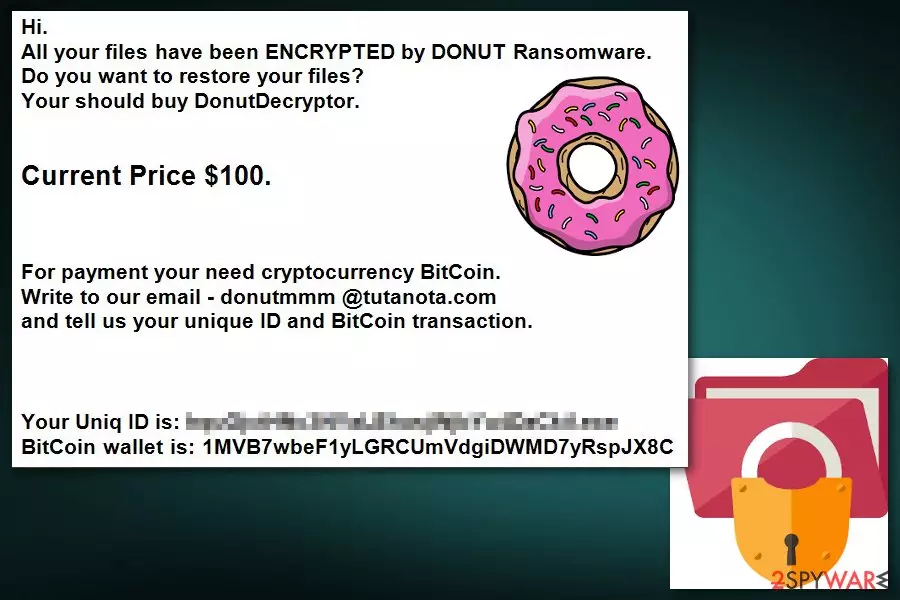
Donut virus usually gets into the system when a person opens a malicious email attachment. Immediately it starts data encryption procedure and drops a ransom note where crooks inform about a necessity to pay the ransom in exchange for decryption software in the lock-screen:
Hi. All your files have been ENCRYPTED by DONUT Ransomware Do you want to restore your files? Your should buy DonutDecryptor.
Current Price $100.
For payment your need cryptocurrency BitCoin. Write to our email – donutmmm @tutanota.com and tell us your unique ID and BitCoin transaction. Your Uniq ID is: BitCoin wallet is: [redacted]
Viruss.lv[3] security specialist warns that these people are dangerous and cannot be trusted. After the payment, they might disappear, and you might not get a decryption key. Thus instead of contacting them via donutmmm@tutanota.com, you should remove Donut ransomware.
Virus elimination won't recover your files, but it's an important task to make sure that malware does not cause more harm to more significant parts of your system. After the infiltration, Donut ransomware virus makes numerous changes to your computer and makes the system vulnerable. Therefore, your machine might not only become sluggish but vulnerable to other cyber threats too.
Although file recovering is not easily doable we highly recommend focusing on Donut ransomware removal instead of looking for the decryption tools. For our knowledge, there is no official decryption tool that is safe to use yet. The most reliable way for file recovery is backups on an extra drive. Also, we provided a couple of methods for file restoration below that might help if you have no backup files. You can use FortectIntego as the first step in virus elimination.
Suspicious emails lead to high-risk infections
Usually, spam emails look legitimate and contain ordinary attachments, but even those familiar Word files can be infected with malicious macros that install various malware to your computer system immediately after opening. This means that you need to be careful and cautious with unknown emails. Be aware that spam folder in your email box is dangerous, so do not open them and delete all letters without any clicking on advertisements or attachments.
You need to be cautious before these attacks, so you are prepared for cyber infections in advanced. File backing can be a good idea when your files are accidentally lost or encrypted by the malicious ransomware. Safely stored on the external drive your data can be recovered at any time. Be cautious and make sure that your anti-spyware tools are updated in time.
Donut ransomware elimination procedure
To remove Donut ransomware successfully, you should use professional anti-malware tools like FortectIntego, SpyHunterCombo Cleaner or MalwarebytesMalwarebytes. You can use other programs, but it is vital to trust providers you know are legitimate. These tools can help to get rid of every little thing that relates to this malware. This can ensure that when you recover your files from a backup, your data would not be destroyed. If the system is not safe, your backup drive can be damaged, and you lose your files permanently.
To avoid any possible threats in the future after you did the correct Donut ransomware removal, you should update your anti-virus or anti-spyware tools and use them in the future often. The full system scan can be a perfect way for infection prevention. Follow our guide below that could help you to get rid of this virus entirely and recover your lost files. It is important to do quickly as possible, so there are not many changes done to your OS.
Did this guide help?
Be the first to comment