

Ersolpick.live shows misleading messages to make visitors provide their personal details or download unwanted software

Users are at risk of being deceived by Ersolpick.live, an online fraud website that seeks to mislead users in a variety of ways. People usually reach this site after clicking on a link from another website or if their system has malicious software installed (frequently adware).[1] They then see the false claim that they have won some valuable prize from Google, Amazon, or other established companies.
Ersolpick.live often claims that users have been randomly chosen to receive a free, expensive item such as an iPhone, PlayStation, or TV – this can be tempting for some people and make them feel lucky enough to benefit from a generous gift. However, their real aim is far more sinister; they are trying to dupe individuals out of personal information like email addresses and home addresses which could then be used by cybercriminals. Even worse still, many times they require payment in return for these “free” gifts.
Please refrain from interacting with any contents of the page and instead, check your system for infection. If you have already provided your personal details, for example, we'll provide a few tips on how to deal with this situation as well.
| Name | Ersolpick.live |
| Type | Scam, phishing, adware |
| Operation | Claims that the user has been selected for a free gift; those who proceed to reclaim the alleged gift are asked to provide personal details |
| Distribution | Adware, redirects from other websites, malicious links |
| Dangers | The objective of gift scams is typically to steal personal user information, but scammers might also lead users to harmful or inaccurate websites. This can result in privacy risks, virus infections, and financial losses |
| Removal | To remove unwanted apps manually, you can follow our removal guide below. If the unwanted ads and other disruptive behavior do not stop, you should scan your computer with SpyHunterCombo Cleaner security software and delete all threats automatically |
| Tips | Use FortectIntego to clean your system from data trackers and fix any damage done by adware or other malicious software |
Upon entering Ersolpick.live, you could receive the following message:
You've made the 9.68-billionth search!
Congratulations! You are the lucky winner!
Every 10 millionth search is reached worldwide, we will proclaim a winner to send out a thank-you gift.
Please select your lucky prize below and claim it by following the instruction.
This is nothing more but a scam – You've made the 9.68-billionth search one to be precise. Note that this website can host a variety of similar or entirely different scams, such as “Congratulations, you won” although all of the messages are fictional.

Fake giveaways and other online fraud: what to look out for
Fake giveaways online are a popular scam that has been in use since the early days of the internet. These scams often go by different names, such as phishing scams and online lottery frauds.
The premise is simple: an individual or organization will create a website offering something for “free” – usually money or goods – in exchange for information or a fee. In most cases, the people behind the giveaway are not actually giving away anything of value at all. Instead, they’re trying to collect personal information from unsuspecting victims and use it for financial gain.
Fake giveaways can be difficult to spot, especially if you don’t know what to look for. Here are some tips to help you avoid falling victim to a fake giveaway scam:
- Verify the source. If the giveaway isn’t posted on an official website or social media page, be wary.
- Check for contact information. Legitimate giveaways will include contact information, such as an email address or phone number. Be sure to call or email the person behind the giveaway before signing up.
- Research the company or organization running the giveaway. Make sure it’s a legitimate business with a good reputation.
- Never give out personal information. Be very wary of giving out your full name, address, phone number, credit card details, or other information that could be used to steal your identity.
- Don’t click on suspicious links. If the giveaway requires you to click a link, make sure it’s authentic and doesn’t take you to a malicious website.
By following these simple tips, you can help protect yourself from becoming a victim of online fraud. If you think you may have been scammed, contact the authorities immediately to report the incident. The sooner you act, the better your chances of recovering any money or goods that were stolen from you. Don’t be fooled by fake giveaways – take steps to protect yourself.
Redirects to Ersolpick.live might be caused by adware infection
Individuals seldom visit scam websites deliberately, yet a few risk-takers browse torrents, illegal video converters, and other hazardous places. These are jam-packed with malicious scripts and booby-trapped links that divert users away from their original destination – this is one of the primary causes of redirections to Ersolpick.live or similar sites.
In other cases, adware could also be the cause of redirects to suspicious sites and an increased number of ads you encounter while you're browsing the web. To ensure that your system is secure and adware and malware-free, please scan it with SpyHunterCombo Cleaner, MalwarebytesMalwarebytes, or another reputable anti-malware.
Take care of your privacy
If you have already exposed your personal details, you should be wary that they could be abused by cybercriminals. While it is unlikely that you would get any funds from your bank account stolen, your contact details, such as email, phone, or even home address could be used to further target you with phishing[2] campaigns and regular fraud schemes.
Therefore, be prepared and be wary that this can happen – never provide any further details about yourself if you are not absolutely sure that the call, email, or online message is coming from a legitimate source.
Another good practice is removing cached data from your local device to ensure that no cookies[3] or other trackers from these malicious websites like Ersolpick.live remain. To quickly and easily delete this data, you can use the PC repair and maintenance utility FortectIntego, although manual steps are also available below.
Google Chrome
- Click on Menu and pick Settings.
- Under Privacy and security, select Clear browsing data.
- Select Browsing history, Cookies and other site data, as well as Cached images and files.
- Click Clear data.


Mozilla Firefox
- Click Menu and pick Options.
- Go to Privacy & Security section.
- Scroll down to locate Cookies and Site Data.
- Click on Clear Data…
- Select Cookies and Site Data, as well as Cached Web Content and press Clear.


MS Edge (Chromium)
- Click on Menu and go to Settings.
- Select Privacy and services.
- Under Clear browsing data, pick Choose what to clear.
- Under Time range, pick All time.
- Select Clear now.


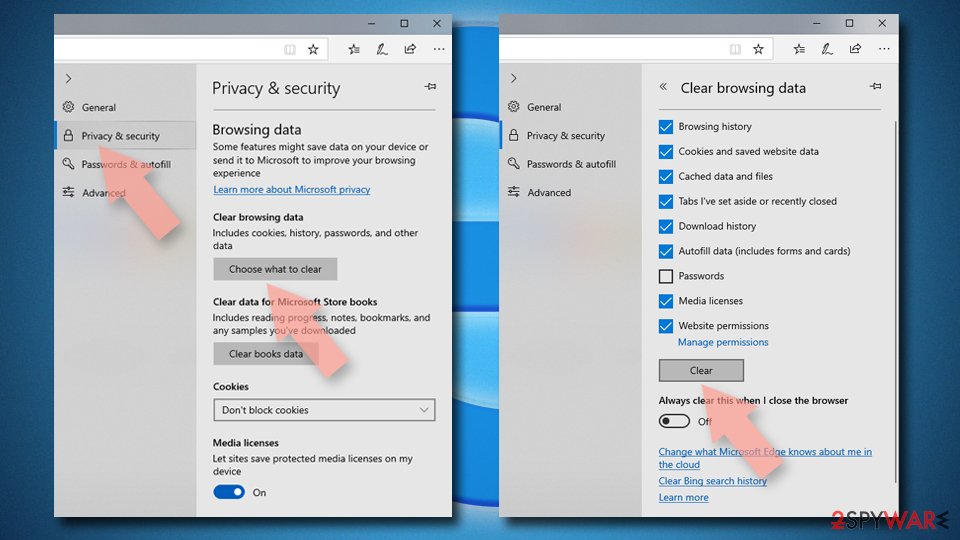
MS Edge (legacy)
- Click on the Menu (three horizontal dots at the top-right of the browser window) and select Privacy & security.
- Under Clear browsing data, pick Choose what to clear.
- Select everything (apart from passwords, although you might want to include Media licenses as well, if applicable) and click on Clear.

Safari
- Click Safari > Clear History…
- From the drop-down menu under Clear, pick all history.
- Confirm with Clear History.


Did this guide help?
Be the first to comment