

Forma ransomware is a new crypto virus that uses .locked extension and targets Polish users
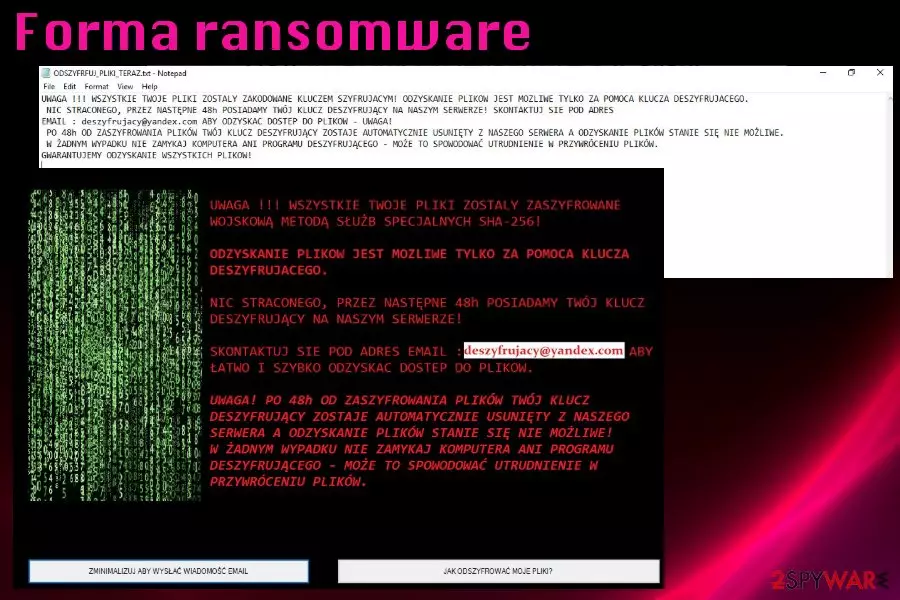
Forma ransomware is yet another file locker that is based on HiddenTear open source virus. This time, however, it targets Polish computer users exclusively. Malware employs AES encryption[1] algorithm for data locking process and appends a .locked extension to all photos, videos, databases, documents, etc., preventing victims from accessing any of personal files. Forma virus changes the desktop wallpaper and drops a ransom note ODSZYFRFUJ_PLIKI_TERAZ.txt which explains to users how to retrieve the encoded data. Experts highly discourage users from contacting cybercriminals, especially when security researchers can help victims with file decryption. Note that the added .locked extension is used by several other viruses, so you should check your ransom note for the correct virus name.
| Name | Forma ransomware |
|---|---|
| Type | Cryptovirus |
| Related | .Locked virus |
| File extension | .locked |
| Ransom note file | ODSZYFRFUJ_PLIKI_TERAZ.txt |
| Encryption method | AES |
| Targeted users | Polish |
| Contact email | deszyfrujacy@yandex.com |
| Distribution | Spam email attachments, unsafe sites, exploits, etc. |
| file decyption | Data decryption is possible by using backups or third-party software. However, users should also try contacting Michael Gillespie for a free decryptipn |
| Elimination | Use FortectIntego and remove Forma ransomware |
At first glance, the infected victims can quickly see that Forma ransomware is designed for Polish, as the ransom note and the wallpaper text is written in Polish. Additionally, “Forma” means “From” in Polish.
As soon as files get locked, Forma virus opens a full-screen window displaying detailed instructions on how to proceed next. Users can also view this information on the ransom note ODSZYFRFUJ_PLIKI_TERAZ.txt. Here's the translation of the message:
ATTENTION !!! ALL YOUR FILES WERE CALLED WITH A CHARACTER KEY! RECOVERY OF FILES IS POSSIBLE ONLY WITH THE AID OF A DESZYRUIZING KEY. NOTHING LOST, BY THE NEXT 48h, WE HAVE YOUR KEY THAT IS TRANSFERS ON OUR SERVER! CONTACT EMAIL ADDRESS: deszyfrujacy@yandex.com TO RECOVER ACCESS TO FILES – ATTENTION! AFTER 48 HOURS FROM FILE ERASING, YOUR SATISFACTION KEY IS AUTOMATICALLY DELETED FROM OUR SERVER AND THE RECOVERY OF FILES IS NOT POSSIBLE. IN NO EVENT, DO NOT CLOSE A COMPUTER OR A DESIRACKING PROGRAM – IT MAY CAUSE THE IMPROVEMENT IN THE RETRIEVATION OF FILES. WE GUARANTEE THE RECOVERY OF ALL FILES!
Even though Forma ransomware developers suggest contacting them and paying the ransom, you shouldn't do so because it gets you nowhere.[2] Contacting cybercriminals or even paying them might result not only in data but also in money loss, as they are not obligated to pay you. Instead, contact security researcher Michael Gillespie or use third-party software.
Researchers[3] always advise removing malware as soon as possible because malware like Forma ransomware can render your machine vulnerable to other cyber infections.
Once you remove Forma ransomware you can revert the changes done on your device:
- registry entries;
- scheduled tasks;
- disabled functions and programs;
- stop spawned process, and similar.
The best Forma ransomware removal results can be achieved using professional anti-malware tools. Programs like FortectIntego or similar antivirus software helps in virus elimination process because it detects all dangerous files, applications and removes them from the computer safely. Also, check additional malware termination tips down below.

The main email spam goal is to trick users into installing malware
In most cases of cyber infections, malware is distributed via the internet. When it comes to trojans, crypto mining malware or ransomware infections spam emails with infected attachments spread the code widely and quickly. Email scams are often used to demand payments from victims directly,[4] but emails that distribute malware are set to trick users into opening attached files.
When the safe-looking document or PDF is opened, it redirects to direct payload download or installs malware directly on the device. These MS documents like Word or Excel contain macro viruses and spread various cyber threats without your permission or even knowledge.
There is a way to avoid cyber infections like this because you can exit the suspicious email or don't even open it in the first place. However, if you downloaded the file from the questionable email, you can scan it before opening to avoid the additional virus infiltration.
Use reputable anti-malware to eliminate Forma ransomware
The best option for Forma ransomware removal is professional anti-malware tools with virus elimination functions because of the additional changes ransomware makes on the computer. Since this is a virus that can change Windows Registry keys and disable your antivirus, you may also need to reboot the machine in Safe Mode before a full system scan.
To remove Forma ransomware, download and install FortectIntego, SpyHunterCombo Cleaner or MalwarebytesMalwarebytes. Then, scan the system fully using one of these tools and follow the suggested steps. These tools indicate all possibly dangerous programs or files and delete them from the computer completely.
When Forma ransomware virus is eliminated from the machine, you can try restoring your files lost due to the ransomware. The best option is to replace encoded files with data from the backup on external device or cloud service. However, we have a few additional methods if you have no file backups. Follow our guide and delete all intruders from the system.
Did this guide help?
Be the first to comment