

Gryphon ransomware “steals” file extensions from other viruses
Gryphon virus is a new computer infection with an aim typical to most cyber infections – making a substantial and effortless profit. Technically, it is known as ransomware [1]. For the communication with their victims, hackers indicate email addresses: decr@cock.li and decrsup@cock.ll.
The same email address is featured next to the files that undergo a complex encryption process: documents are appended with [decr@cock.li].gryphon extensions. More recent ransomware versions add .crypton file extensions on encrypted records.
Malware experts believe that this cyberthreat might be related to the BTCWare ransomware family as it is build using the code of this infamous virus. Due to such obvious relations, some people are already relabelling this malware as BTCWare Gryphon virus.
Currently, the virus experts are aware of one Gryphon virus version which spreads around as payload.exe file. Once this executable manages to infiltrate the computer, it enables the ransomware to start encrypting files and, eventually, display a ransom note demanding money for data decryption.
Experts have been monitoring this cyber infection for a while, and the mentioned features are major improvements compared to the initial virus version (Test ransomware) which added .[test].gryphon extensions to the computer files and had no defined interface, to begin with.
If you find your files encrypted, don’t allow yourself to be manipulated by the cyber criminals and remove Gryphon from your PC before the parasite receives additional updates. Use FortectIntego or MalwarebytesMalwarebytes to fix your device.
Gryphon makes a diversion by adding .cryptON extension
If you follow the trends in the IT sphere, you may recall that each ransomware has a distinguishable feature – different file extension. Nonetheless, there are cases, when a couple of the same family viruses or even different crypto-malware append the same extensions. Relatively new Gryphon virus happens to behave likewise as well.
It attaches %s.[gladius_rectus@aol.com ].crypton extension similar to the one attached by a different virus – CryptOn ransomware. It presents its demands in HELP.txt file. After the victims are ready to transfer the money, they are instructed to contact the perpetrators via gladius_rectus@aol.com or gladius_rectus@india.com.
While there are no major improvements, the authors have employed a different RSA key for encrypting the AES which lowers the overall Gryphon decryption probabilities. Luckily, the new variant is already detectable by multiple cyber security utilities.

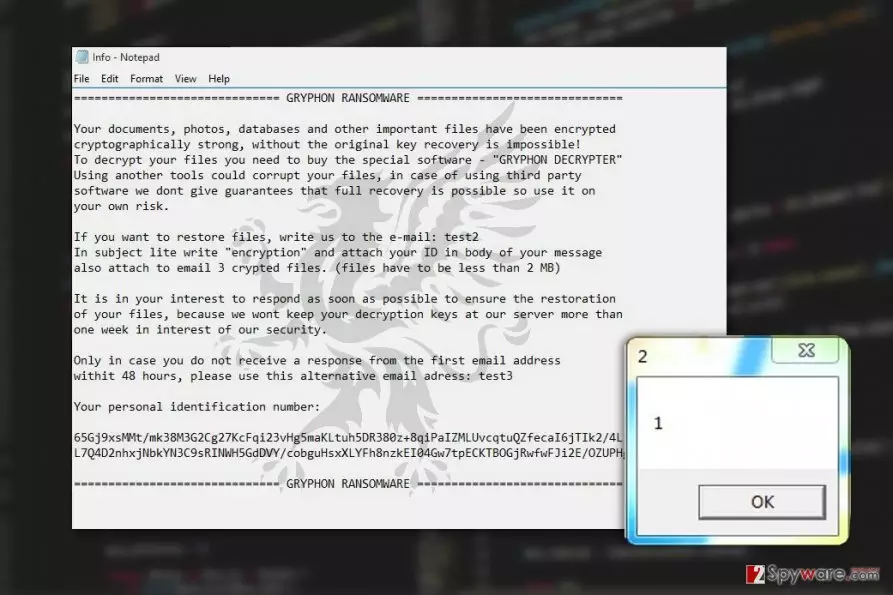
The original version of the malware greets its victims by opening HELP.inf or !## DECRYPT FILES ##!.txt files which contain the following message:
GRYPHON RANSOMWARE
Your documents, photos, databases and other important files have been encrypted cryptographically strong, without the original key recovery is impossible!
To decrypt your files you need to buy the special software – “GRYPFON DECRYPTER” Using another tools could corrupt your files, in case of using third party software we dont give guarantees that full recovery is possible so use it on your own risk.
If you want to restore files, write us to the e-mail: test2
In subject lite write “encryption” and attach your ID in body of your message
also attach to email 3 crypted files. (files have to be less than 2 MB)
It is in your interest to respond as soon as possible to ensure the restoration of your files, because we wont keep your decryption keys at our server more than one week in interest of our security.
Only in case you do not receive a response from the first email address withit 48 hours, please use this alternative email adress: test3
Your personal identification number:
[Victim’s ID]
GRYPHON RANSOMWARE
It seems that the virus is currently undecryptable. Besides, it messes with the computer's Master Boot Records which may need additional fixing after the malware is removed from the PC. The good news is, the parasite does not seem to be erasing Volume Shadow Copies from the infected system which allows relatively easy recovery of your important data.
But first, you must take care of the Gryphon removal. Be careful not to leave dangerous malware files lurking inside your system. Unattended files can trigger the virus to come back to your PC and encrypt your files again.
Ransomware prevention tendencies:
Gryphon ransomware is a perfect example of how various in-development programs can turn into full-blown ransomware infections which may seriously damage infected computers and corrupt users’ personal files.
Thus, a smart thing to do is to learn how to avoid becoming a target.
You can start by following these simple rules:
- Stay away from poor reputation websites and don’t use them as sources for your software downloads
- Be careful when opening emails, especially if they arrive from unfamiliar or suspicious senders. Spam folder is the absolute red zone. Emails end up there for a reason thus you should avoid opening them unless you are completely sure the email is safe.[2]
- Obtain reliable security software, enable firewalls and keep all computers protection tools up to date
- Don’t forget to enable automatic System Updates as well! If you are still using outdated and unsupported operating system version, we also recommend upgrading to the newest one.
Implementing these rules in your daily computer use should diminish the chances of getting infected with Gryphon or any other ransomware viruses.
Eliminating Gryphon malware
The first Gryphon removal step you should take is to obtain a professional tool that would have no problem eliminating ransomware from your PC. You can find descriptions of our recommended tools in the Software section of our website.
For those who don’t want to invest in new antivirus software or simply can’t remove Gryphon from their computers automatically due to the lack of system capacities, we provide a manual step-by-step guide below this article.
Did this guide help?
Be the first to comment