

Jokeroo is a notorious ransomware which is using scamming techniques to leave victims with nothing
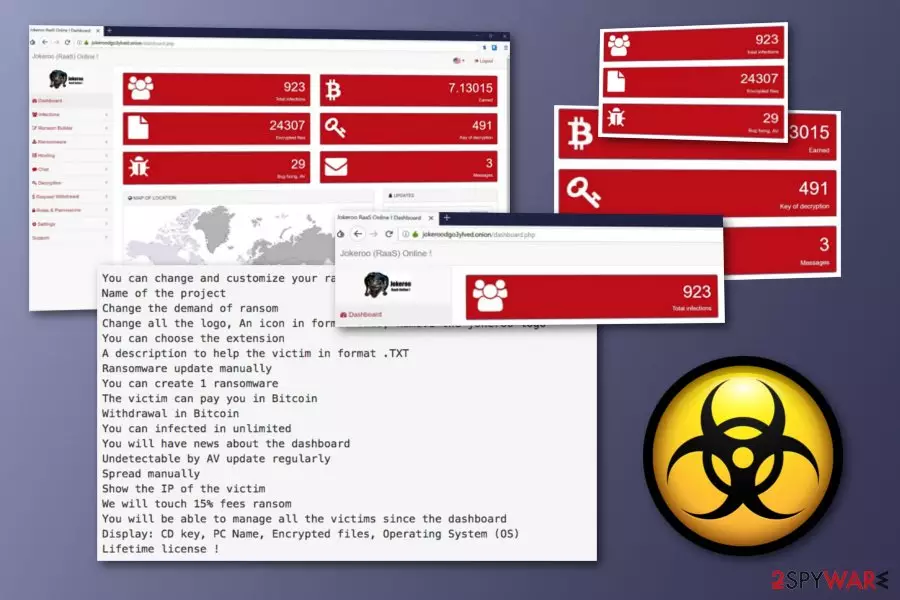
Jokeroo is a ransomware-as-a-service offering its code as a convenient way to launch cryptoviruses.[1] This threat has been actively spread via underground hacking sites or social networks, including Twitter.[2] The ransomware virus first pretended to be a variant of the infamous GandCrab and presented itself as a GandCrab RaaS on an underground website, known as Exploit.in. However, sometime after that, the cybercriminals changed the name to Jokeroo RaaS and started advertising it on the Twitter social network. Recently, virus developers started claiming that they were seized by the Royal Thai Police, the Dutch National Police, and Europol. However, this is far from true and such declarations are, most likely, used to leave people with no money and no encryption key.
| Name | Jokeroo |
|---|---|
| Type | Ransomware/RaaS |
| Also known as | Its developers were claiming that the virus is GandCrab RaaS |
| Infiltration sources | Spam, infected links, illegal sites |
| Main goal | To convince users to pay for the encryption key |
| Price | The membership for the RaaS costs from $90 to $600, the ransom varies |
| Detection | If infected, don't pay the ransom. Virus developers are now using an exit scam to leave users with no data, money, and decryption key. Use FortectIntego to scan your machine for ransomware files and then use backups to recover your data |
The bad guys hiding behind Jokeroo ransomware have one main goal – to spread their infection as far as possible. To achieve such goal, cybercriminals try to convince other hackers to spread the ransomware infection further to other users. Crooks offer to buy a membership package which includes different abilities and costs from $90 to $600.
Talking about the $90 price membership, the affiliate receives a big variety of functions which are included in the package. He/she becomes able to choose the encryption extension, create a ransom message, generate one new ransomware virus of his/her own, manual spreading, also demanding and receiving a ransom in Bitcoin which 15% goes to the cybercriminals' pockets:
You can change and customize your ransomware
Name of the project
Change the demand of ransom
Change all the logo, An icon in format .ICO, Remove the jokeroo logo
You can choose the extension
A description to help the victim in format .TXT
Ransomware update manually
You can create 1 ransomware
The victim can pay you in Bitcoin
Withdrawal in Bitcoin
You can infected in unlimited
You will have news about the dashboard
Undetectable by AV update regularly
Spread manually
Show the IP of the victim
We will touch 15% fees ransom
You will be able to manage all the victims since the dashboard
Display: CD key, PC Name, Encrypted files, Operating System (OS)
Lifetime license !
However, talking about users who decided to benefit from Jokeroo ransomware, they additionally are offered to buy more functions for $300 or $600. For such a free, potential hackers can receive Salsa20 encryption algorithm to make victim's files useless, an ability to use a set of different ransomware versions and different type of cryptocurrency, not only Bitcoin, used as a ransom, etc.
Unfortunately, all these techniques can increase the chances of getting infected. While at the moment hackers are claiming that they were blocked by different authorities, there is a higher chance that hackers are working on an exit scam technique. In this case, hackers claim that they were locked and vanish away with money collected from victims.[3]
However, if you ever suspect that this ransomware virus has entered your system in some type of way, you should take immediate actions to terminate it from the system. The longer it stays, the more files you can lose without a chance to recover them. There is a high chance that hackers can't recover users' data and that there is no decryptor created by them.
To detect malicious content, use anti-malware programs, such as FortectIntego or SpyHunterCombo Cleaner. After that, remove Jokeroo from your machine automatically. For recovering your files, use third-party tools provided at the end of this post. We cannot guarantee that they will help, but you should try them at first. The easiest way to get your data back is by using backups saved in external drives or clouds. However, Jokeroo ransomware removal should be your first step after being infected.

The ransomware-related payload is mostly found in spam messages
If you have ever been infected with a dangerous file-encrypting threat, you might have wondered from where it had come. According to Virusai.lt computer specialists,[4] ransomware is a virus form which is capable of tricking naive people and invading the system by convincing users to open suspicious payload that comes attached to email messages.
Crooks often attach an infected executable file or any other type of document to a spam message.[5] They also might insert a damaging hyperlink inside the email letter itself. Additionally, these hackers sometimes pretend to be from reliable and well-known organizations and send their letters to the inbox section which gives the look of legitimacy.
We recommend deleting all email messages that look questionable to you and investigating all that you were not expecting to receive. Additionally, you should get an antivirus program on your computer system and scan all email attachments to check if they are safe to download and open or if something malicious is hiding in them.
Terminate Jokeroo ransomware if you have found it on your machine
If, in any case, you discover Jokeroo ransomware on your system, we recommend performing virus elimination. Don't deal with virus developers as this threat has been spread as a RaaS, so there is no information about virus developers. Besides, there is a high chance that they will be very unprofessional as the membership can be bought for $90.
Jokeroo removal can be performed by downloading and installing one of these tools:
This software will allow you to perform a full system scan and find all hazardous payload that might be hidden in different locations of the infected computer. Additionally, use the following methods after Yokeroo removal to recover your encrypted data.
Did this guide help?
Be the first to comment