

Karo ransomware infects the system to take your files hostage
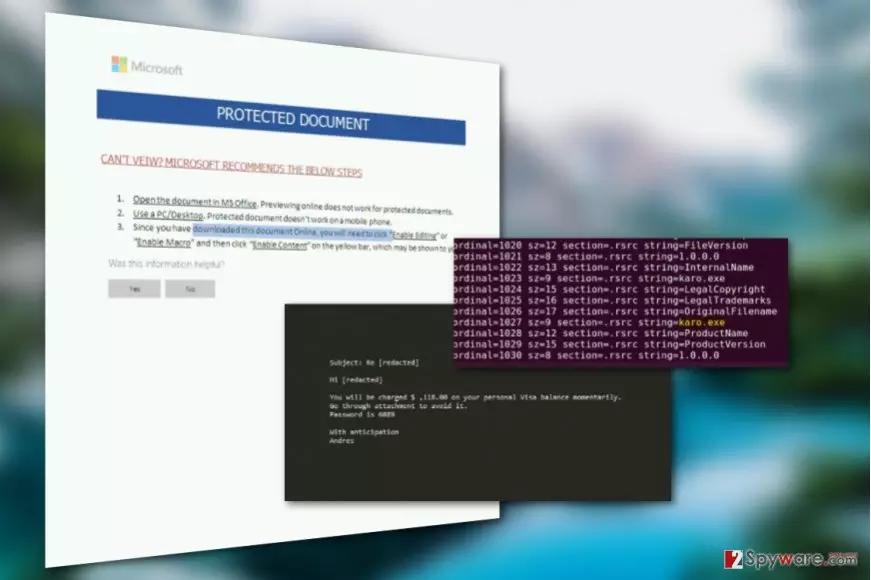
Karo ransomware is a data-encrypting computer virus[1] that emerged in the end of June 2017. It targets vulnerable computer systems that have no security software installed on them. The ransomware encrypts data and marks corrupted files with .ipygh file extensions. Then it drops a ransom note with a banal title ReadMe.html.
The virus will encrypt files with an AES-256 encryption algorithm [2], rendering them unreadable and appends .ipygh extensions to indicate which particular files have been affected. The destructive encryption may be applied to a variety of documents on mounted hard drives, external storage drives as well as open network shares.
Extortionists communicate with the victims via Tor network.
Ransomware infection is a serious computer security infringement. Naturally, it has a significant impact on the system’s performance. This means that if you recognize your computer quite well, you may be able to grasp the ransomware at the initial states of its infiltration.
Monitor your system’s performance speed, CPU and RAM utilization. If these indicators show unusual activity while no visible programs are running in the system, you should not ignore it. Take some time to scan your PC for potential ransomware infection and remove Karo if it is found hiding on your system.
Experts do not recommend[3] tackling the virus manually. The virus is way too complicated to be eliminated without the assistance of specialized software. That’s why experts recommend employing FortectIntego, MalwarebytesMalwarebytes or similar utilities to perform Karo removal for you.
Alleged connections to Petya
Since this virus has emerged in the middle of Petya/NotPetya ransomware campaign upheaval, some tend to ascribe it to this particular virus family. Nevertheless, the relationship between the two was denied – it turned out that unexpectedly emerged Karo was simply confused with the new Petya virus.
It appears that Karo's downloader hashes were found in a GitHub repository for Petya-related IOCs. It was yet another detail that led to the confusion of these two viruses. However, now it is clear that viruses are not related and created by different cyber crime gangs.
The main Karo ransomware attack vector
Karo ransomware is mainly promoted via malicious spam. The attackers use victim's name in the email subject. They pretend to be someone from a well-known business company and falsely inform the victim about a sum that they're about to charge from victim's bank account. The crooks state a sum that is not unrealistic, but also quite large as well.
The deceptive message then informs the victim to check an attached password-protected document associated with the payment. The document contains a macro function that, once activated, launched cmd.exe and downloads the ransomware to the system.
This social engineering scheme is extremely effective and it helps to convince users install ransomware on their computers without realizing it. For this reason, you should never interact with files or programs sent to you by unknown people.
Prevent ransomware attack with these easy tips
Karo distribution is currently rather low. If you have not been infected with the malware yet, you should use this for your own benefit – strengthen your system’s security! You can make your system a lot more safe in just four steps:
- Upgrade your system to the latest version. Don’t use outdated OS versions as they don’t receive security patches and are often more vulnerable to different malware infections.
- Keep your antivirus software and other installed programs updated. Programs that don’t receive security patches may have zero-day vulnerabilities that could be easily exploited to drop malware on your computer.
- Be careful while browsing through your email. Malware may arrive at your PC in spam emails as an attached invoice, speeding ticket or some other document. These files may hide Karo ransomware dropper file which will be activated once opened.
- Refrain from browsing on poor reputation websites and stay away from unsafe peer-to-peer networks. Ransomware tend to circle around in such places and can be well disguised as legitimate programs.
Get rid of Karo ransomware virus
Trying to remove Karo virus from the infected device can be risky and may result in total data corruption as well as the entire operating system. All it takes is a single mistake while eliminating one of its malicious files from the PC. Luckily, mistakes can be prevented by putting professional anti-malware software to work.
Just launch some reliable malware removal tool on your PC and let it take care of all the dirty work. After the security software is done with the system scan, there should be no malicious components left on your computer and Karo removal should be complete.
Did this guide help?
Be the first to comment