

LanRan ransomware is a serious computer infection which corrupts important data and requires 0.5 BTC for the decryption service
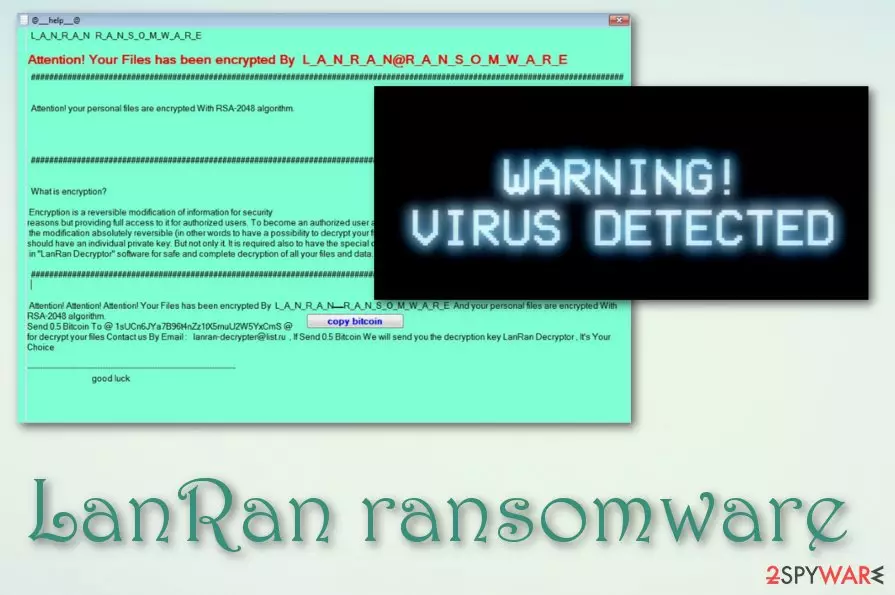
LanRan ransomware is a sneaky cryptovirus that seems to be a new version of the open-source MyLittleRansomware virus. On the affected machine, the virus changes the wallpaper and shows a lock screen. After infiltration, the virus might modify Windows Registry, disable programs. These alterations allow taking root into the system and activate malicious processes whenever the victim turns on the infected computer.
However, the main purpose of ransomware is to encrypt files immediately.[1] It uses the RSA-2048 encryption algorithm and aims at the most popular file types, such as MS Office documents, multimedia files, etc. A ransom note, named @___help___@ and urging 0.5 BTC for a file decryption key, appears. Recently a new version of this ransomware has been released – LanRan v2 which uses the .LanRan2.0.5 file extension to corrupt data.
| Name | LanRan |
|---|---|
| Type | Ransomware |
| Extension | .LanRan |
| Ransom note | @___help___@ |
| Algorithm used | RSA-2048 |
| version | The new version is called LanRan v2. It adds the .LanRan2.0.5 appendix to encrypted data, displays a @___ README ___ @.tx named ransom note, and urges 0.5 BTC for a decryption tool |
| Distribution techniques | Spam messages, dubious sites/software |
| Elimination | Install anti-malware tool and terminate the virus fully |
| Repair | The machine can get affected, so run FortectIntego to repair issues automatically |
Thus, it takes over all personal files and important documents in order to convince more victims to pay the ransom. Although it’s easy to be threatened by a malware attack, the most important task is LanRan ransomware removal. Later you can think about the alternative ways to restore your files.
Once the virus completes the data encryption procedure, it drops a ransom note. The crooks ask to transfer 0.5 Bitcoins to the provided Bitcoin wallet address in order to purchase the Decryptor. This tool is vital for data recovery, and people need to contact the creators of the ransomware via email lanran-decrypter@list.ru if they want to get back access to their files.
Indeed, it might be hard to recover encrypted data if you do not have backups. The threat is likely to delete Shadow Volume Copies that are essential for the recovery. However, purchasing the decryption key from the hackers is not recommended either.[2] They might gladly take your money and leave you without the decryptor. Cybercriminals are not the ones who can be trusted.
Nevertheless, it’s not enough to remove the virus from the computer to retrieve encoded data; this task is crucial. Only professional security tools, such as MalwarebytesMalwarebytes or SpyHunterCombo Cleaner can clean your computer from this cyber threat. If you encounter some obstacles, please scroll down to the third part of the article.

Ransomware infects computers through spam messages
Malware researchers found few crypto-extortion-based malware samples lurking on the Web. The hackers might trick you into clicking on an infected link, ad, or email attachment in order to install payload on your computer. Thus, if you receive a questionable link on social media,[3] do not rush clicking it. Even if your friend sent it, he or she might not be aware of this activity.
What is more, if you receive a strange email that expresses the urge to open the attached document, you need to make sure that it’s safe to open.[4] System hijack might also occur if you decide to download infected or obfuscated freeware or other files from unreliable sources. Hence, taking precautions[5] and being vigilant is important in order to protect your data from any malware.
Eliminate LanRan virus as soon as you get the demanding message
You can perform the malware removal by using professional malware elimination equipment. However, the virus might block antivirus programs or prevent them from installing. Thus, if you found yourself in this situation, please reboot your computer to the Safe Mode with Networking.
The instructions below will help you to do that. When in Safe Mode, install and update your preferred malware removal program. If you have no idea which tool to choose, please pick either MalwarebytesMalwarebytes or SpyHunterCombo Cleaner. These programs are strong enough to remove LanRan ransomware along with all its malicious components from the system.
Talking about possibilities to restore your files, we have to be honest and tell you that if you do not have backups, chances are not high. Researchers haven’t developed a decryption software yet. However, you can try the alternative recovery options presented below.
Did this guide help?
3 comments
Remy
The ransom note looks like from 1995...
Lilly
Another ransomware... Someone should punish hackers and make them stop!
Tori
Lets flood hackers email with ridiculous emails! It could be a revenge for other ransomware attacks and swindled money!