

Mdk4y ransomware is a dangerous file locking virus that uses AES encryption algorithm to lock up personal data
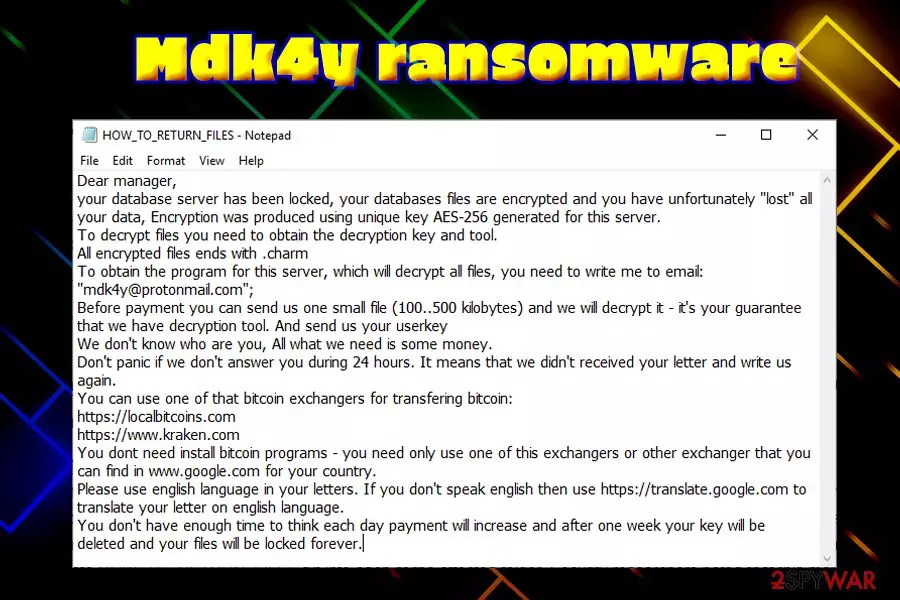
Mdk4y ransomware is a crypto locker that was first spotted by a security researcher in mid-January 2019. The main purpose of file locking virus is to deny access to victims' pictures, music, videos, documents, databases and then demand ransom for the decryption key that is stored on a Command & Control server, only accessible by hackers. Malware uses military-grade encryption algorithm AES-256 to modify files and appends .mdk4y extension, subsequently dropping a ransom note HOW_TO_RETURN_FILES.txt into each of the affected folders. Security researchers noted that this malware sample has no connection to Kraken ransomware; instead, it mentions kraken.com cryptocurrency exchange service. In the message, hackers ask users to send an email to mdk4y@protonmail.com to finalize the price for file decryption.
| Name | Mdk4y |
| Type | Ransomware |
| Cipher | AES-256 |
| Extension | .mdk4y |
| Ransom note | HOW_TO_RETURN_FILES.txt |
| Contact | mdk4y@protonmail.com |
| Peculiarities | Stops 184 commands, modifies Windows registry, etc. |
| Decryptable? | No |
| Elimination | Use reputable anti-malware software like FortectIntego, SpyHunterCombo Cleaner or MalwarebytesMalwarebytes |
Just as many other crypto viruses, Mdk4y virus relies on multiple distribution methods, including:
- Spam emails;
- Brute-force attacks;
- Infected installers;
- Fake updates;
- Drive-by downloads
- Cracks or keygens, etc.
As soon as malicious Mdk4y ransomware payload is executed, it stops 184 commands and services related to anti-malware software and databases. Additionally, the malware attempts to delete Shadow Volume Copies and Modifies Windows Registry to retain persistence.
Due to such activities, Mdk4y ransomware removal might become a challenging task, although anti-malware software that can detect[1] the virus (we suggest FortectIntego, SpyHunterCombo Cleaner or MalwarebytesMalwarebytes) should be able to eliminate all the malicious components and restore the system to its original state.
Mdk4y ransomware runs the commands in order to proceed with the file encryption without interruption. It modifies data the following way: picture.jpg turns into picture.jpg.mdk4y, preventing file owners to access it. Soon after encryption, malware drops a ransom note that explains what happened to users' files and provides contact details.
Researchers highly advise users to refrain themselves from contacting criminals, as there is no guarantee that they will send the decryptor back. While unique keys cannot be acquired from anywhere else, the best way to recover your data encrypted by .mdk4y is by using backups.
In case you have no backups prepared (many users ignore this vital cybersecurity step), there is little chance of file decryption, although you can try using third-party applications that might be able to recover at least some of your files. Besides, security researchers are constantly working of free decryptors, and they often succeed in time, as proves No More Ransom project.[2]
Remember, you need to remove Mdk4y ransomware virus before you attempt to recover your files, or backups will be encrypted as well.

Use adequate security measures to avoid ransomware infections
Ransomware is one of the most damaging cyber infections there are as, even after its removal, files remain encrypted. Additionally, ransomware is often associated with other threats like trojans, backdoors, crypto-miners, and similar. All of these infections are extremely harmful for the victim, and should be avoided by any cost.
These tips from security researchers[3] can help you stay more secure online:
- Employ anti-malware software that supports real-time internet shield function;
- Update your system and installed software immediately after patch releases;
- Regularly backup your files;
- Do not casually open attachments or click on links inside spam emails;
- Avoid file-sharing websites that host pirated software;
- Do not use cracks or keygens;
- Use strong passwords for all your accounts;
- Use tools like Virus Total to scan various files or check suspicious URLs.
Delete Mdk4y ransomware and only then attempt file recovery
If you are unfortunate enough to get infected with Mdk4y virus, you will most likely lose your files, unless you are OK with paying criminals possibly a large amount of money. However, paying crooks will only show them that their scheme works and they do not even have to contact your back.
Therefore, the first thing you need to take care of is Mdk4y ransomware removal. As we already mentioned, the virus modifies Windows system heavily and tries to stop processes that are related to anti-malware software. Therefore, you should enter Safe Mode with networking, which would temporarily disable the functionality of Mdk4y.
As soon as you successfully remove Mdk4y ransomware using security tools, you can proceed with file recovery procedure. If you have no backups, do not lose hope and try using file recovery software that might be able to help you restore at least some of your data.
Did this guide help?
Be the first to comment