

ms13 ransomware is a dangerous crypto virus that might result in victims losing their files permanently
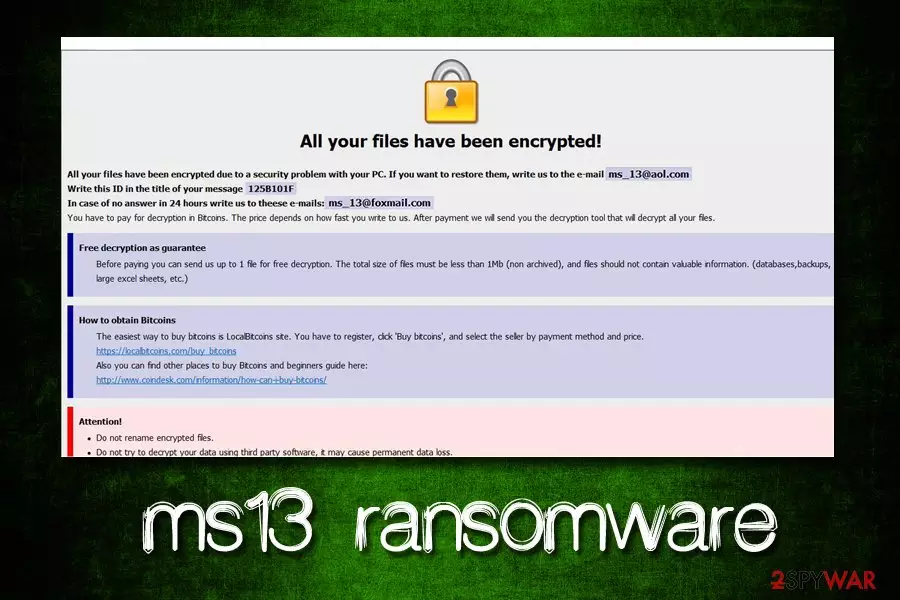
ms13 is a file locking malware that stems from the notorious Dharma family, which is currently one of the active strings in the wild. Ransomware-type viruses are used for extortion – mostly monetary. Once, inside, ms13 ransomware looks for documents, databases, pictures, etc. and then uses AES or DES encryption algorithm to lock data. Victims can quickly see that their files are compromised, as the name is modified in the following way: [filename].[file extension].id-[unique identifier].[ms_13@aol.com].ms13. After this process, malware drops a ransom note FILES ENCRYPTED.txt, as well as a pop-up window that explains the situation in greater detail. Allegedly, users are meant to contact hackers via ms_13@aol.com or ms_13@foxmail.com emails and pay ransom in Bitcoins for the decryptor. However, users are not encouraged to do that and rather focus on ms13 ransomware removal.
| Name | ms13 |
| Type | Ransomware |
| Extension | .id-[unique identifier].[ms_13@aol.com].ms13 |
| An example of an encrypted file | picture.jpg.id-B4197430.[ms_13@aol.com].ms13 |
| Contact | ms_13@aol.com or ms_13@foxmail.com |
| Ransom note | FILES ENCRYPTED.txt |
| Related files | chrome64.bin, chrome64.exe |
| Decryptable? | No |
| Termination | Use reputable security software like FortectIntego or SpyHunterCombo Cleaner |
ms13 ransomware can slip into the system when users are downloading unsafe files from the internet (cracks, keygens, pirated installers)[1], get tricked by fake updates, open malicious attachments inside spam emails, do not adequately protect their accounts, do not update their operating system, etc. To avoid such severe infections like .ms13 virus, refer to the second part of this article.
After the initial infection, ms13 ransomware modifies a variety of system files. For example, Shadow Volume Copies[2] are deleted in order to complicate the file recovery, or Windows registry is adjusted to launch the virus with every system boot and increase persistence. Some malware might also add an exclusion in the Firewall of anti-malware software, preventing its termination.
These changes are performed in order to achieve encryption without any interruptions. Once the process is complete, ms13 virus drops the following note (FILES ENCRYPTED.txt):
all your data has been locked us
You want to return?
write email ms_13@aol.com or ms_13@foxmail.com
Additionally, ms13 ransomware shows a pop-up window which explains to users how to proceed next. Bad actors offer test decryption, suggesting to upload one file, no larger than 1MB. This process has become pretty standard among ransomware authors, as they want victims to believe that the decryption is guaranteed once the payment is made.
However, users might get scammed, and end up not only losing access to files permanently but also the paid money. Therefore, experts[3] advise staying away from cybercriminals, and rather remove ms13 ransomware as soon as possible. For that, victims should employ reputable anti-malware software that can detect and terminate the threat. We suggest using FortectIntego or SpyHunterCombo Cleaner.
It is true that the ms13 virus cannot be decrypted currently. However, users can always save locked data and wait for the decryptor to be created by security researchers. Additionally, third-party recovery software might be useful – we provide the download links and instructions in the recovery section below.

Stay away from pirated software and use comprehensive security tools
Unfortunately, but many users tend to neglect adequate security measures when it comes to protecting their devices from malware. This group of regular users is often joined by not only small businesses but also by leading organizations. For example, the “Big Game Hunting” was employed by another widespread ransomware family – GandCrab.[4]
Therefore, if you value your personal files and do not wish to spend thousands of dollars on paying the ransom, here's what you have to do to protect your device from malware attacks:
- Employ reputable security software with real-time scanning feature;
- Use Firewall;
- Patch your system and installed programs as soon as updates are available;
- When dealing with new emails, check out for phishing signs: grammar/spelling mistakes, suspicious “from” address, questionable attachments that ask you to enable macros, etc.;
- Use ad-blocker (especially on less secure sites like porn or torrent);
- Do not click on ads that promote suspicious software (driver updaters, registry cleaners, etc.);
- Scan executables you download from the internet with tools like Virus Total;
- Do not download cracks or keygens, along with pirated software installers;
- Use strong passwords and two-factor authentication for all your accounts.
Terminate ms13 ransomware virus from your computer by using these instructions
ms13 virus belongs to Dharma ransomware family, and security vendors are long familiar with this type of malware. Therefore, there aplenty of tools that are capable of recognizing the threat under such names as TR/Dropper.Gen, Trojan.Encoder.3953, Ransom.Crysis.Generic, Trojan/Win32.Crysis.R213980, GenericRXEA-WW!D613CD49FA1D, etc.
Therefore, to remove ms13 ransomware, download and install one of the security tools that can detect the threat and perform a full system scan. Be aware that the virus might prevent AV engine from doing its job. In such a case, enter Safe Mode with Networking and perform a scan from there.
Once you complete ms13 ransomware removal, you can then proceed with file recovery. The safest way to retrieve data is by using backups. However, if you have none, make use of alternative solutions we provide below.
Did this guide help?
Be the first to comment