

What is “Notice! Please update your FLV Player”?
“Notice! Please update your FLV Player” is a fake notification, which is used to make people download suspicious programs and malware. It typically shows up when users try to watch some video online or try to download one to their computers. Before you see “Please update your FLV Player” notification, you can also notice the “FLV Video Download is required to download online video” screen. We highly recommend ignoring both of these notifications because they belong to hackers! These fake offers to update the FLV Player, Java, Flash Player or other programs are displayed just for tricking people into infecting their PC with malware. According to the latest news, that’s how they have been spreading Cryptowall and Cryptolocker ransomwares that are capable not only affecting PC system. They can also encrypt all of your important files and then start asking to pay the ransom in exchange for the decryption key, which is needed for unblocking locked files. It seems that “Notice! Please update your FLV Player” virus belongs to toplugs.com, which is known for spreading JavaScript Obfuscation malware. In reality, it’s a malicious code, which can additionally install fraudulent and unwanted software on the affected computer. Of course, these is no guarantee that such virus is not capable of tracking users and collecting their personally identifiable information. If you want to protect it, you should avoid such malwares. If you think that your PC has already been affected, you should scan it with FortectIntego. If you want to update your FLV Player, FLV Player, Java, web browser or similar program, you should do that by visiting the official website of each of these softwares. That’s the easiest method to download updates to the system.
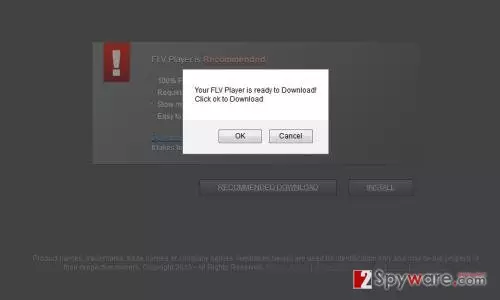
How can “Notice! Please update your FLV Player” show up on my computer?
“Notice! Please update your FLV Player” scam can appear on all Internet browsers that can be found on the system, including Google Chrome, Mozilla Firefox and Internet Explorer. Typically, it shows up when browsing on the Internet and trying to watch some video online. This fake notification blocks the desired video what helps hackers to trick more PC users into downloading malware on their computers. If you see “Notice! Please update your FLV Player” warning on your browser, you should ignore this alert and close your browser right away. If you downloaded this unverified FLV Player update, we highly recommend scanning your PC with updated anti-spyware.
WHAT TO DO IF YOU HAVE ALREADY BEEN FOOLED BY “Notice! Please update your FLV Player”?
If you think that you have already been tricked by “Notice! Please update your FLV Player” scam and have also clicked the OK button, you might have downloaded a fake FLV Player update. In this case, you should waste no time and scan your computer with updated anti-malware. This will help you to make sure that your PC is free of viruses. For scanning your PC, we recommend using any of these applications: SpyHunterCombo Cleaner, FortectIntego, MalwarebytesMalwarebytes.
Did this guide help?
Be the first to comment