

PC SpeedUp Pro – a potentially unwanted program that displays misleading scan results
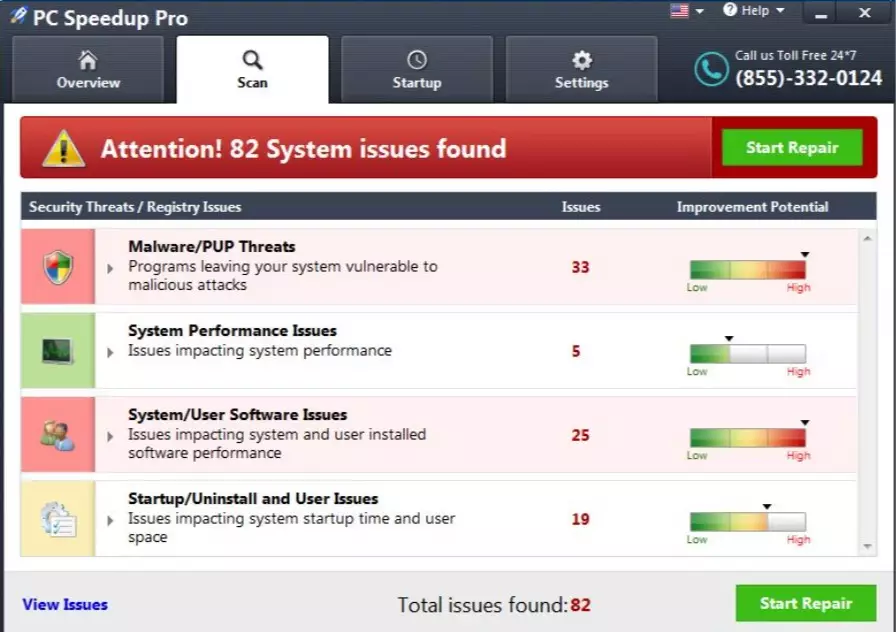
PC SpeedUp Pro is a program that claims to be a powerful tool capable of speeding the computer up. Unfortunately, but you may notice a decrease in your computer's speed after installing this application. This effect may be noticed because this program interrupts each computer's tasks with misleading system scans and reports about computer-related issues.
No matter how professionally these reports look, they are displayed just to deceive you into thinking that there's something wrong with your computer and that you need to buy the licensed version of PC Speedup Pro that will fix the imaginary issues.
This marketing scheme has been actively used by PC Fix Speed, PC Mechanic, and other tools that have initiated various discussions on the Internet. If you want to keep your computer in its best shape, you need to stay away from such apps. Also, we would like to recommend you remove this application from the system. You can find all steps for that in this article.
| name | PC SpeedUp Pro |
|---|---|
| Type | Potentially unwanted program |
| Purpose | Sell its paid version by showing fabricated system error reports and stating that a paid version will fix them |
| Risks | Money loss |
| Elimination | You can remove this program either manually or automatically. Both ways are described below |
| System fix | Runs a system tune-up with the [1] tool to repair any damage your device's system may have suffered |
According to cybersecurity experts, PC SpeedUp Pro is a potentially unwanted program (PUP). As we have already mentioned, it will pretend to scan your system, and it will deliver you scan results that will for sure include warnings about errors on your computer.
This program will mostly inform you about fake problems, and then it will urge you to install a full version of it to delete the identified errors. We haven't mentioned that this program may also block Internet access to secure web pages on the Internet to prevent you from downloading legitimate anti-spyware.
In other words, PC SpeedUp Pro tries to frighten you into making an illusion that your computer is working poorly and that you need to fix it as soon as possible. However, it might be just a trick to swindle money from the computer user because we cannot guarantee if this program is capable of fixing any computer errors.
We recommend installing a trustworthy and well-known anti-malware program, for example, SpyHunterCombo Cleaner or MalwarebytesMalwarebytes. It will detect and eliminate all PUPs and other computer parasites from your system automatically. Then run a scan with the FortectIntego PC repair tool to fix all system-related issues properly.

Methods that are used to distribute the potentially unwanted program
This application has its official web page, and it can be downloaded from it. Unfortunately, our research team claims that this system tool usually travels bundled with freeware or shareware. Therefore, such additional applications almost never inform you about their existence.
To find out if your downloaded program does not have any secret attachments, you have to check the installation settings. Select ''advanced'' or ''custom'' settings, and the configuration window will expand. Now you will be able to see optional downloads if there are any. If needed, untick any unfamiliar suggestions to install apps, plug-ins, add-ons, or extensions.
However, we ask you to be extra careful anytime you install a new program, and especially if it is a free one. You can find a lot of information about the program and its functions in the Terms of Use and Privacy Policy documents. Do not skip them for your own safety.
Tips on how to remove PC Speedup Pro from the system
As we have mentioned, we can hardly believe that this particular tool will be useful for you and your computer. In fact, it may disrupt its functionality by showing questionable warning messages directly on the desktop. Thus, we recommend removing PC Speedup Pro with no delay. If you want to ensure your computer's safety by fixing all system files, use a reliable alternative – FortectIntego.
If you want to get rid of this program, you should know that you can either uninstall PCSpeedUpPro manually or remove this program with the help of reputable anti-spyware software, for example, SpyHunterCombo Cleaner or MalwarebytesMalwarebytes. If you decide to take on the task manually, please feel free to use our instructions below. Whichever method you prefer, it's recommended to proceed with the removal in Safe Mode with Networking (guide shown below).
Uninstall from Windows
Uninstall from Windows 10/8:
- Type Control Panel into the Windows search box and open the result.
- Under Programs, select Uninstall a program.


Uninstall from Windows 7/XP:
- Click on Windows Start > Control Panel (Windows XP users should click on Add/Remove Programs).
- In Control Panel, select Programs > Uninstall a program.


Remove the unwanted program:
- In the Programs and Features window, look for any recently installed suspicious entries, select them, and click Uninstall.
- If User Account Control appears, click Yes to confirm, then complete the removal.


Did this guide help?
1 comment
Joy-ya
I installed this program accidentally a week ago. Of course, I chose the default install mode. This program was blocking my access to the Internet sometimes. What an irritating experience...