

Pidon ransomware is one version out of hundred that came out in Spring 2019 from Djvu ransomware creators
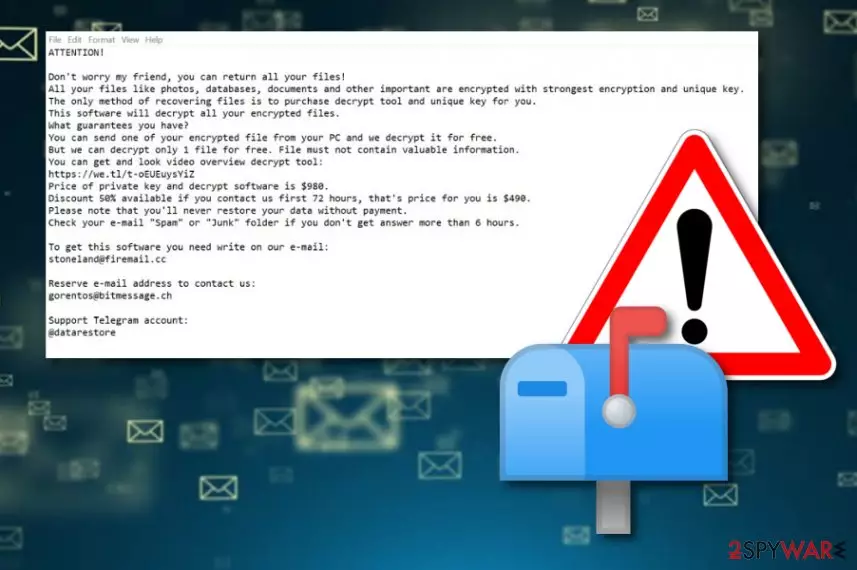
Pidon ransomware is one of many versions in the Djvu family that uses stoneland@firemail.cc, gorentos@bitmessage.ch as contact emails. These emails get displayed as the primary way for contacting these criminals in a ransom note file delivered as _readme.txt that also states about possible test decryption and contains ransom demand that is $980 for the decryption key. Although criminals offer to lower the price by half if you write them in less than 72 hours, we recommend staying away from these people in general.
Especially when Pidon ransomware virus belongs to a notorious ransomware family dubbed Djvu ransomware that is possibly decryptable with STOP decrypter (direct download). There is no need to contact cyber criminals when you can remove the virus from the machine and wait for the needed update of this decryption software. However, remember to clean the system before recovering any of your files, so there is no risk of permanent damage.
| Name | Pidon |
|---|---|
| Type | Ransomware[1] |
| Family | Djvu/STOP virus |
| File marker | .pidon |
| Ransom note | _readme.txt |
| Contact emails | stoneland@firemail.cc, gorentos@bitmessage.ch |
| Distribution | Spam email attachments,[2] software cracks, fake programs, other malware |
| Elimination | Use FortectIntego for Pidon ransomware removal |
| Decryption | Possible with STOP decrypter (direct download) |
Pidon ransomware is the cyber threat that focuses on the encryption process during which the original code of the photo, video, or a document or even database gets changed to make the data useless. This is the main process that cryptovirus as such start the attack with. However, a few things get done before this.
Any malware creators, especially cybercriminals behind crypto-extortion based malware like Pidon ransomware, try to keep the threat as persistent as possible, so there is more damage done on the affected device. This is achieved by:
- changing startup preferences;
- altering the existing ones or adding new registry keys;
- disabling security features and programs;
- installing other files or applications;
- deleting Shadow Volume Copies or other data.
Once all the needed processes get run by the Pidon ransomware, and the system is checked for any other malware, the encryption process starts. This is file-encoding ransomware, so the virus is not going to waste time. The goal is to make peoples' personal files useless and demand the payment or even infect the machine with malware.

Unfortunately, when ransomware gets on the system, it runs in the background silently, and the victim cannot know when or where from the virus came. However, all the processes are fairly quick, and when Pidon ransomware finds all the files for file-locking, it encodes them so the ransom can be required.
Once data gets encrypted, all the files get appendix .pidon to mark them. This process is also unnoticeable as other functions of the virus, but then Pidon ransomware delivers the ransom note that reads the following:
Don’t worry my friend, you can return all your files!
All your files like photos, databases, documents and other important are encrypted with strongest encryption and unique key.
The only method of recovering files is to purchase decrypt tool and unique key for you.
This software will decrypt all your encrypted files.
What guarantees you have?
You can send one of your encrypted file from your PC and we decrypt it for free.
But we can decrypt only 1 file for free. File must not contain valuable information.
You can get and look video overview decrypt tool:
https://we.tl/t-xuSAEnnA8P
Price of private key and decrypt software is $980.
Discount 50% available if you contact us first 72 hours, that’s price for you is $490.
Please note that you’ll never restore your data without payment.
Check your e-mail “Spam” or “Junk” folder if you don’t get answer more than 6 hours.To get this software you need write on our e-mail:
gorentos@bitmessage.chReserve e-mail address to contact us:
stoneland@firemail.cc
These are the main symptoms of cryptovirus because criminals only need your money. However, you should remove Pidon ransomware as soon as possible because of another feature – data stealing. These intruders can access any information stored on the machine in various files and stolen. Then, probably used in other scams or even sold on the dark web.
Experts[3] always state that it is not easy to perform manual Pidon ransomware removal due to all the files installed on the system and various features that malware disables. So rely on anti-malware tools like FortectIntego or SpyHunterCombo Cleaner and run a full system scan. This way, you can eliminate all the damage besides terminating the virus itself.
When it comes to data recovery and files encrypted by Pidon ransomware virus, we recommend relying on file backups or data recovery software. However, you can check the decryption options for this particular virus since researchers have a method of recovering data encrypted with offline keys. All these methods listed below.

Infected spam email file attachments may load malware on the system
Direct virus payload or malicious script designed to infect the system can get dropped on the targeted PC in various ways. One of the techniques involves software cracks, non-official software providers and malicious duplicates of applications. You can easily get malware if you get such products from the internet via torrents or p2p networks.
However, when it comes to ransomware the main spreading method is spam email campaigns and infected files that get attached to the legitimate-looking notifications posing as emails from services or companies like DHL, UPS, eBay and so on. You can allow malicious macros to get on your device by downloading the file and opening document or launching and executable without paying attention.
You should be aware that emails may have file attachments with malicious macros or direct malware, so make sure that the sender is familiar and think about the specific email when you receive it before opening the notification. If you are not using the service at the time or at all – delete the email once received and don't look back. Clean the email box more often and keep anti-malware tools running to avoid any cyber infections.
Pidon ransomware removal techniques
Before Pidon ransomware removal, we suggest scanning the entire Windows computer system with antimalware software. Our suggestion would be to try tools such as FortectIntego, SpyHunterCombo Cleaner, or MalwarebytesMalwarebytes. This type of software will find all infected locations and provide you with descriptions of all malicious sources discovered.
After that, you should remove Pidon ransomware from the machine. This is necessary if you want to restore locked files. We have provided some possible data recovery methods at the end of this article. Even though experts have not yet released the original decrypter for this cyber threat, you can try using the one created for STOP ransomware virus.
Did this guide help?
Be the first to comment