

Promoz ransomware – a cryptolocker which belongs to the Djvu ransomware family
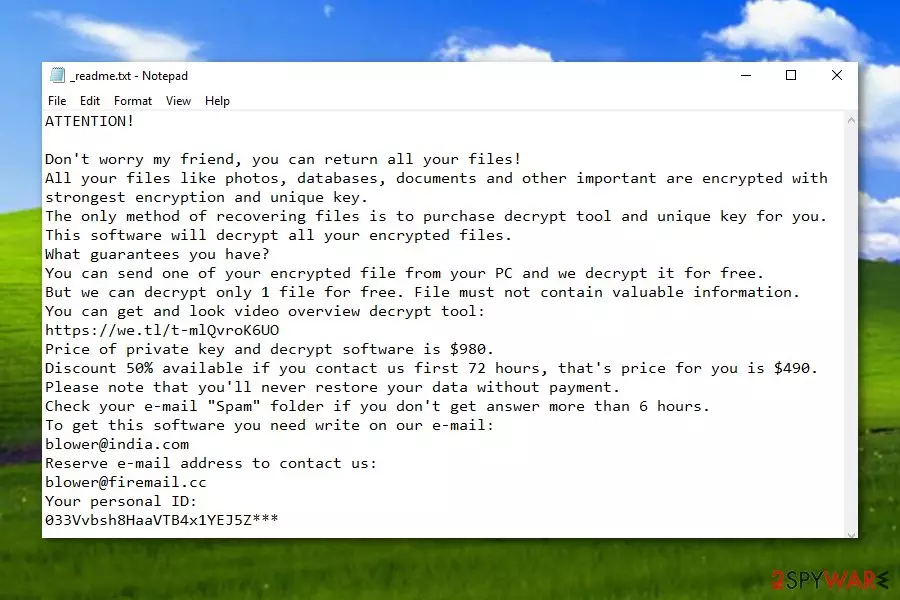
Promoz ransomware is a sneaky and malicious cyber threat which appears to be from the Djvu ransomware category. As you might have already heard about the infamous Djvu virus, it has been releasing various new versions, and Promoz virus is one of them. This ransomware virus was first spotted by a cybersecurity researcher named Michael Gillespie. It is known that the cryptovirus uses strong cryptography[1] to block all kinds of files that are found on the infected Windows computer system. Once files are encrypted with a unique cipher, they appear with the .promoz appendix added and a ransom note which is named _readme.txt pops out and informs the victims what just has happened. Cybercriminals claim that the user needs to pay a ransom of $980 if he/she wants to receive the decryption tool, they also offer a 50% discount if contact is made in 72 hours and users need to write them via the blower@india.com email address to discuss all matters.
| Name | Promoz |
|---|---|
| Type | Ransomware |
| Sub-type | Malware |
| Discovered by | Michael Gillespie |
| Appendix added | .promoz |
| Ransom message | _readme.txt |
| Price | $980 |
| Belongs to | Djvu ransomware |
| Detection purposes | FortectIntego can detect malware-laden content |
Promoz ransomware is a dangerous file locking virus which sneaks in the system thru suspicious-looking email messages and their infected payloads which come attached together. Mostly, executables are launched by a gullible user and the malware-laden content executes leaving the system infected and important data locked.
Promoz ransomware crooks use unique cipher algorithms to encrypt data which is stored on the Windows computer system and hide these keys on specific remote servers which are inaccessible for any other persons. However, this fact does not mean that you have to rush and pay the demanded $980 or $460 ransom price to the crooks.
According to computer specialists from Virusai.lt,[2] cybercriminals are these people who do not care about honesty. They can try to scam you, take your money, and you will receive no decryption tool at all. We recommend making serious thoughts about all options possible. However, our offer would be to remove Promoz virus permanently and use other software for data recovery purposes.
Continuously, you should use specific malware detection tools which are capable of scanning the entire computer system and detecting all threats possible. Before you complete the Promoz ransomware removal, use a program such as FortectIntego. Additionally, take a look at some data recovery software which is provided below this article.
If you are looking for a way to protect valuable information in the future from similar secret encryption, we recommend storing it on portable USB drives[3] or iCloud servers that ransomware such as .promoz files virus will not be able to reach the files. Just one thing, keep the remote device disconnected from your computer system when it is out of usage.

Ransomware distribution techniques are always the same
All ransomware viruses are distributed mostly thru the same sources. Cybercrooks use email messages, attach the malicious payload to the emails, and send them to numerous potential victims. Some of these people become interested in the clipped attachment and open it without any other further investigation which often relates in ransomware infections.
What you should do in this case is carefully check all email messages that you receive, especially, ones which fall in the spam section. If you find any attachments such as executable files or text documents attached to received email messages, better scan them with an antivirus program to check if the content is harmless or not.
Continuously, you always have to act carefully while browsing the Internet sphere. Make sure you avoid all questionable-looking websites and stay away from any unknown links or advertisements that you overcome in your way.
Elimination techniques for .promoz files virus
You need to know that ransomware viruses are these kinds of cyber threats which leave rogue content behind them and inject them all over the computer system. In order to find such content, you need to use reputable tools such as FortectIntego, SpyHunterCombo Cleaner, or MalwarebytesMalwarebytes. After that, you can start performing the Promoz ransomware removal automatically and cleaning your entire computer system.
You can remove cyber threats such as Promoz virus only with reputable tools. Manual elimination should not be an option for any user in this kind of case. By removing the ransomware on your own, you might only cause even more damage to your system, make it vulnerable to other infections, and still not get rid of the cyber infection successfully.
Did this guide help?
Be the first to comment