

Rapid 2.0 is a ransomware virus that excludes Russian PC users from its target list
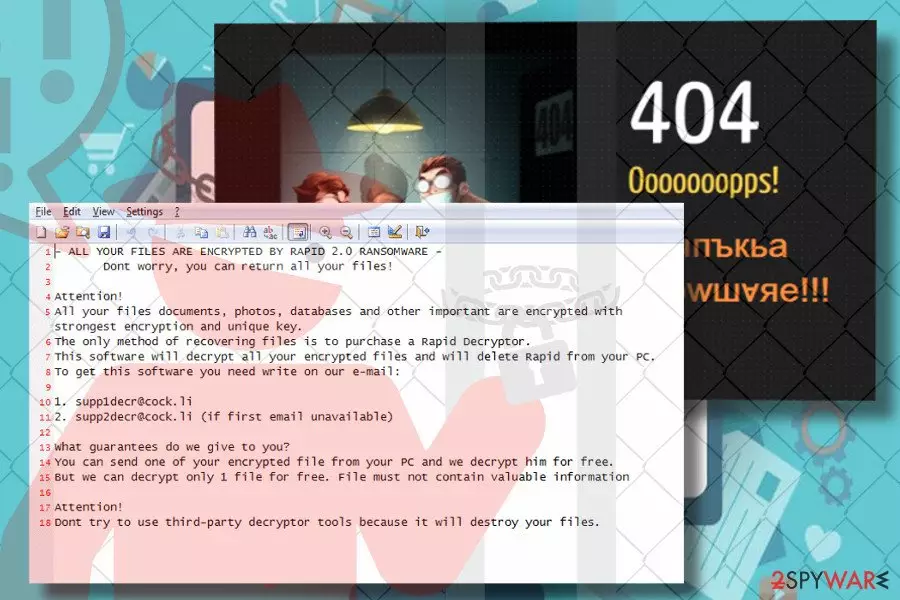
Rapid 2.0 is the second version of Rapid ransomware which has been released two months after the original version. While its style of attack, performance, and most of the other traits coincide with the ancestor, specialists find one significant difference – Rapid 2.0 excludes Russian locale from its target. File extension has also been modified, the current Rapid release appends randomly generated file extension to encrypted files, be it .16152000 or .16152125. Usually, file extension consists of eight random numbers.
| Name | Rapid 2.0 |
|---|---|
| Type | Ransomware |
| File Extionsion | Eight random digits (.e.g. .16152000 or .16152125) |
| Ransom note | DECRYPT.[5-random-characters].txt |
| Contact info | supp1decr@cock.li or supp2decr@cock.li |
| Danger level | High. Locks files and demands a ransom |
| Distribution | Fake IRS malspam campaigns |
| Symptoms | Most of the personal files inaccessible. Numeric code attached to each locked file. DECRYPT.[5-random-characters].txt file created on the desktop |
| Elimination | Automatic removal required. Rapid 2.0 payload can be immunized with FortectIntego. Install the tool and run a deep system scan with it. |
Rapid 2.0 has been distributed in several ways, including, but not limited to:
- fake IRS malspam;[1]
- corrupted remote desktop applications;
- fake software updates.
It renders a complicated SHA-256[2] cipher to encrypt data on a target PC and make them inaccessible by appending eight-digit file extension. After that, the Rapid 2.0 ransomware generates a DECRYPT.[5-random-characters].txt ransom note, which says:
ALL YOUR FILES ARE ENCRYPTED BY RAPID 2.0 RANSOMWARE –
Dont worry, you can return all your files!Attention!
All your files documents, photos, databases and other important are encrypted with strongest encryption and unique key.
The only method of recovering files is to purchase a Rapid Decryptor.
This software will decrypt all your encrypted files and will delete Rapid from your PC.
To get this software you need write on our e-mail:1. supp1decr@cock.li
2. supp2decr@cock.li (if first email unavailable)What guarantees do we give to you?
You can send one of your encrypted files from your PC, and we decrypt him for free.
But we can decrypt only 1 file for free. File must not contain valuable informationAttention!
Dont try to use third-party decryptor tools because it will destroy your files.
Once the victim is presented with ransom note, there's no doubt that Rapid 2.0 initiated major system's changes, like modifications of Registry entries, removal of Shadow Volume copies, and application of AES cipher.
Extortionists urge the victim to email them via supp1decr@cock.li or supp2decr@cock.li email addresses asap to get a personal Rapid 2.0 decryptor. However, they do not explicitly inform the victim about the demanded sum and in what currency it is expected to be transferred, but specialists guess that it may demand Bitcoins.
By the way, the origin of Rapid 2.0 ransomware seems to be Russia or the virus is closely related to this country. Experts found out that the most significant difference of this ransomware virus from the Rapid 1.0 is the exclusion of Russian locale from the targeted list. Once the ransomware payload is executed, it launches a scanner that checks locale settings. If Russian locale settings are found set up by default, the virus retreats without initiation of data encryption.
At the moment of writing, ransomware is at its initial stage. According to experts, massive prevalence is not likely, since it has been released with an unpacked source code, which made it easy for experts to crack.

Nevertheless, the free decryptor is not yet available. In case of attack, you have two options to recover after it, i.e., to pay the ransom and expect to get a decryptor from crooks or remove Rapid 2.0 virus with FortectIntego or another powerful anti-malware tool. Keep in mind that the first scenario may fail as hackers can ignore your payment and keep your files blocked.
Additionally, Dieviren.de[3] team, along with a group of other cybersecurity experts, highly recommends home users not to initiate manual Rapid 2.0 removal. Due to the multiplicity of infected files and registry entries, it's not possible to delete the virus manually. Instead of malware removal, you may cause more damage and lose data encrypted by Rapid 2.0 ransomware permanently.
Ransomware spreads via fake IRS malspam campaigns
Ransomware viruses can be disseminated via many different media. One of the prevailing distribution strategies is social engineering attacks or malspam campaigns. This particular crypto-malware has been caught spreading via fake IRS malspam campaigns.
Spam email may include lines, such as “Please Note – IRS Urgent Message- 164” or similar. The email may contain body text, which informs the potential victim that he or she is overdue on real estate taxes by several months. Besides, he or she is asked to check the attached ZIP file or check DOC file.
The attached document on fake IRS emails is usually a DOC or DOCX files with malicious macros. If the victim agrees to enable Macros, the ransomware payload is being downloaded. Typically, the victim might suspect that something has happened because the attachment triggers Command Prompt window to pop-up for several seconds and the system may freeze for a while.
In addition to malspam, the ransomware can enter random PCs via fake software updates, phishing sites, malicious ads, remote desktop apps, or drive-by-download attacks. Anyway, it's a must to avoid illegal and suspicious websites and ensure a powerful anti-virus with a real-time protection feature enabled all the time.
Learn how to remove Rapid 2.0 ransomware easily
Rapid 2.0 removal is a must to restore the previous condition of your PC. If you attempt to decrypt files before ransomware removal, the data will soon be locked again or deleted permanently.
To prevent this from happening, remove Rapid 2.0 virus completely and only then try to recover data using third-party data recovery tools. You can find a comprehensive data recovery guide down below:
Did this guide help?
Be the first to comment