

SecurityP ransomware is the cryptovirus that encrypts your documents, photos or videos and appends every file using .{support@p-security.li}.securityP extension
| Name | SecurityP ransomware |
|---|---|
| Type | Cryptovirus |
| Family | Paradise ransomware |
| File marker | .{support@p-security.li}.securityP |
| Encryption algorithm | RSA |
| Contact email | support@p-security.li |
| Ransom note | Instructions_with_your_files.txt |
| Distribution | Spam email attachments |
| Elimination | Get a reputable anti-malware program and remove SecurityP ransomware. Clean virus damage with FortectIntego |
SecurityP ransomware virus is one of many versions belonging to Paradise ransomware family which is known for a few years already. This particular version came out on the first day of April 2019.
The file-encrypting SecurityP ransomware affects various personal files that can be found on the victim's computer and marks data using the patter of extension – .{support@p-security.li}.securityP.
The fact that extension is in a pattern and a program window with payment instructions might also get displayed resembles another ransomware – Dharma, that is especially active nowadays.[2] However, there are no other features to confirm the association.
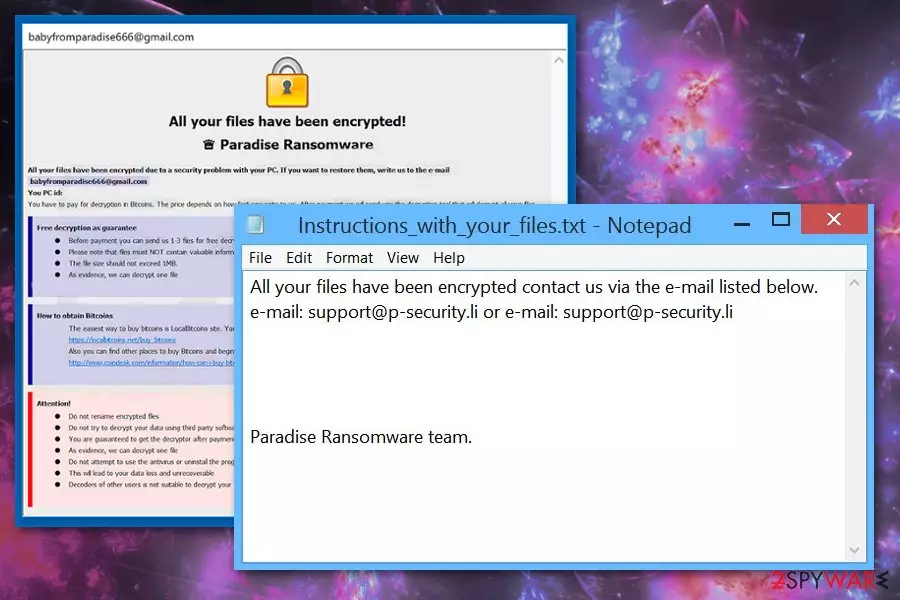
Once SecurityP ransomware is done with encryption,the virus creates a ransom note – Instructions_with_your_files.txt that displays the following:
All your files have been encrypted contact us via the e-mail listed below.
e-mail: support@p-security.li or e-mail: support@p-security.liParadise Ransomware team.
Although, many ransomware developers claim to guarantee file recovery we don't recommend even contacting SecurityP ransomware creators. All malware program developers are cybercriminals, especially when it comes to ransomware because it involves cryptocurrency. Often these people also attempt to steal personal information stored on the device because selling those details on the Dark Web can make them more profit.[3]
You should remove SecurityP ransomware as soon as you notice affected files or the initial ransom note and use the professional anti-malware for this. There are no manual solutions for this type of malware because there are many files that get installed by the virus behind your back.
Experts[4] always recommend getting anti-malware tools for SecurityP ransomware removal because this way you can clean the whole system thoroughly and fix possible virus damage. FortectIntego or any antivirus program can perform a full system scan and check for malicious programs, help remove associated files and programs.

Payload dropper is downloaded from spam emails
The main technique used to deliver ransomware to targeted devices is spam emails and infected file attachments. Malicious executables or macro-filled MS documents like Excel or Word files get attached to emails that pose as legitimate notifications from companies or services.
Unfortunately, users often open these emails without paying enough attention and even downloads files attached to the notification. This is the crucial mistake because downloaded and opened file triggers malicious script. Then ransomware gets directly on the device and can perform intended processes.
You should avoid opening emails that have:
- grammar mistakes or typos;
- shortened hyperlinks;
- document attachments.
Removing SecurityP ransomware virus is crucial when you need to avoid further infection
Get rid of the intruder by scanning the system with FortectIntego, SpyHunterCombo Cleaner, or MalwarebytesMalwarebytes and remove SecurityP ransomware completely. This is the best way to terminate malware because it allows users to detect all possible threats and delete them in a few easy steps.
SecurityP ransomware removal is a quick process when you choose reputable anti-malware tools and scan the device entirely. Antivirus programs can indicate all malware-associated files, programs that affect your machine. Unfortunately, your data remains encrypted.
However, data recovery is possible. When the computer is thoroughly cleaned, and you can ensure that SecurityP ransomware is terminated, file recovery methods can be used. The best option is to replace encoded files with backup files, but not everyone has their data backed up. So try data recovery software instead.
Did this guide help?
Be the first to comment