

Overview of Telecrypt ransomware features
Telecrypt virus is a ransomware program that the cyber criminals have developed with an intention to extort money from the victims. Although the functionality of Telecrypt reminds us of such infections as Cerber or Locky, it is less destructive. The specialists have revealed that it employs Telegram API channels for its execution process. In addition, command-and-control servers are also used. One of the peculiarities is that the virus needs the constant Internet access for complete execution. This particular weakness was one of the factors that allowed the IT specialists to create Telecrypt decrypter which has just recently been presented to the public. This tool has been invented by the cyber security team at MalwareBytes and you will find its download link next to the data recovery instructions the end of the article. We know what you are thinking right now: if there is a decryption tool capable of unlocking the encrypted files, why would you need to know about the alternative data recovery methods? Well, viruses are unpredictable and always evolving, so it is only a question of time when will Telecrypt creators release yet another version of the virus resistant to the decryption tool. If you are infected with one of these new virus versions and are struggling to find the data recovery solution, you have come to the right place. Start with the Telecrypt removal using FortectIntego or other security tool and complete the process by following data recovery guidelines provided at the end of the article.
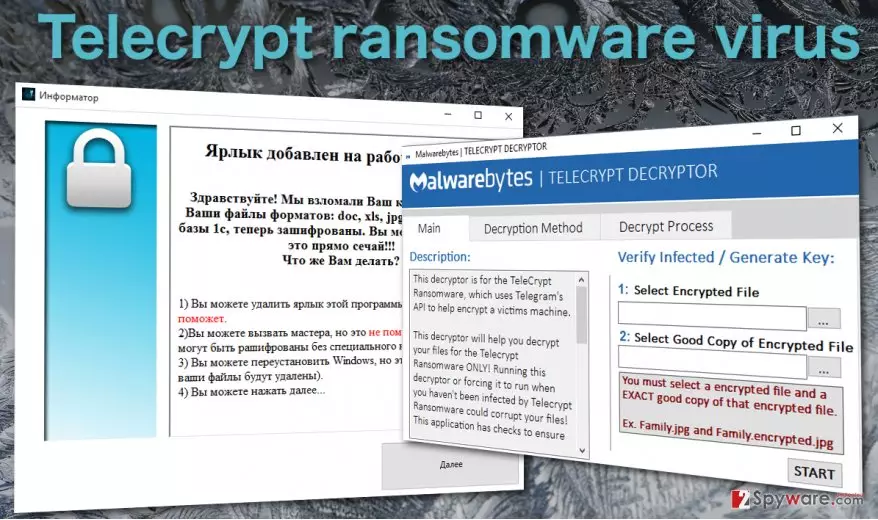
The ransomware has been named after its distinctive ability to use Telegram protocol in order to generate the bot. In comparison with other ransomware viruses, this file-encrypting malware stands out. Before encrypting the files, the virus needs to make some preparations. When the executable with Telecrypt malware is launched, it inserts the Telegram API in https://api.telegram.org/bot/GetMe. Such action ensures the existence of bot and burdens the detection and cancellations of the command. After implanting specific protocol in a Telegram channel, it ensures that the virus retains your device under control even after the reboot of the system. When the preparatory steps are completed, Telecrypt ransomware sets out to encrypt files. Luckily, it targets only a small range of formats:
DOC, DOCX, XLS, XLS JPG, JPEG, PNG, DT, DBF, CD, PDFX,
The locked data do not bear any extension, but in some cases, the files might possess .Xcri extension. After the encryption process is finished, the virus launched the application called “Informer” in Russian. The entire message is presented in Russian as well. Here is the translation:
The label has been added to your desktop!
Good day! We have hacked your device! All your files with the extensions of doc, xls, jpg, png, pdf, base 1c, are now encrypted. You can check them right now!!! What should you do?1) You can delete the label, but it does not help.
2) You can call the technical support specialist, but it does not help either (the files cannot be decrypted without the specific key).
3) You can reinstall Windows, but it does not (all the files might be deleted).
4) You can click on “Next”…
Proceeding further, you are asked to transfer 5000 rubles or roughly 80 USD using Yandex, Money and Quiwi payment channels. This is an interesting new feature since the majority of ransomware tends to use Bitcoins for receiving the ransoms. Despite the hackers’ warnings and threats, you should not give in to the psychological pressure and remove Telecrypt from the computer.
System infiltration peculiarities:
This ransomware virus is most likely distributed via outdated applications and file-sharing websites. Since Telecrypt ransom note and other related information is presented in the Russian language, it possibly targets mainly Russian residents. In relation to this, Russian websites are often overcrowded by the links to pornographic domains which might be infected with severe threats. What is more, spamming and phishing are also common techniques for distributing viruses. The hackers make up deceptive FBI warnings, invoice messages, or tax report notifications. It is of utmost importance to keep vigilant while surfing the web and reviewing spam messages. In order to decrease the probability of Telecrypt hijack, you should arm up with powerful anti-spyware tools.
How effective is the Telecrypt removal?
When it comes to complete termination of the file-encrypting threat, we recommend you to remove Telecrypt virus automatically. The malware fortifies its position by implanting its scripts and files in your registry so manually removing the threat might not work. That is why, you might rely on a security tool, such as MalwarebytesMalwarebytes or FortectIntego. After the removal process is finished, you might consider decrypting your files. Since Tele Crypt virus is not Locky or Cerber 4.1.5, there might be more chances of recovering the files. If you cannot complete Telecrypt removal due to non-responding errors, use the following guidelines. Below them, you will find the recommendations how to decrypt the files alternatively.
Did this guide help?
3 comments
miltonBob
The inspiration never ceases..
darren14664
On one hand, it;s really interesting to see how inventive it is.
roxy@wj
Luckily, didnt have trouble getting infected with such virus.